How to view Sales Tax Report with GST Bill-Wise in Adempiere Retail
A Sales Tax Report with GST – Bill Wise shows each sales invoice along with its GST (tax) details,such as Total bill value,Invoice number,Date of sale,Customer details,Taxable amount,GST amount (CGST, SGST, IGST).
User Access
Who Can Access
- Admin
- Back Office
- Purchase Manager
- Manager
What User Can Do
- View GST Collected on Each Invoice
- Track Taxable and Total Sales Amounts
- Prepare for GST Return Filing (GSTR-1, GSTR-3B)
- Filter by Date, Invoice, or Customer
Pre-Requisite Activities
- GST Registration Completed
- Regular Data Updates
- Proper Tax Classification of Products/Services
- Access Rights to GST Reports
Business Rules
- Include Only GST-Registered Sales
- Invoice-Level Details Required
- Refunds, Credit Notes, and Debit Notes Reflected
User Interface
STEP 1: To select a Sales Tax Report with GST-Bill wise.

STEP 2: To enter a Date range.In this field is mandatory and to enter a customer its optional.Then to click the start check box to run the process.

STEP 3: Once to complete the Process to show the report based on the given data.

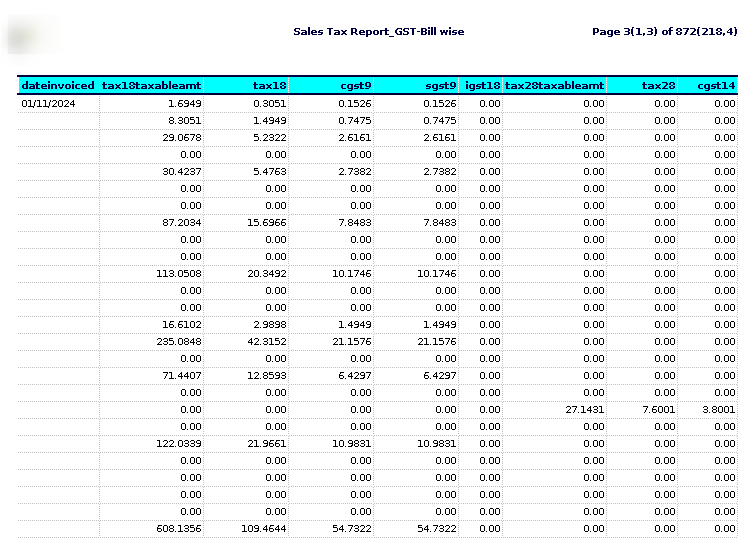

STEP 4: Date invoiced -refers to the specific date on which an invoice is issued to a customer or client. This is the date the seller formally bills the buyer for goods or services provided.
Invoice number– is a unique identifier assigned to an invoice to help track and reference it in financial records.
Customer-is an individual or organisation that purchases goods or services from a business. Customers are essential to a business’s success, as they generate revenue and provide feedback that can drive improvements.
Taxable amount 0,5,12,18,28– generally refers to the portion of income, sales, or other transactions that is subject to tax.
Tax 0,5,12,18,28– is a compulsory financial charge or levy imposed by a government on individuals, businesses, or other entities to fund public services, infrastructure, and government operations.
CGST 0,2.5,6,9,14– stands for Central Goods and Services Tax. It is one of the two components of the Goods and Services Tax (GST) system in India.
SGST 0,2.5,6,9,14-stands for State Goods and Services Tax. It is one of the three types of GST (Goods and Services Tax) levied in India.
IGST 0,5,12,18,28 -stands for Integrated Goods and Services Tax. It is one of the taxes introduced under the Goods and Services Tax (GST) regime in India.
Sales taxable– is a consume TO CREATE A SALES TAX REPORT WITH GST-BILL WISEtion tax imposed by governments on the sale of goods and services. What is subject to sales tax can vary by jurisdiction, but in general, the following categories tend to be taxable.
Total tax amount -generally refers to the total sum of taxes owed or paid by an individual, business, or entity.
Cess total– could refer to the total amount of cess levied or collected under a specific tax system. In general, cess refers to a tax or levy that is imposed in addition to the existing tax structure, often for a specific purpose like funding a particular project or program.
Total amount– typically refers to the total value of sales or supplies made by a business and the corresponding GST that needs to be reported and paid to the government.