How to view Sales R Report in Adempiere Retail
A Sales R Report is a report that shows sales data, typically generated using the programming language R, which is used for data analysis and visualisation.
User Access
Who Can Access
- Admin
- Head cashier
- Sales Manager
- Manager
What User Can Do
- View
- Analyse
- Filter
- Export & Download
Pre-Requisite Activities
- Collect Sales Data
- Clean and Prepare Data
- Report Requirements
Business Rules
- Data Accuracy
- Report Frequency
- Error Handling
- Export Options
- Version Control
User Interface
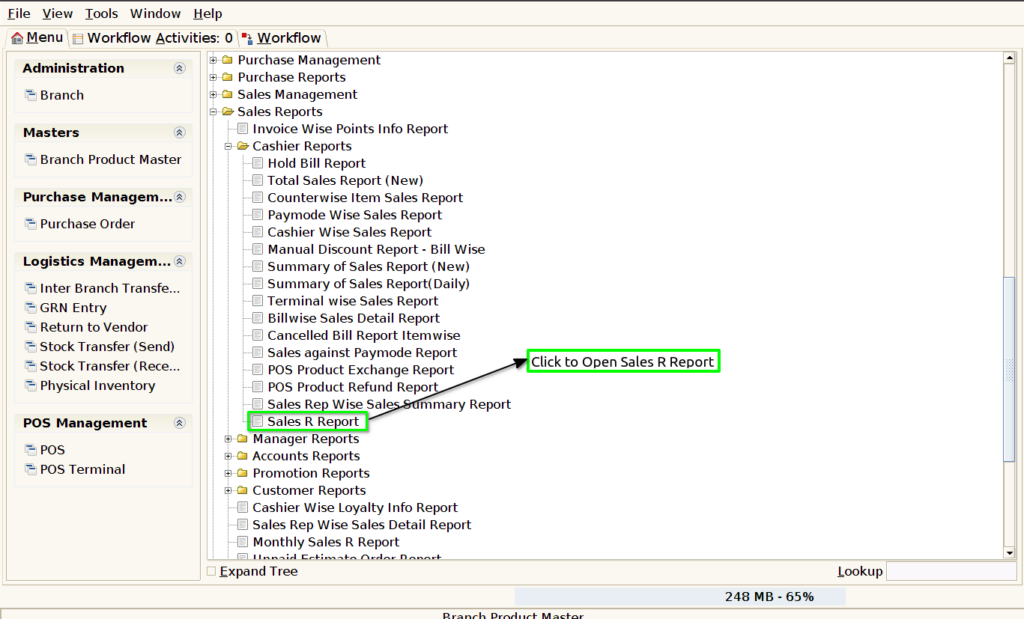
Step 1 : Select ‘Sales R Report’ in Menu -> Sales reports > Manager report > Sales R Report or Search Sales R Report.
Step 2 : Select the date range and Department to open the Sales R Report.

Step 3 : To view a preview of the Sales R Report in Jaldi.

Bill Date : The bill date in a Sales R Report refers to the date on which a sales transaction is officially recorded or invoiced. This date is crucial because it helps in accurately tracking sales activities within specific time periods and ensuring that the report aligns with the financial calendar or business cycle.
Bill No : The bill number acts as a unique reference for each sale, allowing businesses to quickly locate and verify specific transactions. This is useful for auditing, resolving disputes, or addressing customer queries.
Sales Rep : For commission-based roles, showing the sales rep in the report is necessary for accurately calculating commissions or bonuses based on their sales achievements.
R No : The R No allows businesses to link a specific sales transaction to a commission payout. This helps in ensuring that the correct salesperson receives compensation for the sale they facilitated.
Department : Including the department in a Sales R Report helps businesses track performance, allocate resources, evaluate sales strategies, and ensure accountability at a departmental level.
Product : Including the product in a Sales R Report helps businesses gain valuable insights into individual product performance, optimize inventory, improve profitability, and make data-driven decisions on pricing, promotions, and sales strategies.
Product Attribute : Including product attributes in a Sales R Report enhances the depth of analysis and provides more granular insights into sales performance. Product attributes can refer to characteristics like size, color, model, version, or other specifications that differentiate products within a category.