How to run Barcode Info Update-SS process in ADempiere Retail
Barcode Info Update means modifying or correcting the barcode details assigned to products in the system. This helps in accurate product scanning, billing, stock tracking, and reporting.
User Access
Who Can Access
- Admin
- Cashier
- Back office
What User Can Do
- Add or update the barcode number for a product
- Assign multiple barcodes to one product
- Enable or disable barcode scanning for a product
- Sync updated barcode info with billing or inventory systems
Pre-Requisite Activities
- Finalize barcode standard used in your system
- Ensure product master is available and active
- Check barcode is unique and not used by another item
- Confirm barcode printing setup
Business Rules
- Barcode must be unique per product/variant
- Only authorized users can update barcode information
- System should validate correct barcode length/format
- Barcode must sync to all related modules (billing, stock)
- Invalid or duplicate barcodes should be rejected automatically
User Interface
STEP 1: To select the Barcode Info Update.

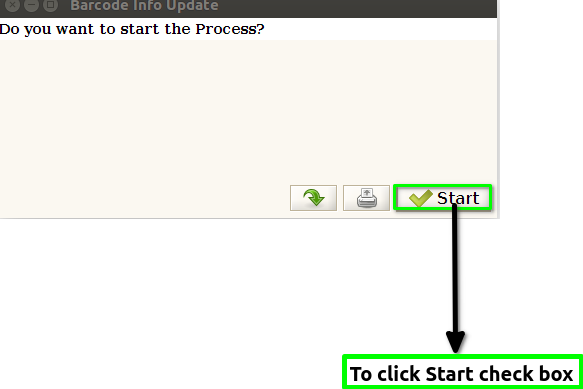
STEP 2: To click the Start check box.
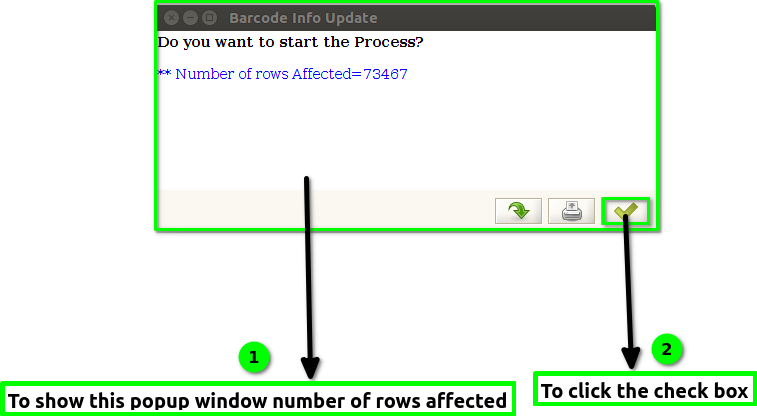
STEP 3: Once to run the the process the popup will show the Number of rows Affected count.And finally to click the box.