How to create Transfer Reason in Adempiere Retail
Transfer Reason means,the specific cause or explanation for moving inventory from one location to another.
User Access
Who Can Access
- Back Office
- Purchaser
- Purchase Manager
- Manager
- Admin
What User Can Do
- Select a Reason
- Add New Reasons (if allowed)
- Use Transfer Reason for Documentation
- Filter or Report by Transfer Reason
Pre-Requisite Activities
- Define Transfer Reasons in the System
- User Access Rights
- Understand Transfer Policies
- Prepare Transfer Details
Business Rules
- Predefined List of Reasons
- Reason Appropriateness
- Restricted Modifications
- Approval Requirements
User Interface
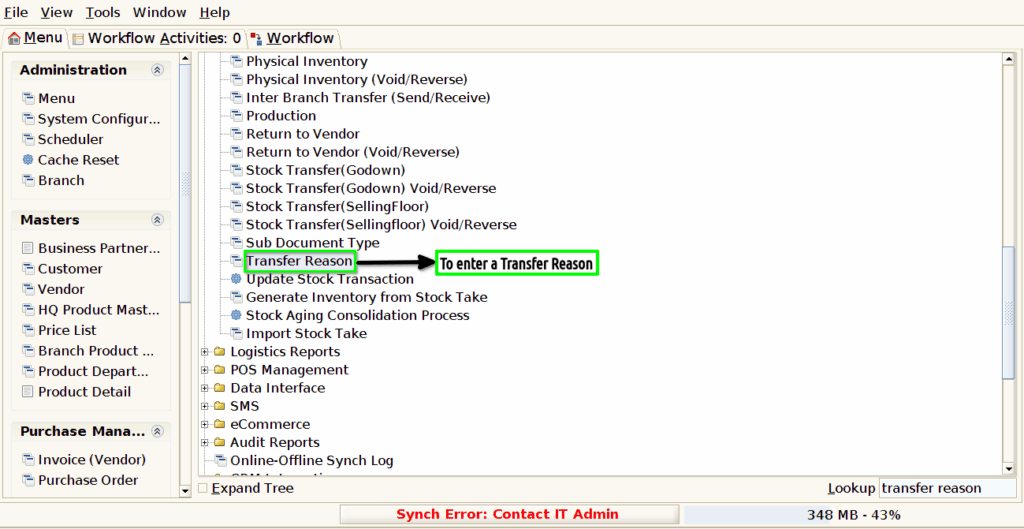
Step 1 : To Select a Branch in Menu.Then to click Transfer Reason.
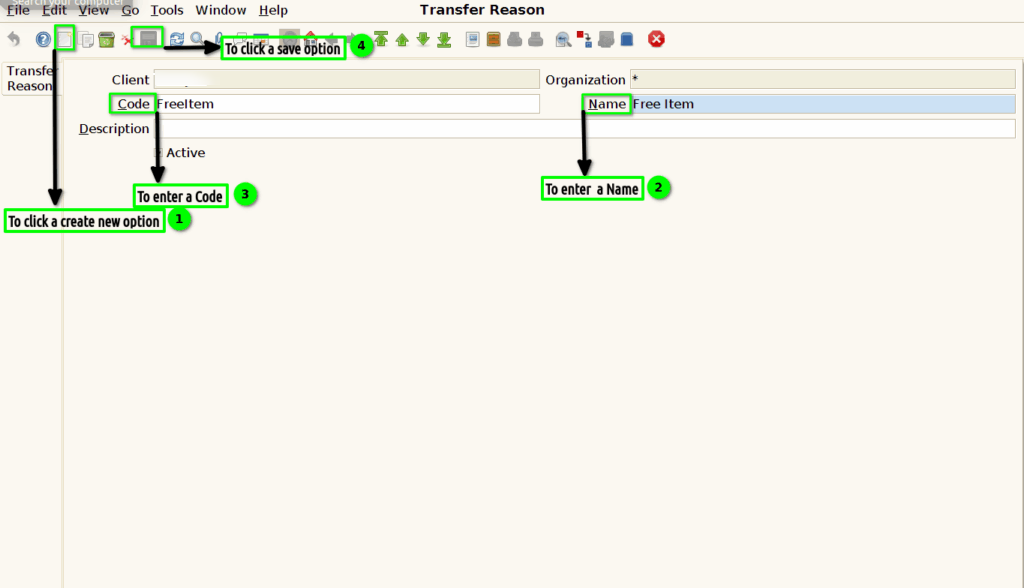
Step 2 : To click a create new option and to enter the value for Name and code.Finally to save the document.