How to run Inter Branch Synch Rerun Process in ADempiere Retail
Re-executing the data synchronisation between branches to ensure that inventory and transaction records are correctly updated and consistent across all branch systems.
User Access
Who Can Access
- Admin
- Cashier
- Head Cashier
- Back Office
What User Can Do
- Initiate Sync Rerun
- Monitor Sync Status
- Resolve Sync Issues
Pre-Requisite Activities
- Identify Sync Failure or Inconsistency
- Backup Current Data
- Ensure User Authorization
Business Rules
- Authorized Personnel Only
- Pre Check Required
- Verify Data Consistency Post-Rerun
- Data Backup Mandatory
User Interface
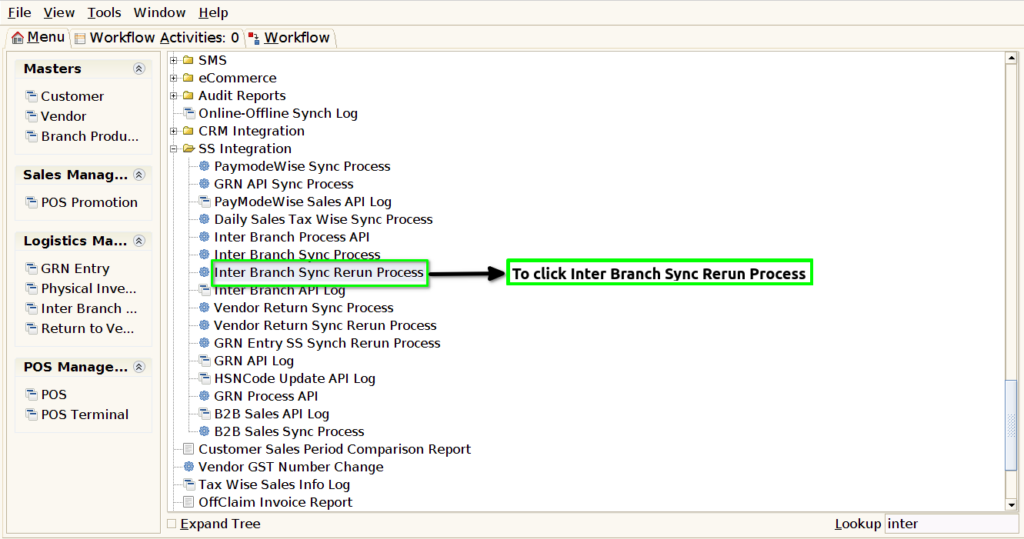
Step 1 : To select a Inter Branch Sync Rerun Process.
Step 2 :To enter a Document Number or to enter Movement Date to enter any one parameter for based on our requirements and then to click start check box.
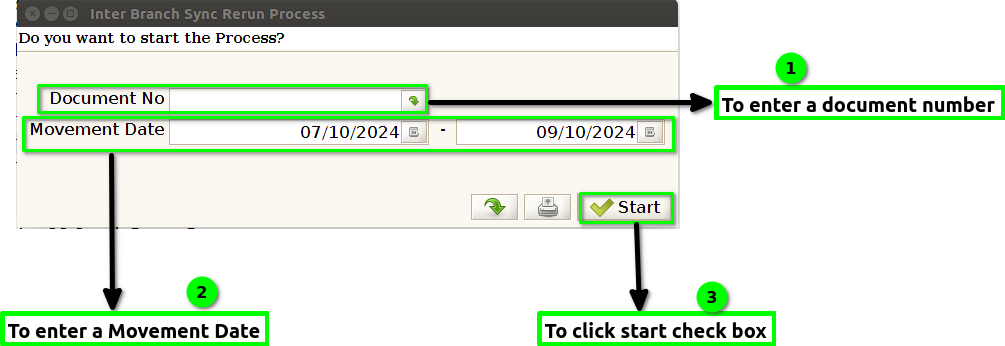
Step 3 : Once to run the process Documents sent Successfully.Inter branch Sync Rerun process only applicable for completed documents. Once to complete the document then again to use this rerun process.Finally to click the check box.
