How to view Cancelled Bill Report Item-Wise in Adempiere Retail
A Cancelled Bill Report (Item-wise) is a report that shows each item from bills that were cancelled at the Point of Sale (POS). Instead of just showing the whole bill, it breaks it down to list every individual product that was on the cancelled bill.
User Access
Who Can Access
- Admin
- Head cashier
- Sales Manager
- Manager
What User Can Do
- Track Cancelled Items
- Investigate Reasons for Cancellation
- Adjust Inventory
- Customer Service Insights.
Pre-Requisite Activities
- Cancellation Policies
- User Access and Roles
- Cancellation Reason Codes
- Inventory and Accounting Integration
Business Rules
- Cancellation Time Limit
- Mandatory Reason for Cancellation
- No Partial Cancellation Without Item Detail
- Inventory Adjustment
- Unique Bill Identification
- Report Generation Frequency
User Interface
Step 1 : Select ‘Cancelled Bill Report Item-wise Report’ in Menu -> Sales reports > Cashier report > Cancelled Bill Report Item-wise Report or Search Cancelled Bill Report Item-wise Report in Lookup.

Step 2 : Select the date range to open the Cancelled Bill Report Item-wise.
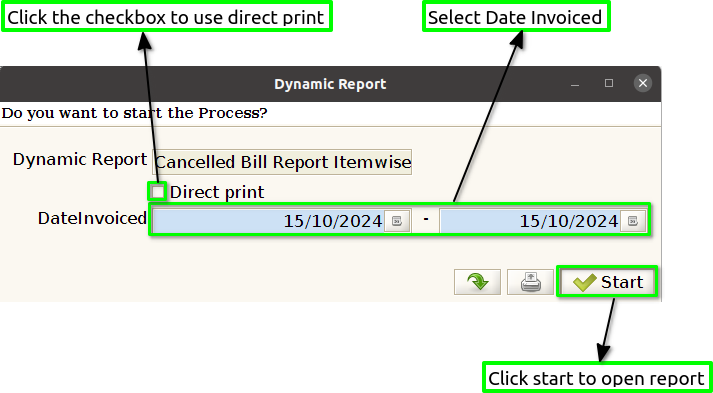
Step 3 : To view a preview of the Cancelled Bill Report Item-wise.
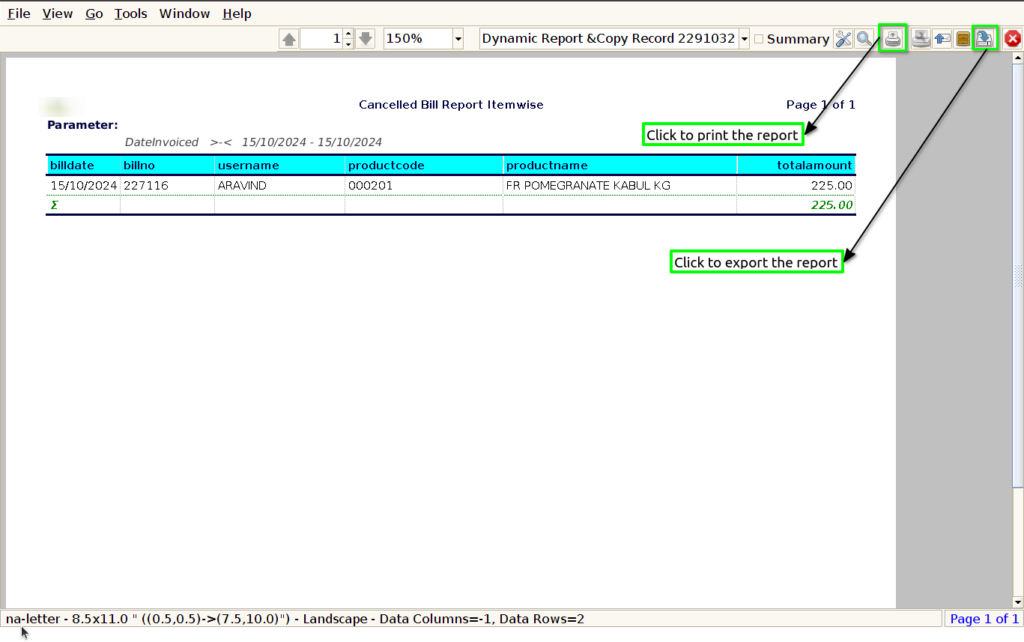
Bill Date : Showing the bill date in a “Cancelled Bill Report Item-wise” provides crucial context for analyzing cancellations, as it helps identify patterns over time, aids in financial reporting accuracy, and enhances understanding of customer behavior.
Bill No : Including the bill number in a “Cancelled Bill Report Item-wise” is essential for tracking and referencing specific transactions, as it enables easy identification of the original bill associated with each cancelled item.
User Name : Displaying the user name in a “Cancelled Bill Report Item-wise” is important for accountability and tracking purposes, as it identifies the individual responsible for processing the cancellation.
Product Code : Including the product code in a “Cancelled Bill Report Item-wise” is
crucial for precise inventory management and tracking, as it allows for
quick identification of specific items associated with cancellations.
Product name : Displaying the product name in a “Cancelled Bill Report Item-wise” is essential for clarity and ease of understanding, as it allows stakeholders to quickly identify which items have been cancelled without needing to cross-reference product codes.
Total Amount : Including the total amount in a “Cancelled Bill Report Item-wise” is vital for financial transparency and analysis, as it quantifies the impact of cancellations on revenue.