How to create a Document Type in Adempiere Retail
“Document type” means defining a specific category or format of a document (like invoices, purchase orders, or reports) so that it can be organized, identified, and processed correctly within a business system.
User Access
Who Can Access
- Back Office
- Purchaser
- Purchase Manager
- Manager
What User Can Do
- Create a New Document Type
- Edit or Update Existing Types
- Enable or Disable Document Type
Pre-Requisite Activities
- Name
- Description
- Print text
- Document note
- GL Category
- Document Base Type
- Print format
- No of additional Copies
Business Rules
- Document Type Name must be Unique
- Only Active Document Types Can Be Used
- Document Type Cannot Be Deleted If Used in Transactions
- Print Format Must Be Assigned if Printing is Required
User Interface
Step 1 : To Select a Branch in Menu.Then to click a Document Type.

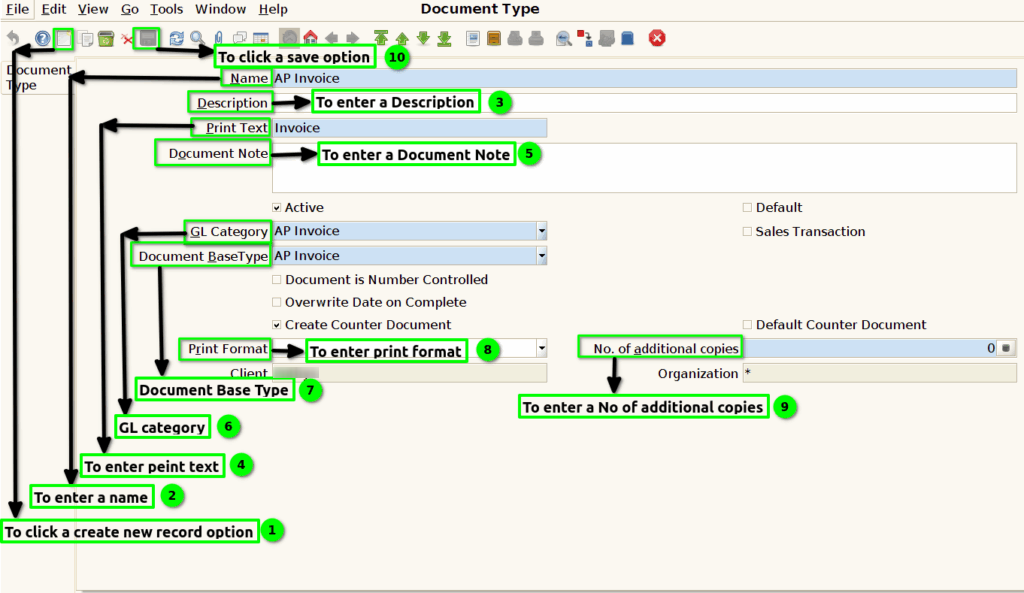
Step 2 : To open this form and to enter a name ,Description and Print text and then to click the check box.

Step 3 :Once to run the process to click the create new option and to enter a Name,Description,Print text,Document note,GL Category,Document base type,print format,No.of additional copies,print Format and finally to click the save the option.