How to view Stock Attribute Report for Lifestyle in Adempiere Retail
A Stock Attribute Report provides a summary of your inventory categorized by specific attributes or characteristics of the stock items.
User Access
Who Can Access
- Admin
- Cashier
- Sales Manager
- Manager
What User Can Do
- Monitor Inventory Level
- Optimize Stock Management
- Improve Warehouse Organization
- Track Product Life cycle
Prerequisite Activities
- Relevant Stock Attributes
- Maintain Accurate Inventory Data
- Conduct Regular Stock Audits
- Reporting Period and Scope
Business Rules
- Real-Time or Periodic Updates
- Accurate Stock Quantities
- Include All Locations
- Handle Stock Movements
- Exclude Non-Stock Items
User Interface
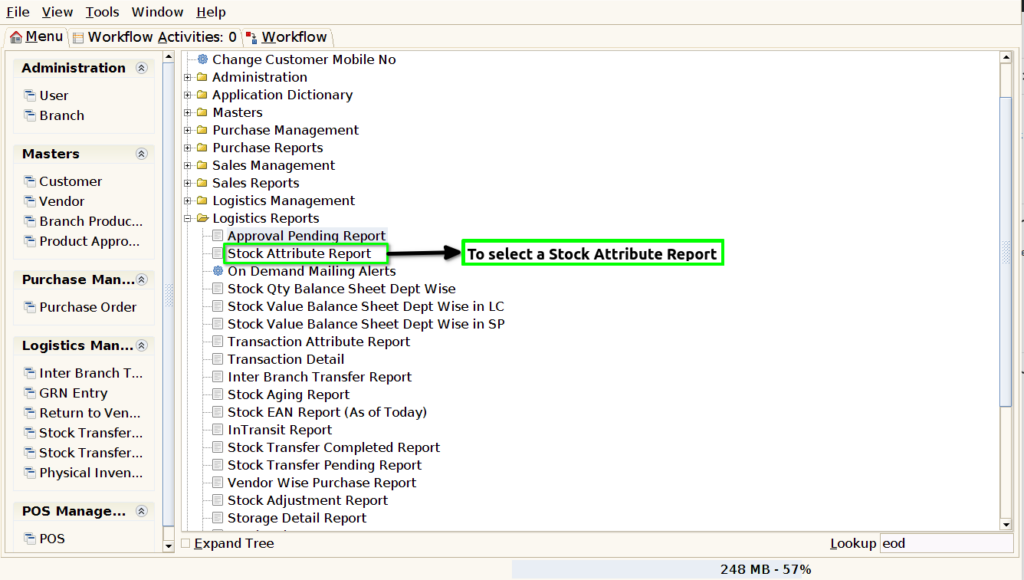
STEP 1:To select a Stock Attribute Report.
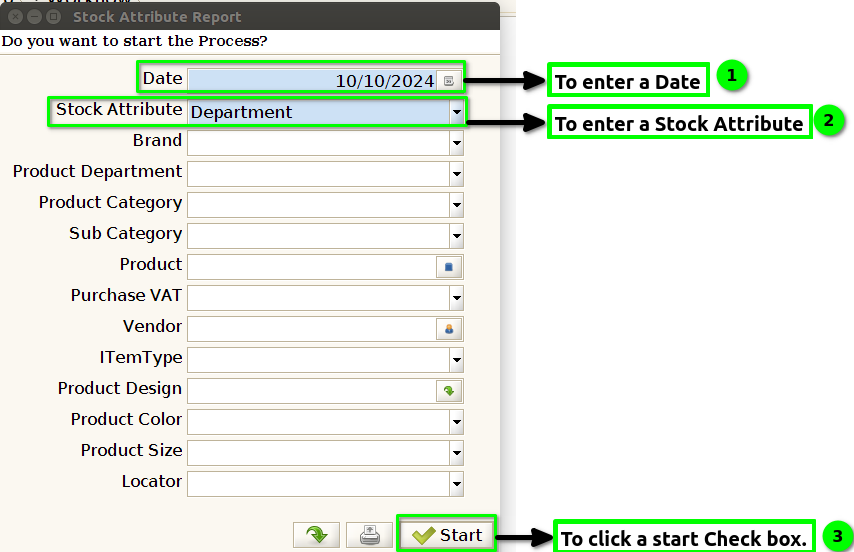
STEP 2:To enter a Date.And then to enter the Stock Attribute.These Two Parameters are mandatory fields.Either to select any parameters based on our requirements.Finally to the start check box.
STEP 3:Once to run the process.To show the report from the given details.

STEP 4: Name -Product Department name.