How to view Floor Wise Sales Report in Adempiere Retail
A Floor-wise Sales Report is a summary that shows sales performance broken down by each floor or section of a retail store, shopping center, or building.
User Access
Who Can Access
- Admin
- Cashier
- Sales Manager
- Manager
What User Can Do
- Analyze Sales Performance by Floor
- Optimize Store Layout
- Plan Marketing & Promotions
- Monitor Returns or Issues
- Manage Inventory Efficiently
Prerequisite Activities
- Define Floors or Sections Clearly
- Set Up Point of Sale (POS) System by Floor
- Record All Sales Transactions with Floor Details
- Set Reporting Period
Business Rules
- Floor Tagging is Mandatory
- Consistent Floor Naming Convention
- Time-bound Reporting
- Returns and Adjustments Must Be Reflected
- User Role Control
- Product Category Mapping (If Used)
User Interface
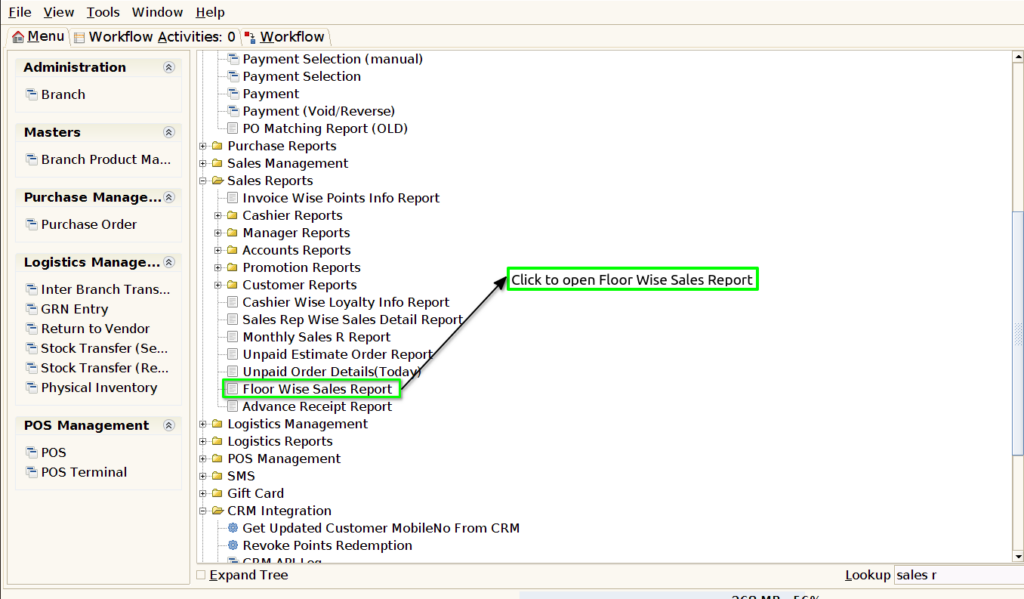
Step 1 : Select ‘Floor Wise Sales Report’ in Menu -> Sales reports > Manager report > Floor Wise Sales Report or Search Floor Wise Sales Report .
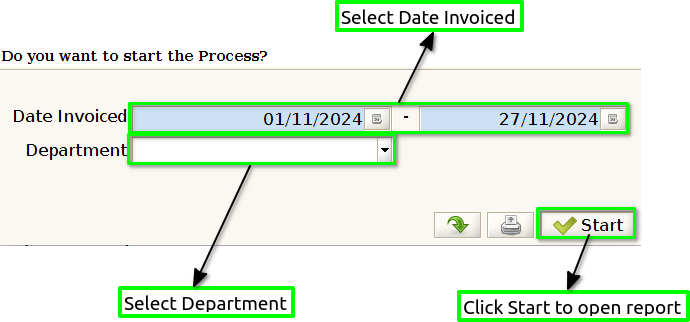
Step 2 : Select the date range and Department to open the Floor Wise Sales Report.
Step 3 : To view a preview of the Floor Wise Sales Report.
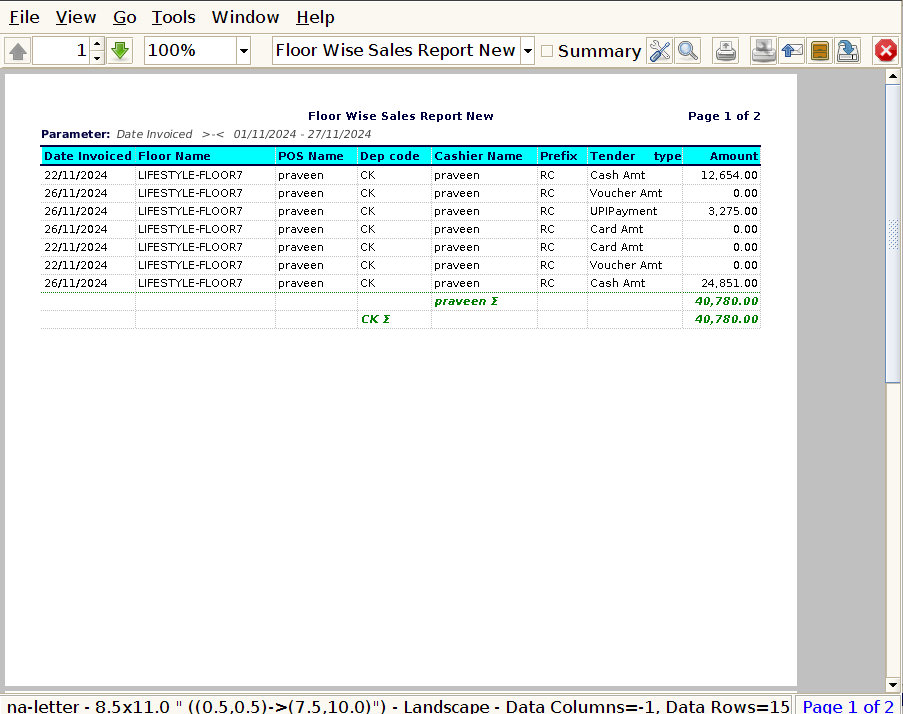
Date Invoiced : The invoice date should correspond to the actual date of the sale, not the date of payment or the date when the transaction is recorded in the system.
Floor Name : The floor name (e.g., Ground Floor, First Floor, Second Floor, etc.) is clearly marked for each row of data, allowing you to easily differentiate the performance of different floors or sections within the store.
POS Name : Including the POS (Point of Sale) name in a Floor Wise Sales Report provides an extra layer of granularity, allowing managers to identify how different registers or sales terminals contribute to overall floor performance.
Department Code : This additional layer of classification allows businesses to track performance not just by floor or POS but also by department, which can provide valuable insights into sales trends, inventory needs, and departmental performance.
Cashier Name : Including the cashier name in a Floor Wise Sales Report enhances the ability to manage and evaluate your staff effectively, track performance, and optimize sales processes across different floors and POS terminals.
Prefix : Including a prefix in a Floor Wise Sales Report can help organize and categorize data more effectively. A prefix could refer to a unique identifier that is added to specific fields (like floor name, POS name, cashier name, or department code)
Tender Type : Including tender type in a Floor Wise Sales Report is crucial for tracking the payment methods used by customers, such as cash, credit cards, debit cards, mobile payments, or gift cards.
Amount : The amount should represent the total sales revenue generated by each transaction processed on a particular floor. This includes all products or services sold, whether paid by cash, card, mobile payment, etc.