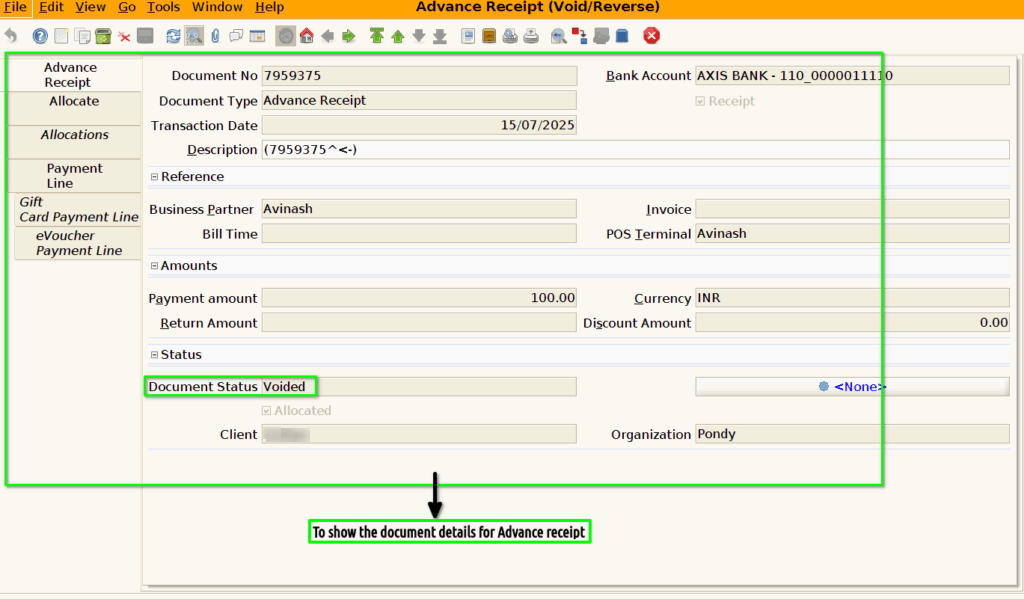
How to create reversal document for Advance Receipt in Adempiere Retail
In accounting, “advance receipt” typically refers to money received before goods or services are delivered, and “void/reverse” refers to the process of canceling or reversing a previously recorded transaction. When an advance receipt is voided or reversed, it means the accounting entry for the advance receipt is effectively undone, often due to cancellation of the underlying transaction or a change in plans.
User Access
Who Can Access
- Back Office
- Purchaser
- Purchase Manager
- Admin
What User Can Do
- To enter a Advance Receipt
- To enter a Allocations
- To enter a Allocate
- To enter a payment line
- To enter a Gift card payment line
- To enter a E-voucher payment line
Pre-Requisite Activities
- Advance Receipt
- Allocations
- Allocate
- Payment line
- Gift card payment line
- E-voucher payment line
Business Rules
Advance receipt void/reverse business rules typically involve adjustments to previously recorded transactions, especially related to tax liabilities. These rules govern how businesses handle situations where advance payments are received and later refunded or adjusted against a final invoice. The key aspects include correctly reflecting the change in tax liability, maintaining proper documentation, and ensuring accurate reporting in GST returns.
User Interface
Step 1 : To Select a Branch in Menu.Then to click a Advance receipt(Void/Reverse).

Step 2 : Once to void the document for Advance Receipt screen.Only to void completed documents.Then to show the voided documents for Advance Receipt(void/reverse) screen.