How to view Customer Info Report by Invoice Date in Adempiere Retail
A Customer Info Report by Invoice Date lists customer details along with their invoices, filtered and organised based on the invoice dates.
User Access
Who Can Access
- Admin
- Back Office
- Purchase Manager
- Manager
What User Can Do
- View Customer Transactions by Date
- Verify Customer Details
- Export and Share
Pre-Requisite Activities
- Maintain Accurate Customer Data
- Record Invoice Details
- Ensure Data Integrity
Business Rules
- Include Only Valid Invoices
- User Authorisation
- Export Integrity
User Interface
STEP 1: To select a Customer Info Report – by Invoice Date.

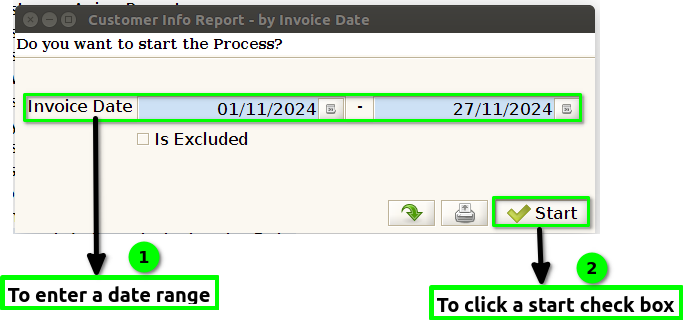
STEP 2: To enter a date range in this field is mandatory and then to click a start check box to run the process.
STEP 3: Once to complete the process to show the report based on the given data.
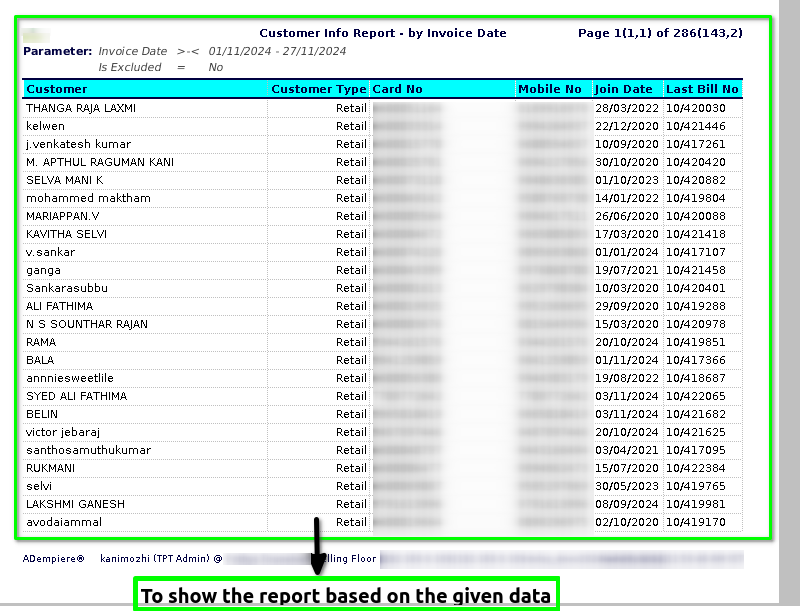

STEP 4: Customer – is an individual or organization that purchases goods or services from a business or company. Customers are typically the primary source of revenue for businesses, as they exchange money for products or services.
Customer type – refers to a categorization or classification of customers based on certain attributes or criteria. This helps businesses segment and understand their customer base more effectively.Retail customer,Wholesale customer etc..
Card number – typically refers to a unique identification number associated with a customer’s account or membership with a company or service provider. It is commonly used in various industries, such as banking, retail, loyalty programs, or subscription services, to help identify and manage customer information.
Mobile number– is a contact number provided by the customer, typically used for communication, updates, notifications, or verification purposes. This number is an essential part of customer service, marketing, and customer relationship management.
Join date – refers to the specific date when a customer first registered, signed up, or became a part of a particular service, membership, or program. It typically marks the beginning of the customer’s relationship with the company or organization.
Last bill number – in a customer info report typically refers to the most recent invoice or billing reference number associated with a customer’s account. It helps track the latest transaction, providing a unique identifier for that particular bill.
Last purchase date – refers to the most recent date on which a particular customer made a purchase or transaction. This is typically a data point used to track customer activity and engagement over time.
Last Purchase Amount – in a customer information report refers to the monetary value of the most recent transaction made by the customer.
Total Bill Count – in a customer information report typically refers to the total number of bills or invoices generated for a particular customer within a specified period. It tracks how many transactions or billing events occurred for that customer.
Total Sold Value – typically refers to the total monetary value of the products or services that have been purchased by the customer over a specified period or during the entire duration of their relationship with the company.