How to view POS Product Exchange Report in Adempiere Retail
A POS Product Exchange Report is a simple report that shows details of products that customers have exchanged at the Point of Sale (POS) — the place where the sale or return happens, like in a store.
User Access
Who Can Access
- Admin
- Cashier
- Sales Manager
- Manager
What User Can Do
- Track Exchanges
- Check Inventory Impact
- Identify Problem Products
- Verify Transactions
- Financial Adjustments
Pre-Requisite Activities
- Exchange Policy
- User Roles & Access
- Create Standard Exchange Reasons
- Stock & Accounting Integration
Business Rules
- Valid Exchange Window
- Receipt is Mandatory
- Product Condition Check
- Inventory Update
- Price Difference Handling
User Interface
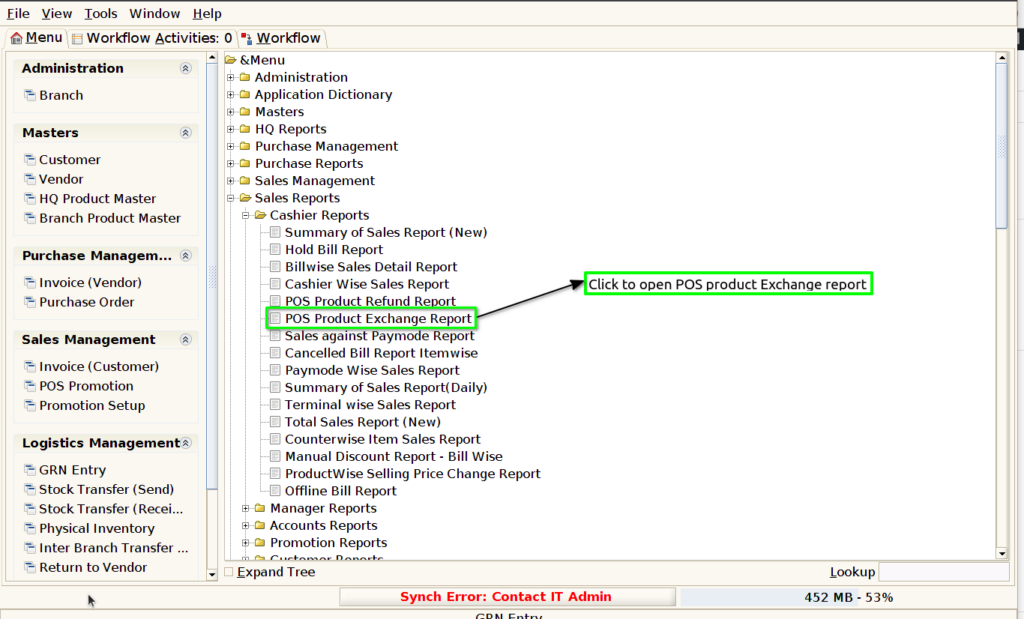
Step 1 : Select ‘POS Product Exchange Report’ in Menu -> Sales reports > Cashier report > POS Product Exchange Report or Search POS Product Exchange Report in Lookup
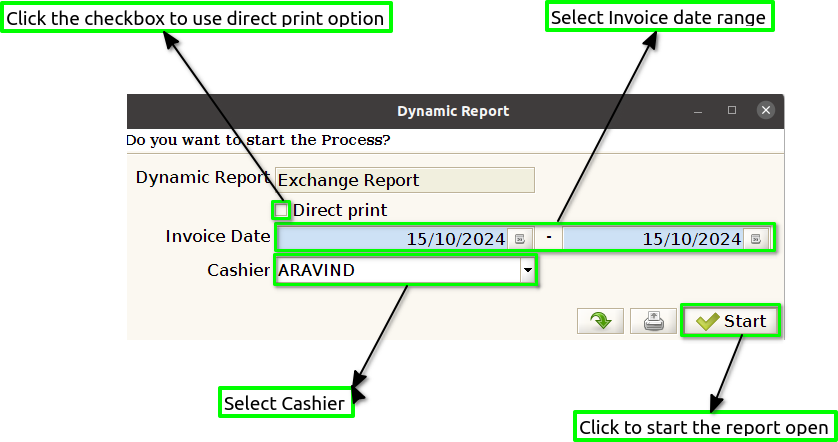
Step 2 : Select the date range and cashier to open the POS Product Exchange Report.
Step 3 : To view a preview of the POS Product Exchange Report

Exchange Bill : Including the Exchange Bill in a POS product exchange report is essential as it provides a clear reference to the original transaction, facilitating accurate tracking of the exchange process.
Original Bill : Displaying the Original Bill in a POS product exchange report is crucial for linking the exchange to the original purchase transaction.
Invoice Date : Including the invoice date in a POS product exchange report is important as it provides context for the timing of the original purchase, helping to establish whether the exchange falls within the allowed return period.
Product Code : Displaying the product code in a POS product exchange report is essential for accurately identifying the specific items being exchanged.
Product name : Including the product name in a POS product exchange report is important for clear identification of the exchanged items, which helps avoid confusion and ensures that both staff and customers can easily recognize the products involved.
Exchange Quantity : Displaying the exchange quantity in a POS product exchange report is crucial for accurately reflecting the number of items being exchanged.
Original Invoice Selling Price : Including the Original Invoice Selling Price in a POS product exchange report is essential for transparency, as it clearly indicates the amount originally paid for the exchanged item.
Line Total : Displaying the line total in a POS product exchange report is important as it provides a clear summary of the total amount associated with each exchanged item.
Cashier : Including the cashier’s name in a POS product exchange report is important for accountability and tracking purposes.
Terminal : Displaying the terminal information in a POS product exchange report is important for identifying the specific point of sale where the exchange occurred.