How to view Customer Info Report by Join Date in Adempiere Retail
A list of customer details, sorted by the date they joined.
User Access
Who Can Access
- Admin
- Back Office
- Purchase Manager
- Manager
- Cashier
What User Can Do
- View
- Sort & Search
- Download or export
- Update
Pre-Requisite Activities
- Collect Customer Data
- Ensure Accurate Join Dates
- Maintain Updated Database
Business Rules
- Accurate Join Date Required
- Sort Order
- Date Range Filtering
- Update Restrictions
User Interface
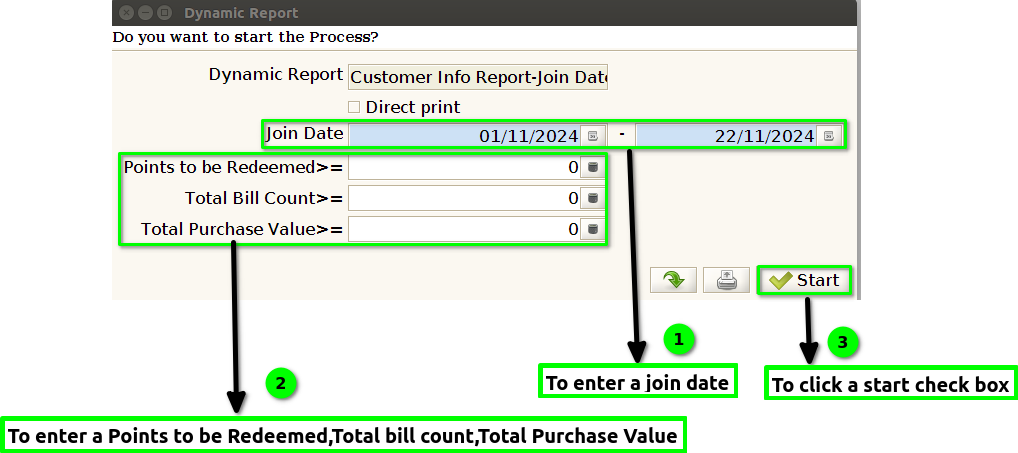
STEP 1: To select a Customer Info Report-By Join Date.

STEP 2: To enter a join date in this field is mandatory and to enter a points to be Redeemed,Total bill count and Total Purchase Value,then to click a start check box to run the process.
STEP 3: Once to complete a process to show the report based on the given data.
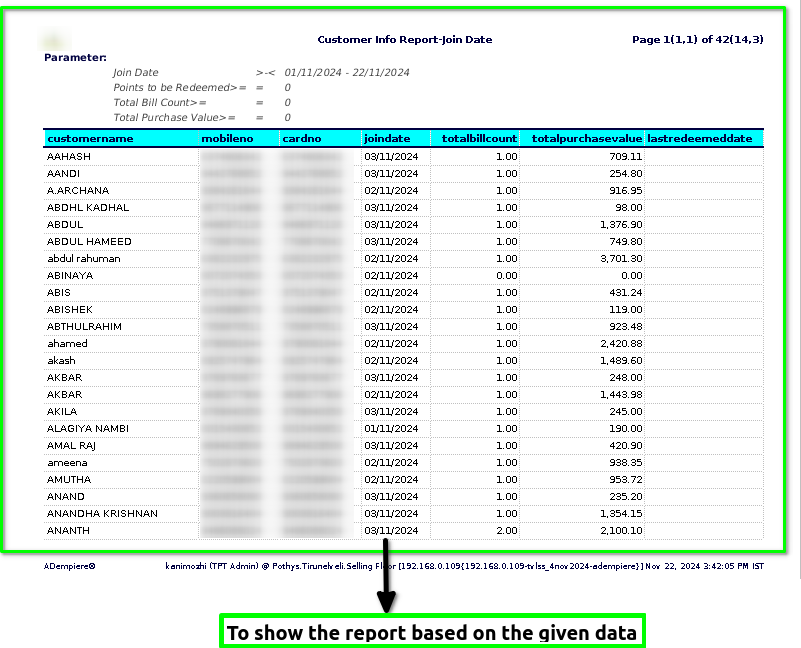
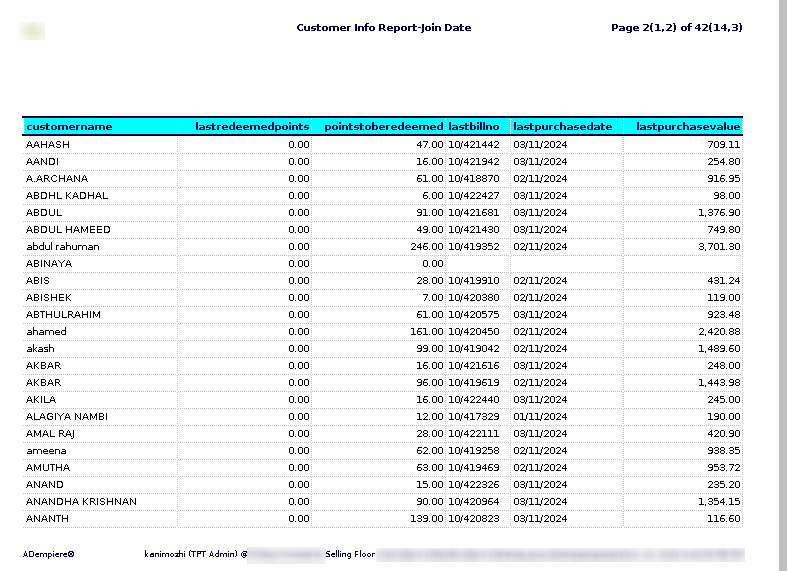
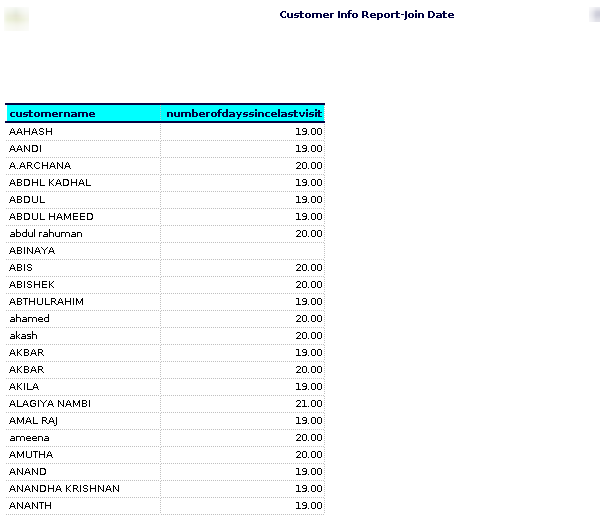
STEP 4: Customer name – refers to the name of an individual or entity that purchases goods or services from a business. It is a key piece of information used for identifying and addressing the customer in various interactions, such as orders, invoices, or customer support.
Mobile number– refers to the phone number associated with a customer, typically their mobile phone number. It is used by businesses to contact customers for various reasons, such as order updates, customer support, marketing communications, and other notifications.
Card number – refers to a unique identifier assigned to a customer, typically by a company, organization, or service provider. This number is used to identify and manage customer-related information, transactions, or account activities.
Join date-typically refers to the specific date when a customer first registered, signed up, or became a member of a service, platform, or company.
Total Bill Count – refers to the total number of bills, invoices, or transactions that have been issued to each customer over a given period of time.
Total Purchase Value – refers to the total amount of money spent on purchasing goods or services over a specific period or for a particular transaction.
Last Redeem Date – typically refers to the most recent date when a customer redeemed a promotion, reward, or loyalty points. It reflects the latest interaction the customer had with a reward or redemption system.
Last redeem points – typically refers to the most recent points redeemed by a customer, with respect to the join date. This value would usually be the last transaction in which the customer used or redeemed their loyalty points, gift card balance, or any rewards points they may have accumulated through purchases or engagement.
Points to be redeemed– it typically means the number of loyalty points or rewards points that a customer has accumulated and is eligible to use or redeem based on their join date in the system.
Last bill number– in this report, it implies you would be looking at- The most recent customer based on join date.The bill number associated with this most recent customer would be considered the last bill number.
Last Purchase Dat– Customer Info Report by Join Date- typically refers to a report that shows customer information, specifically focused on the date of their last purchase, organized by the date they first joined (or registered) with a service or business.
Last purchase value– typically refers to the cost of the most recent purchase made by an individual or organization.
Number of days since last visit– in a customer info report based on the “join date” refers to the number of days that have passed since a customer last visited or interacted with your business or service, starting from the date they joined (their “join date”).