How to view Coupon Summary Report in Adempiere Retail
A Coupon Summary Report shows the total number of coupons issued, used, and remaining within a specific time period — along with their values and types.
User Access
Who Can Access
- Admin
- Head cashier
- Sales Manager
- Manager
What User Can Do
- Track Coupon Usage
- Monitor Campaign Performance
- Plan Future Promotions
- Export and Share Data
Pre-Requisite Activities
- Create and Configure Coupons
- Enable Coupon Tracking
- Maintain Customer and Transaction Records
- Reporting Period
- User Access Control
Business Rules
- Include Only Valid Coupons
- Track by Status
- Accurate Value Calculation
- Exclude Cancelled Transactions
- Date Range Filtering
User Interface
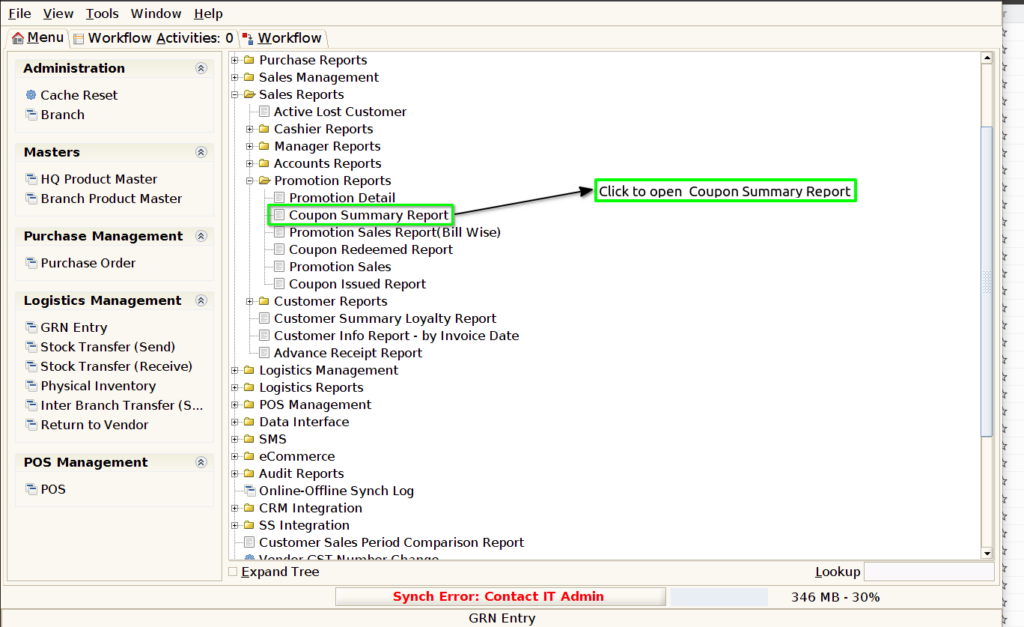
Step 1 : Select ‘Coupon Summary Report’ in Menu -> Sales reports > Promotion report > Coupon Summary Report or Search Coupon Summary Report.
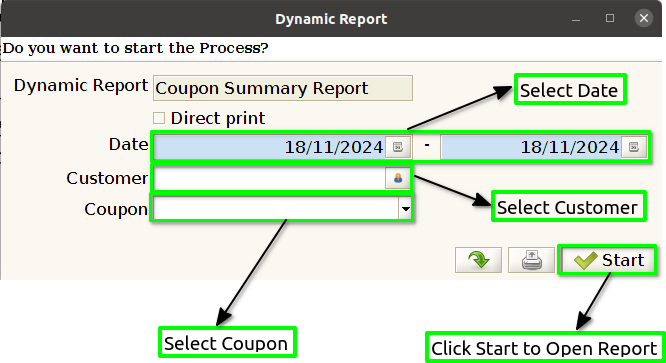
Step 2 : Select the date range and vendor to open the Coupon Summary Report.
Step 3 : To view a preview of the Coupon Summary Report .
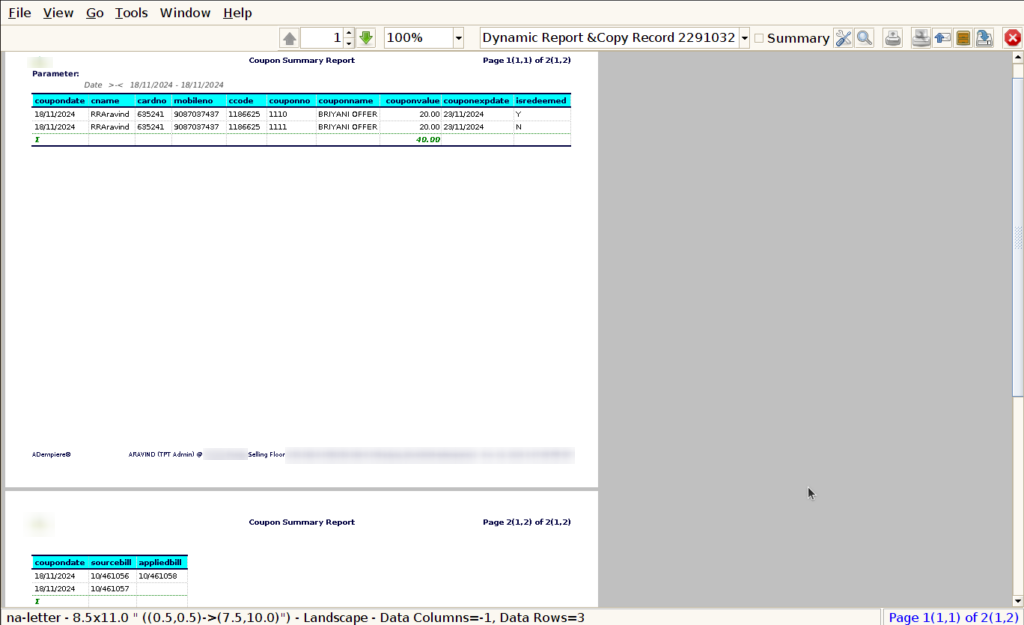
Coupon Date : In a Coupon Summary Report, including the coupon date (or date range) is critical for tracking when coupons were issued and redeemed.
Customer name : The name of the customer who redeemed the coupon. This field helps businesses track individual customer behavior and engagement with the coupon. It can be beneficial for customer segmentation, loyalty programs, or identifying high-value users.
Card number : For businesses that use loyalty cards or reward programs, it is safer to track the loyalty card number or membership ID rather than financial card numbers.
Mobile No : Including mobile numbers in a Coupon Summary Report can provide valuable insights into customer behavior and help businesses optimize their coupon strategies, especially in the context of mobile marketing, SMS campaigns, or customer loyalty programs.
Customer Code : Including the customer code (or customer ID) in the Coupon Summary Report can be an effective way to track how individual customers are engaging with coupons, especially in businesses that maintain customer profiles or use loyalty programs.
Coupon No : Including coupon numbers in the Coupon Summary Report allows businesses to track and analyze coupon redemption with high granularity, making it easier to monitor coupon performance, prevent abuse, and optimize future promotions.
Coupon Name : Including the coupon name in the Coupon Summary Report enhances the ability to track and analyze the effectiveness of individual promotions.
Coupon Value : Including the coupon value in the Coupon Summary Report helps businesses track the total value of discounts applied through each coupon redemption.
Coupon Expire Date : Including the coupon expiry date in the Coupon Summary Report is a valuable addition because it provides important information about the validity of each coupon.
Is Redeemed : Including a field for “Is Redeemed” in the Coupon Summary Report is an essential feature for tracking the redemption status of coupons. This field helps businesses quickly identify whether a coupon has been redeemed by the customer or is still unused.
Source Bill : Including the Source Bill in the Coupon Summary Report provides critical context to the coupon redemption process. The Source Bill refers to the specific invoice or sales transaction where the coupon was redeemed.
Applied Bill : Including the Applied Bill in the Coupon Summary Report provides another layer of transparency, helping businesses to track exactly where and how a coupon has been applied.