How to view Stock Aging Report in Adempiere Retail
A report that shows how long stock items have been in inventory, grouped by the length of time (e.g., 0-30 days, 31-60 days, etc.).
User Access
Who Can Access
- Admin
- Cashier
- Sales Manager
- Manager
What User Can Do
- Identify old or slow-moving inventory.
- Make decisions to discount, promote, or clear aged stock.
- Manage inventory better to reduce holding costs.
Prerequisite Activities
- Maintain accurate stock entry dates
- Regularly update stock quantities and movements.
- Ensure inventory system can track item aging based on entry or receipt date
- Define aging categories or time buckets (e.g., 0-30, 31-60 days).
Business Rules
- Age Categorization
- Replenishment
- Stock Movement and Tracking
- Restocking and Reordering
- Inventory Valuation
User Interface
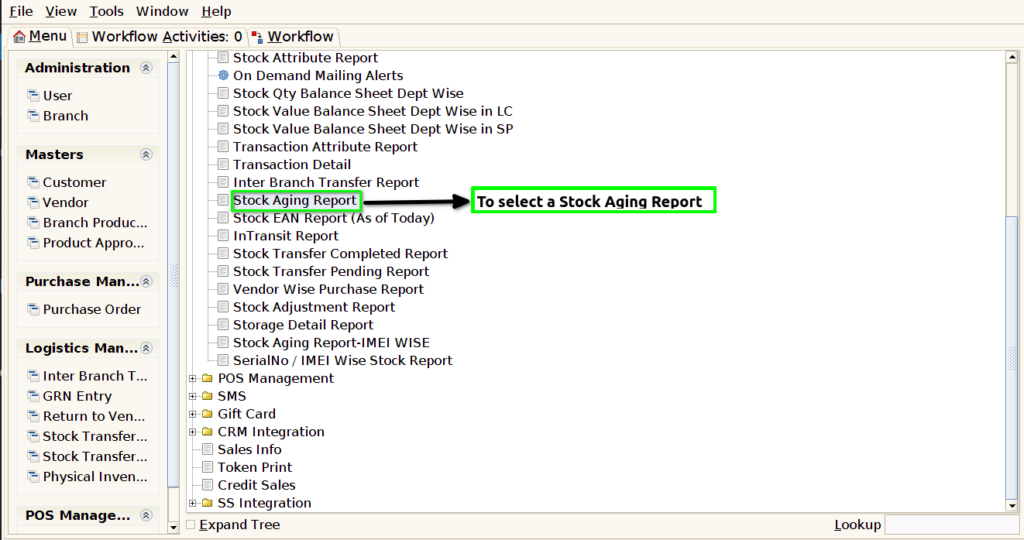
STEP 1: To select a Stock Aging Report.
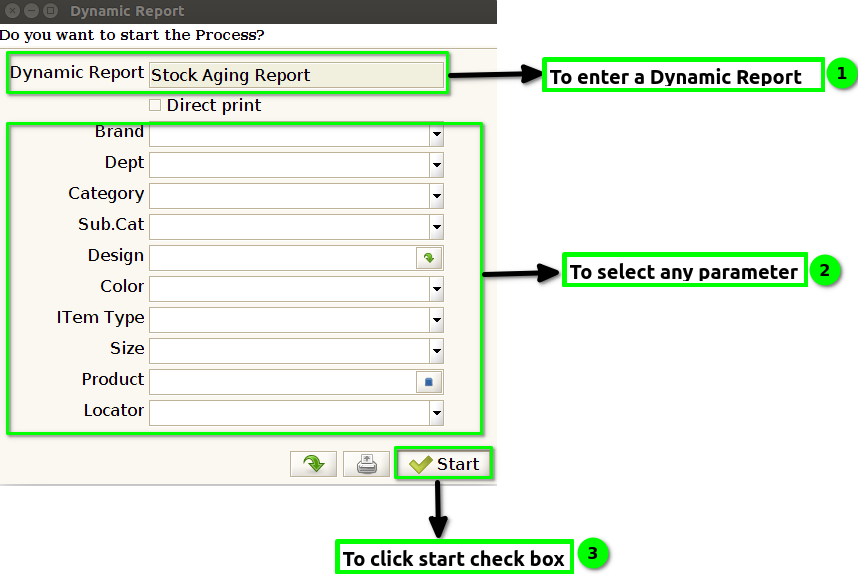
STEP 2: To enter the Dynamic report this field value is default.To use these any parameters.To click the start check box.To run the process.
STEP 3: Once to complete the process and to show the Report based on given parameter.
