How to view Sales Info Report in Adempiere Retail
A Sales Info Report provides a summary or detailed view of all sales transactions made within a specific time period.
User Access
Who Can Access
- Admin
- Back Office
- Purchase Manager
- Manager
What User Can Do
- View Daily/Monthly Sales
- Analyze Product Performance
- Check Customer Sales (if available)
- Monitor Sales by POS or Store Location
- Export or Share Report
Prerequisite Activities
- POS or Sales System Configuration
- User and Access Rights
- Tax and Discount Settings
- Ensure Real-Time or Daily Syncing
Business Rules
- Each Sale Must Include Item, Quantity, and Price
- Multiple Payment Modes Should Be Supported
- Returns and Refunds Must Be Tracked Separately
- Data Must Sync Before Reporting (if multi-location)
User Interface
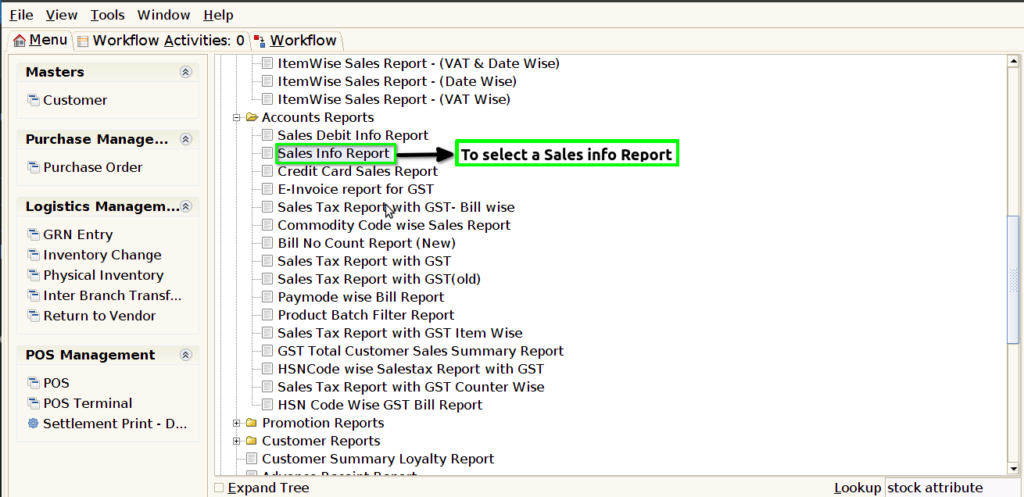
STEP 1: To select a Sales Info Report.
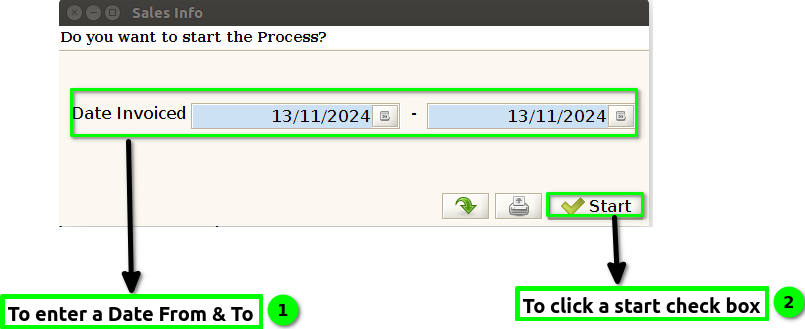
STEP 2: To enter a Date invoiced.To click a start check box.To run the process.
STEP 3: Once to complete the process to show the report based on given parameter.
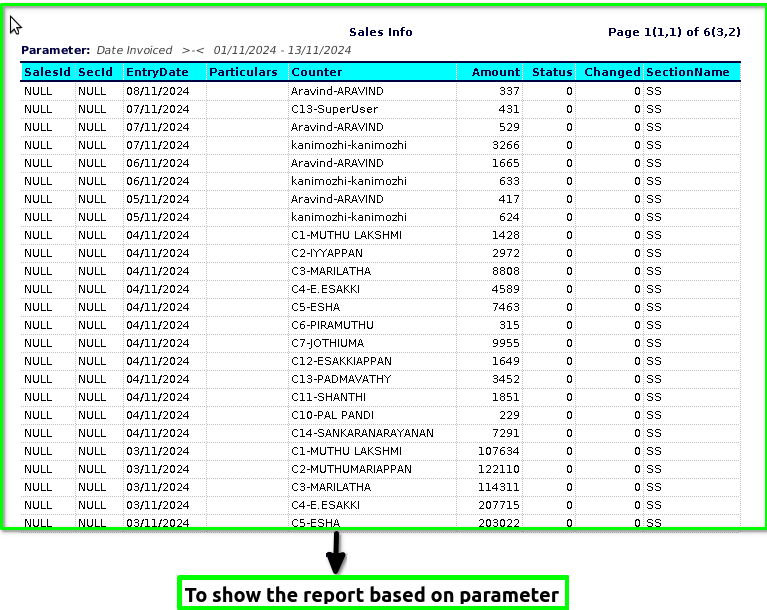
STEP 4: Sales ID– is a unique identifier assigned to a particular sales transaction or a sales record within a system, such as a customer relationship management (CRM) system, an enterprise resource planning (ERP) system, or an e-commerce platform. This identifier helps in tracking, managing, and referencing individual sales transactions.
Section ID-A unique identifier assigned to a particular section of a course or class. This ID helps in organizing and differentiating between various sections of a course.
Section Name– The title or name of that specific section within a course, usually indicating the subject matter or focus (e.g., “Introduction to Biology – Section A”).
Entry Date- typically refers to the date when a particular sales transaction or record was entered into the sales tracking system or database.
Counter– typically refers to a metric that tracks the number or frequency of specific events or transactions over a designated period.
Amount-The amount in sales info report generally refers to the total sales figures recorded within a specific report that summarizes sales performance over a certain period.
Status-typically refers to the current state or condition of a sales opportunity, order, or transaction within the sales process. The status helps sales teams, managers, and stakeholders understand where they stand in relation to their sales goals and objectives.
Changed-typically refers to an update in the condition or classification of a sale or transaction.