How to use POS Util in Adempiere Retail for offline node creation
POS UTIL (short for POS Utilities) refers to a set of tools or functions in a Point of Sale system used for system setup, maintenance, troubleshooting, and daily operations.
User Access
Who Can Access
- Back Office
- Cashier
- Manager
- Admin
What User Can Do
- Cashier-Level Functions
- Supervisor/Manager Functions
- Admin/System Functions (if applicable)
Pre-Requisite Activities
- User Authentication
- Shift or Terminal Status Check
- Complete Pending Transactions
- Verify System Connection
Business Rules
- Access to POS UTIL functions must be role-based (e.g., cashier, supervisor, admin).
- Critical utilities (e.g., void, reverse, settlement, EOD) must require authorization before use.
- POS UTIL actions must be logged with user ID, timestamp, and action details for audit purposes.
- Users must complete or cancel all pending transactions before running utilities like EOD or settlement.
- Utility functions that affect financial data (e.g., drawer open, cash out, manual settlement) must be reconciled.
- Reprint functions (receipts, settlement reports) should be clearly marked as “Reprint” to avoid duplication.
User Interface
Step 1 : To Select a Branch in Menu.Then to click a POS Util.

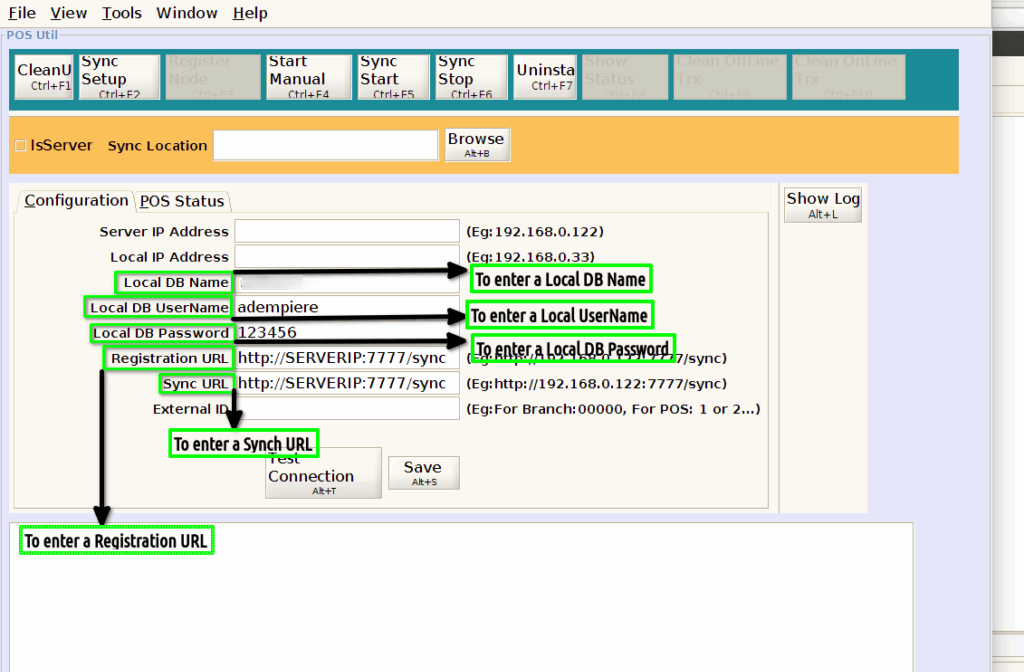
Step 2 :To enter the value for Local DB Name,Local DB UserName,Local DB Password,Registration URL and Sycn URL.