How to view Approval Pending Report for Lifestyle in Adempiere Retail
An Approval Pending Report shows a list of items, transactions, or requests that are waiting for managerial or authorized approval before they can proceed.
User Access
Who Can Access
- Admin
- Cashier
- Sales Manager
- Manager
What User Can Do
- View All Pending Approvals
- Track Approval Status
- Take Approval Actions (if authorized)
- Download or Share Report
Prerequisite Activities
- Approval Workflow
- User Roles and Permissions
- Capture Complete Request Data
- Reporting Period and Filters
Business Rules
- Unique Request Identification
- Role-Based Approval
- Timely Action
- Multi-Level Approvals
- Cancellation and Withdrawal
- No Duplicate Approvals
User Interface
STEP 1: To select a Approval pending Report .

STEP 2: The report will show default Dynamic Report Column.To enter a Approval Out Date Range and then to enter the product.Finally to click the Start check box.
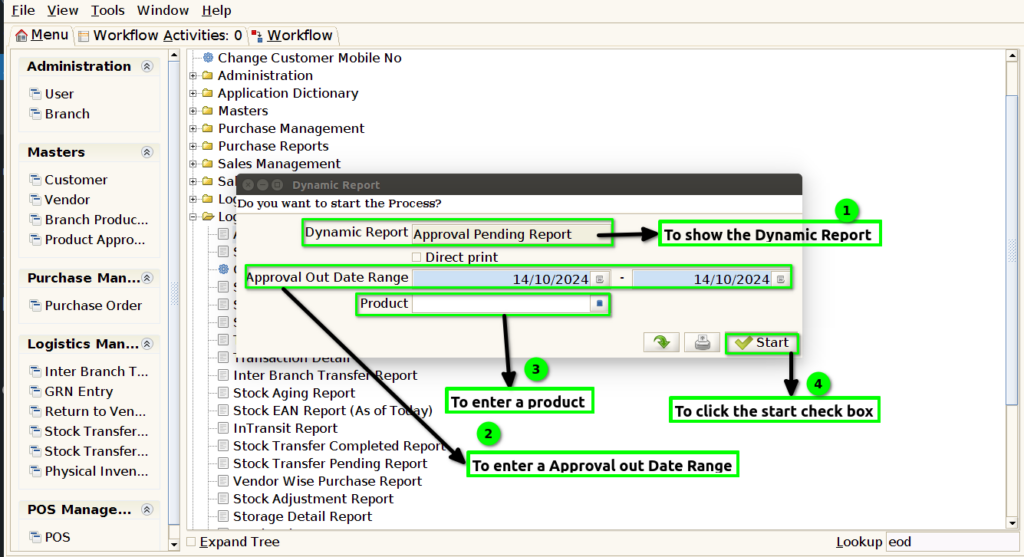
STEP 3: Once to run the process,if process completed to open the report .
