How to run EOD (Promotion Update) process in Adempiere Retail
Product promotion is the process of explaining the value of a product to potential and existing customers to educate, generate interest, and spur purchase. It is one of the four P’s of the marketing mix, along with product, price, and place.
Who Can Access
- Back Office
- Cashier
- Manager
- Admin
What User Can Do
- Verify and Finalize All Transactions
- Generate End-of-Day Reports
- Review and Report Discrepancies
- Close the Register/Terminal
Pre-Requisite Activities
- Complete All Sales and Return Transactions
- Close Till (if applicable)
- Print/Review Required Reports
- Verify All Discounts and Voids
- User Authorisation
BUSINESS RULES
- Completion of Transactions
- Unique EOD Process Per Day
- Report Generation
- Data Synchronization
User Interface
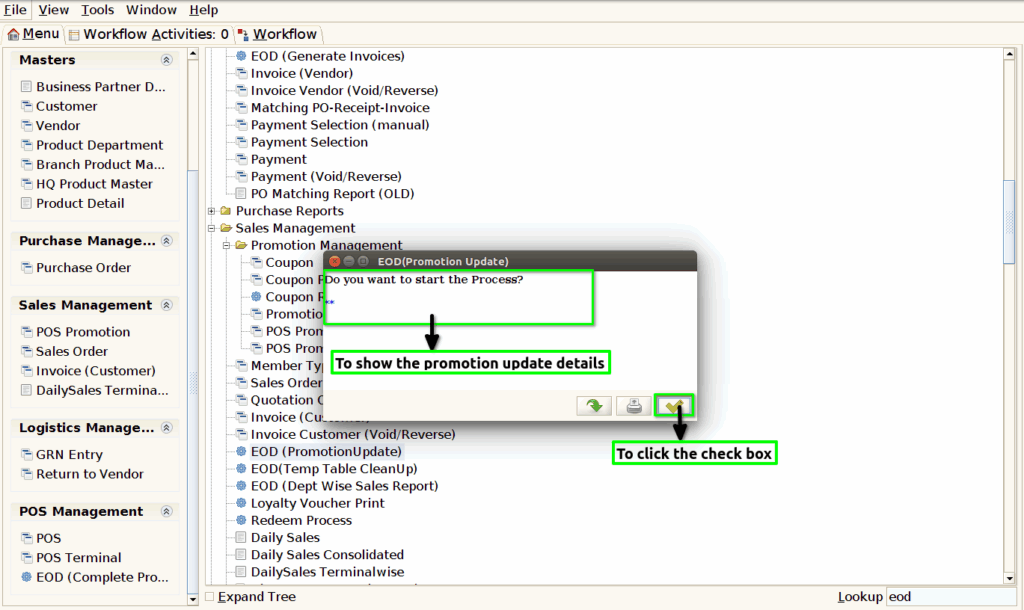
Step 1 : To Select a Branch in Menu.Then to click a EOD (Promotion Update).

Step 2 : To show the last EOD date and to click the check box.

Step 3 : Once to run the process and to show the Promotion update details and then to click the check box.