How to view Department Wise Purchase Report in Adempiere Retail
A report that shows the total purchases made by each department within an organisation over a certain period.
User Access
Who Can Access
- Admin
- Back Office
- Purchase Manager
- Manager
What User Can Do
- Budget Monitoring
- Identify Cost Center
- Approve Purchases
- Improve Accountability
Pre-Requisite Activities
- Complete Purchase Data Entry
- Update Vendor Information
- Reporting Period
- Data Validation
Business Rules
- Department Assignment
- Valid Departments Only
- Complete Purchase Data
- Reporting Period
User Interface
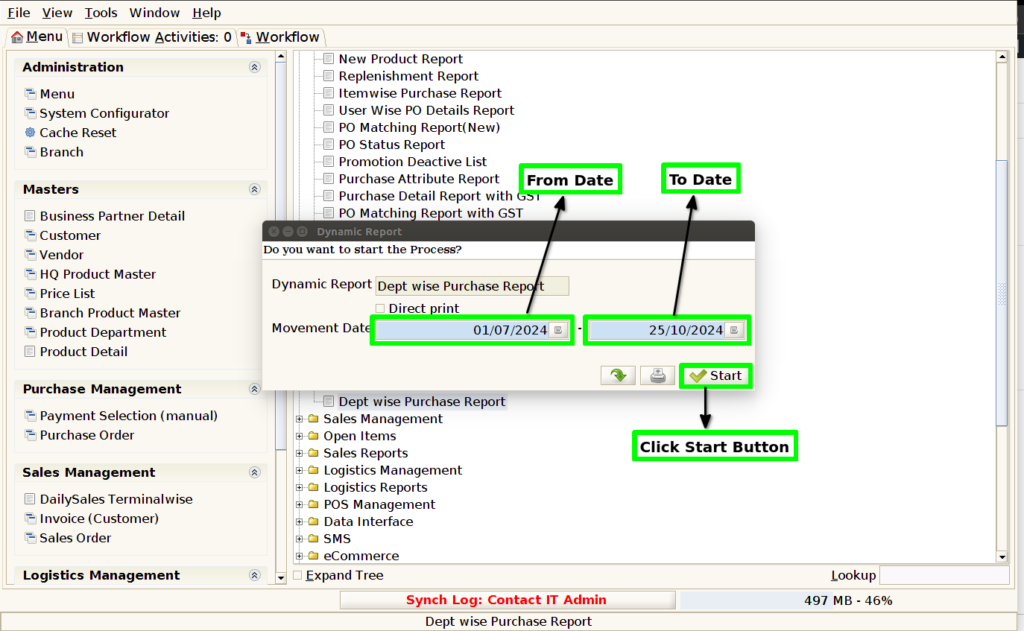
STEP 1: Click Purchase Reports Folder.

STEP 2: Click Dept wise Purchase Report.

STEP 3: Choose Parameter From Date, To Date.
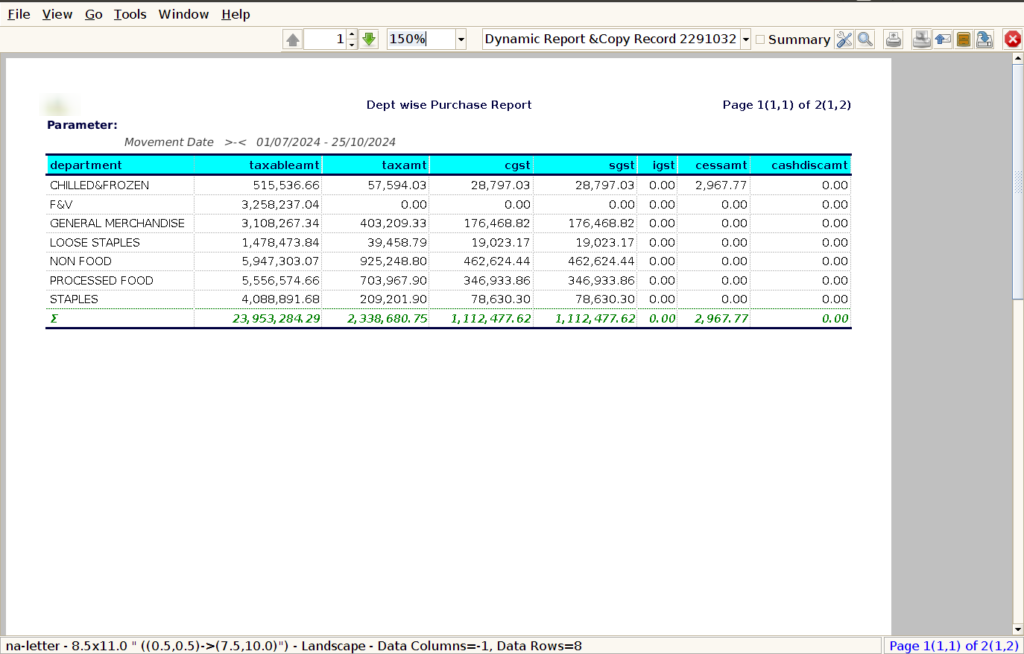
STEP 4: Department Name : By showing the department name, the report clearly separates purchases made by different departments, making it easier to understand which department is responsible for each expense.
Taxable Amount : Including the taxable amount in a Dept-wise Purchase Report is critical for ensuring accurate financial reporting, compliance with tax regulations, and proper budgeting.
Tax Amount : Including the tax amount in a Dept-wise Purchase Report is crucial for ensuring tax compliance, managing expenses accurately, and providing transparency into departmental spending.
CGST : In India, GST is a multi-layered tax system, with both Central GST (CGST) and State GST (SGST) applied to sales and purchases. By showing the CGST amount in the report, the business ensures it is adhering to the tax laws and keeping accurate records of the tax it pays on its purchases.
SGST : Including the SGST (State Goods and Services Tax) amount in a Dept-wise Purchase Report is important for various reasons, particularly in countries like India where GST is implemented.
IGST (Integrated Goods and Services Tax): is a tax levied on goods and services that are traded between different states in India. It is part of the Goods and Services Tax (GST) framework, which aims to create a unified tax system for the entire country, replacing a range of indirect taxes.
Cess amount – is an additional tax or levy imposed by the government on top of the regular tax. It is usually intended for a specific purpose or fund, and the revenue generated from it is used to finance certain initiatives or government schemes.
Cash Discount Amount : Including the Cash Discount amount in a Dept-wise Purchase Report is important for a variety of reasons. A Cash Discount is a reduction in the purchase price granted by the seller to the buyer, typically for early payment of an invoice or for paying in cash.
STEP 5: Click Page Down Button Show Columns Details.
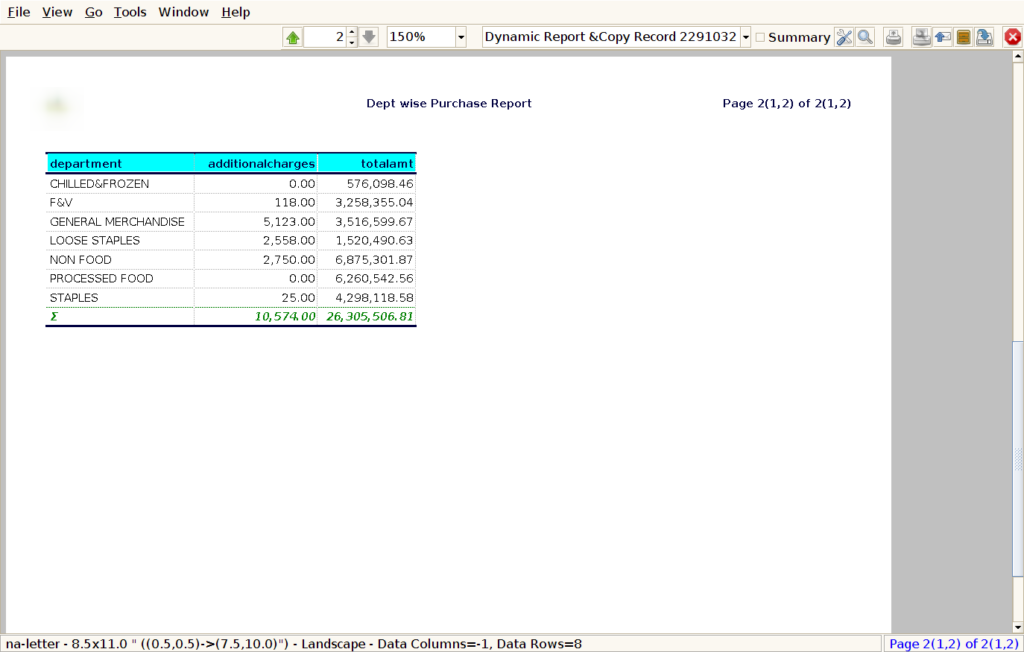
Additional Charges : Additional charges can include a variety of extra costs associated with purchases that are not part of the base price of goods or services. These charges can include shipping costs, handling fees, packaging costs, freight charges, insurance, or other service-related fees.
Total Amount : Showing the Total Amount in a Dept-wise Purchase Report is essential for several reasons, as it provides a comprehensive view of the total expenditure incurred by each department for its purchases.