How to view Sales VAT Report Item-Wise in Adempiere Retail
A Sales VAT Report – Item Wise shows,The VAT collected on sales for each individual product or item during a specific period.
User Access
Who Can Access
- Admin
- Back Office
- Purchase Manager
- Manager
What User Can Do
- Verify VAT Calculations by Item
- Analyze Tax Impact on Different Products
- Prepare Detailed Tax Reports
- Filter by Date or Product Category
Pre-Requisite Activities
- Maintain Accurate Product and VAT Master Data
- Record Sales Transactions with Item-Level VAT Details
- Update VAT Rates as per Regulations
- Reporting Period
Business Rules
- Include Only Finalized Sales
- Display Both Taxable Value and VAT Amount
- Adjust for Returns and Credit Notes
- Support Filtering and Grouping
User Interface
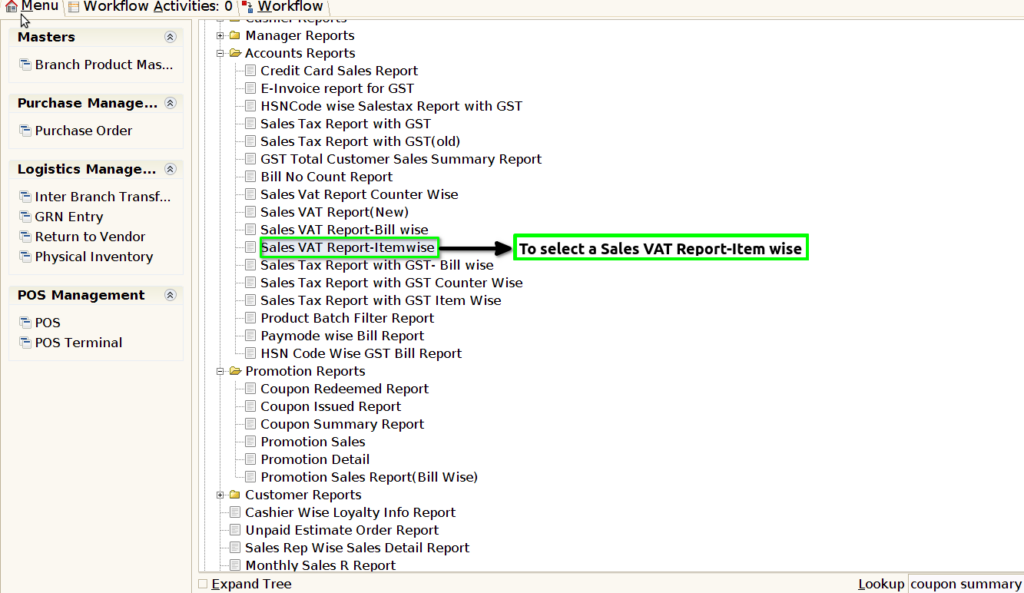
STEP 1: To select a Sales VAT Report-Item wise.
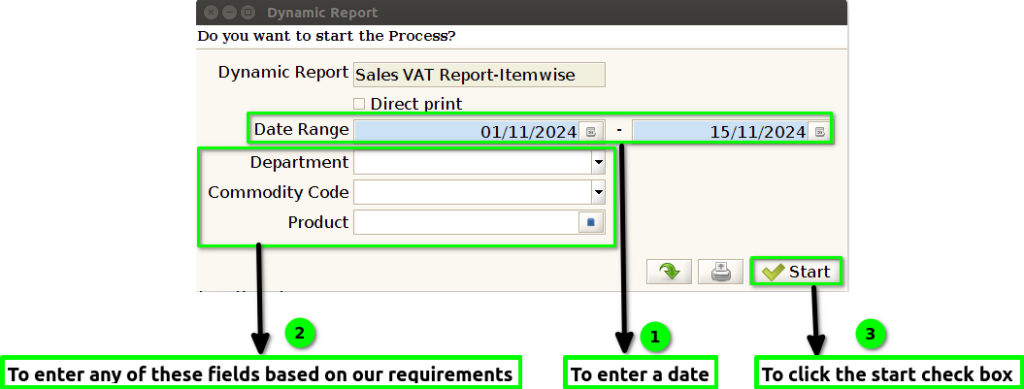
STEP 2: To enter a date range in this field is mandatory.And to enter any of these fields based on our requirements.Then to click a start check box to run the process.
STEP 3: Once to complete the process to show the report based on the given data.
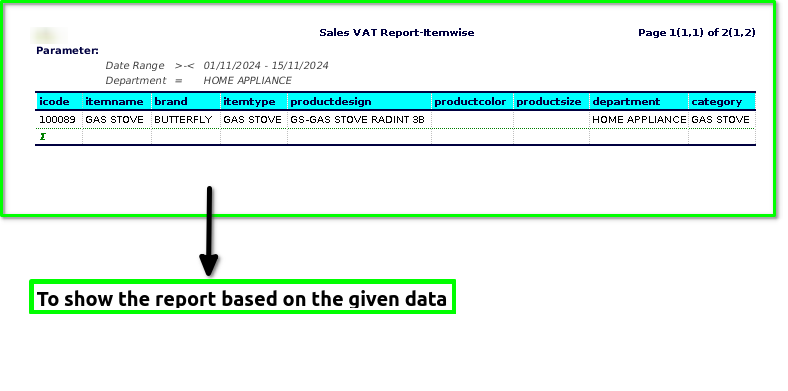
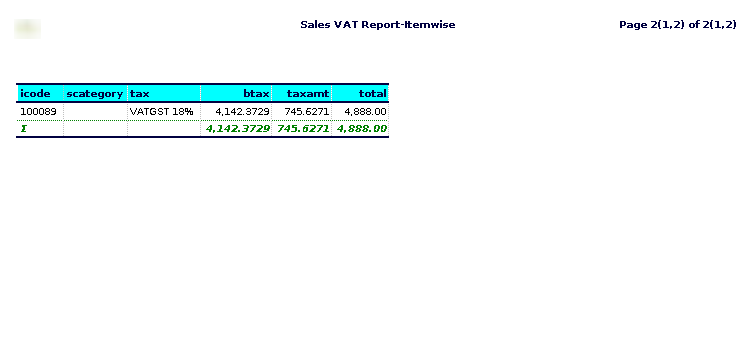
STEP 4: Item code -(also known as a product code, SKU, or stock-keeping unit) is a unique identifier assigned to a specific product or item, usually for the purpose of inventory management, sales tracking, and categorization.
Item name-is the descriptive title or label given to a specific product or item to identify it. It is typically used to provide a clear understanding of what the item is, making it easier for customers, employees, and businesses to recognize and differentiate products.
Brand– A brand is created through design, packaging, and advertising elements that distinguish the product from its competitors.
Item type-can have different meanings depending on the context in which it is used.
Product Color – This refers to the hue or shade of the product. Color is an important feature as it can influence consumer preference, appeal, and perception.
Product Design– This refers to the aesthetics, style, and overall appearance of the product, as well as its functionality. Design encompasses aspects such as shape, texture, form, and the materials used in the product’s construction.
Product Size– This refers to the physical dimensions or measurements of the product, such as length, width, height, or volume. Size is crucial for determining how the product fits into its intended environment or user context.
Category -is a way for a business to group similar items together for customers to find them, whether in a store or on a website.
Department -for each product and that department controls all activities related to the product including development, production, marketing, sales, and distribution.
Tax– axes on products comprise value added tax, taxes and duties on imports and exports and other taxes on products.
Subcategories– help businesses, retailers, and consumers navigate large product selections and make it easier to find what they are looking for.Example:Product Category: Electronics – Subcategory: Smartphones.
Business Tax-(B Tax) could be shorthand for general business taxation, such as corporate tax, sales tax, or other taxes that businesses are required to pay.
Tax amount-refers to the total sum of money that a person, business, or entity is required to pay to a government in the form of taxes. It is typically calculated based on specific tax rates applied to a taxable income, value, or transaction.
Total– generally refers to the complete sum or aggregate of a set of numbers, amounts, or items. It represents the final value obtained after adding up all the individual parts or components in a given context.