How to consolidate the stock by product for reporting purposes in Adempiere Retail
The process of grouping and summarising inventory based on how long items have been in stock, usually categorised by age brackets (e.g., 0–30 days, 31–60 days, etc.).
User Access
Who Can Access
- IT Admin
- Cashier
- Manager
- Back Office
What User Can Do
- Run the Aging Report
- Filter by Product, Category, or Location
- Identify Slow-Moving or Aged Stock
- Export or Print Report
Pre-Requisite Activities
- Ensure Inventory Data Is Up-to-Date
- Verify Warehouse/Location Mapping
- Define Aging Periods
- Check User Permissions
Business Rules
- Use of Accurate Receipt Dates
- Consistent Aging Buckets
- One Item, One Age Group
- Real-Time or Latest Data Required
- Location-Level Tracking (if enabled)
User Interface
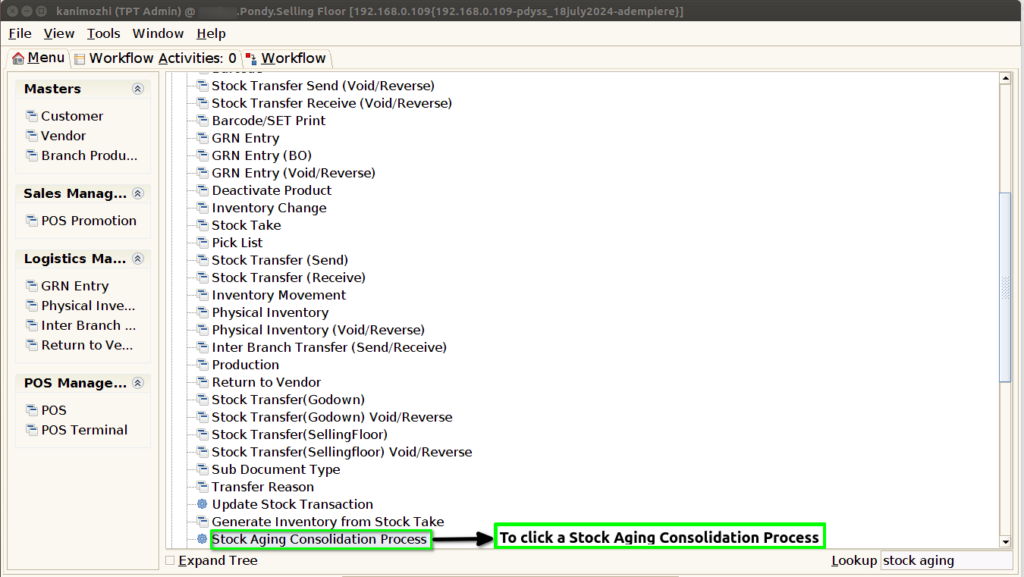
STEP 1: To select the Stock Aging Consolidation Process.
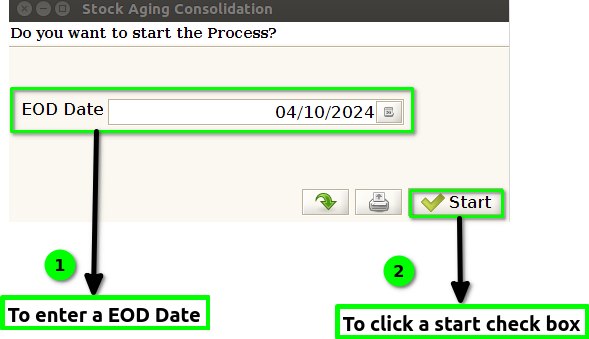
STEP 2: To enter a EOD Date And to click a start check box.
STEP 3: Once to run the process to open this popup window Number of rows Inserted and Updated Successfully.Finally to click the check box.
