How to approve a Product in ADempiere Retail
Product Approval is the process of reviewing and authorizing a product before it becomes active or available for use in the system (e.g., for sales, purchase, or listing). It ensures that the product data is complete, accurate, and meets business standards.
User Access
Who Can Access
- Back Office
- Cashier
- Manager
- Admin
What User Can Do
- Submit a new product for approval
- Review product details before approval
Pre-Requisite Activities
- Product must be created and saved in the system
- All mandatory product fields (e.g., name, category, price, tax, HSN code) must be filled
- Approval roles or workflow must be configured
Business Rules
- Only users with approval rights can approve/reject a product
- Products cannot be used in transactions until approved
- Mandatory fields must be validated before submission
User Interface
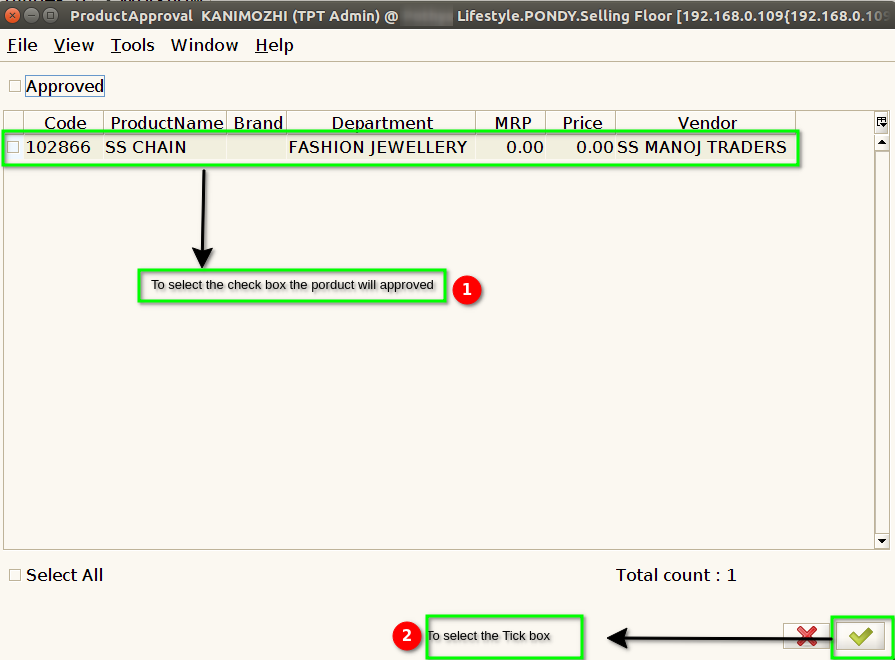
STEP 1: To select a Product Approval.

STEP 2 : To select approved check box selected,to show approved products only.

STEP 3 : To select approved check box un-selected,Only to show unapproved products.Then to select the check box products will approved.