How to run Inter Branch Transfer synch process to Accounts software in ADempiere Retail
Inter Branch Transfer SS Integration refers to the automated process of synchronizing inventory transfer data between different branches (stores) via a SivaSakthi. It ensures that stock movement between branches is recorded accurately in both source and destination locations in real-time or scheduled syncs.
User Access
Who Can Access
- Back Office
- Manager
- Admin
What User Can Do
- View
- Rerun Process
Pre-Requisite Activities
- Branch master setup must be completed
- Item and UOM (Unit of Measure) master data should be uniform across branches
- Transfer routes and warehouse/storage locations must be defined
- Users should have proper access rights to initiate and receive transfers
Business Rules
- Inter-branch transfers must have valid approval (manual or system-based)
- Stock cannot be transferred if quantity is insufficient at source branch
- Document number for transfer must be unique and traceable
- Goods in transit must be tracked and not available for sale
User Interface
IBT Synch Process
Step 1 : Select ‘INTER BRANCH SYNC PROCESS’ in Menu -> SS Integeration > INTER BRANCH SYNC PROCESS or Search INTER BRANCH SYNC PROCESS in Lookup.

Step 2: after clicking the process menu it will show like below image.

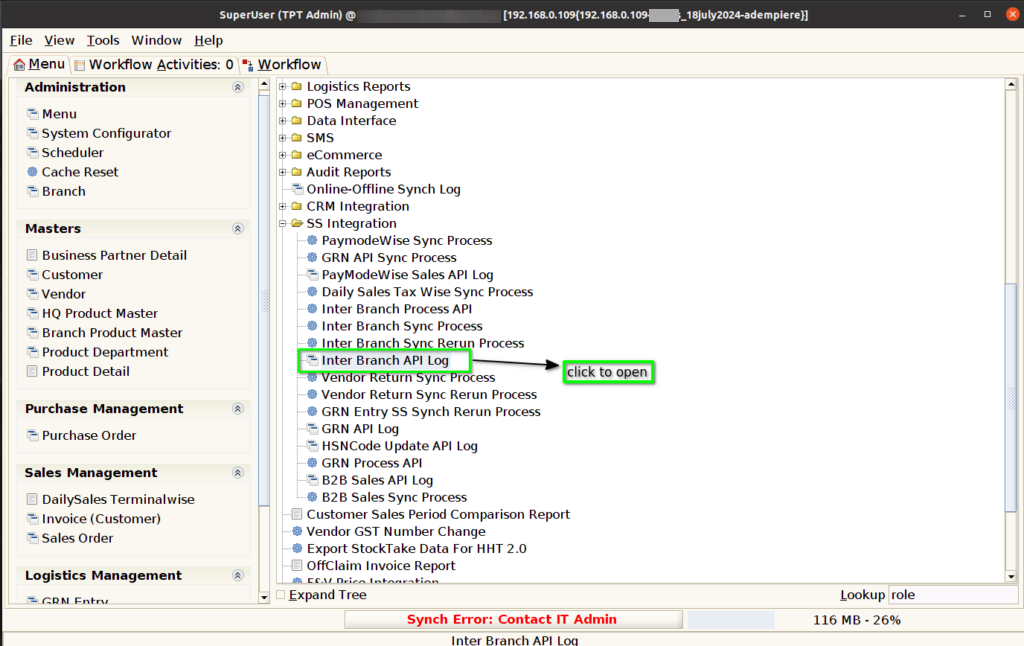
Step 3: We can check the Log Details of Synched Documents of IBT using Inter Branch API Log .
Step 4: Users can utilize filter options to check the synchronization status of specific IBT documents or view the status of all documents, allowing for targeted tracking and efficient data management.

Step 5: This screen displays an example of successful SS synchronization requests and responses, highlighting the status of each document. Users can easily review the details to ensure accurate data transfer and confirm that all records have been synchronized correctly.

Step 6: As shown below in the image, the Inter Branch Synch Rerun synchronization process is used to synchronize individual documents to the Siva Sakthi System in case of failure. It includes error handling to log issues and implement retry mechanisms. Additionally, manual intervention may be required for unresolved errors.
