How to view Item Wise Sales Report Tax-Wise in Adempiere Retail
An Item-wise Sales Report (VAT-wise) is a detailed record of the sales transactions for each individual product (item), categorized by the applicable Value Added Tax (VAT) rates.
User Access
Who Can Access
- Admin
- Head cashier
- Sales Manager
- Manager
What User Can Do
- Detailed Sales Data
- Filter or Sort Data
- Calculate VAT Liability
- Export Data
Prerequisite Activities
- Create and Maintain Product Database
- Verify VAT Invoices Generation
- Data Entry and Validation
Business Rules
- VAT Application on Sales
- Invoice Generation and VAT Display
- Sales Transaction Recording
- Reporting Period
User Interface
Step 1 : Select ‘Item-wise Sales Report (VAT Wise)’ in Menu -> Sales reports > Manager report > Item-wise Sales Report (VAT Wise) or Search Item-wise Sales Report (VAT Wise).
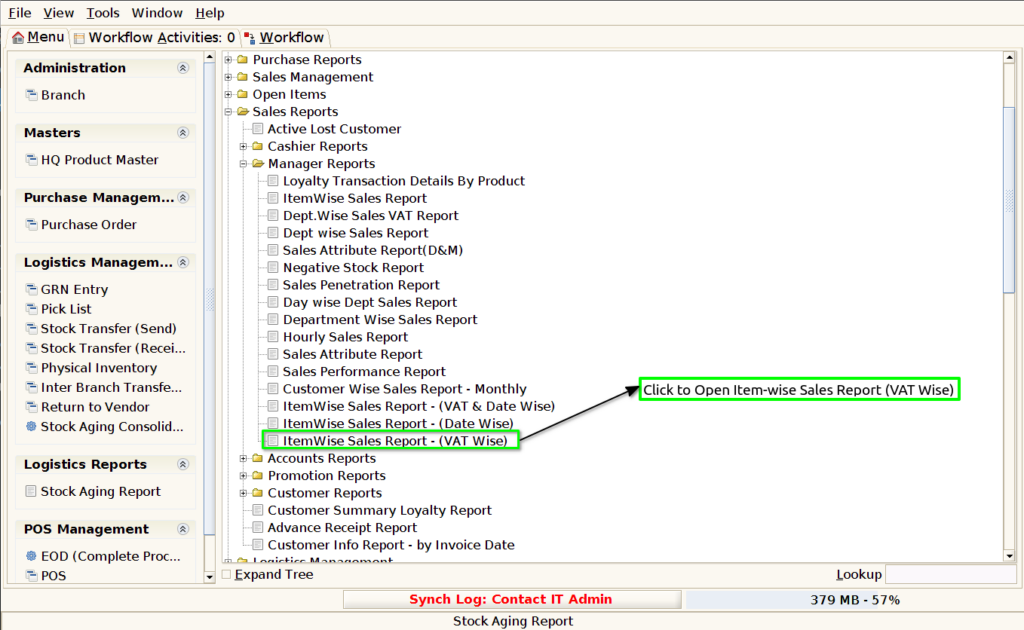
Step 2 : Select the date range and Parameter to open the Item-wise Sales Report (VAT Wise).

Step 3 : To view a preview of the Item wise Sales Report (VAT Wise).
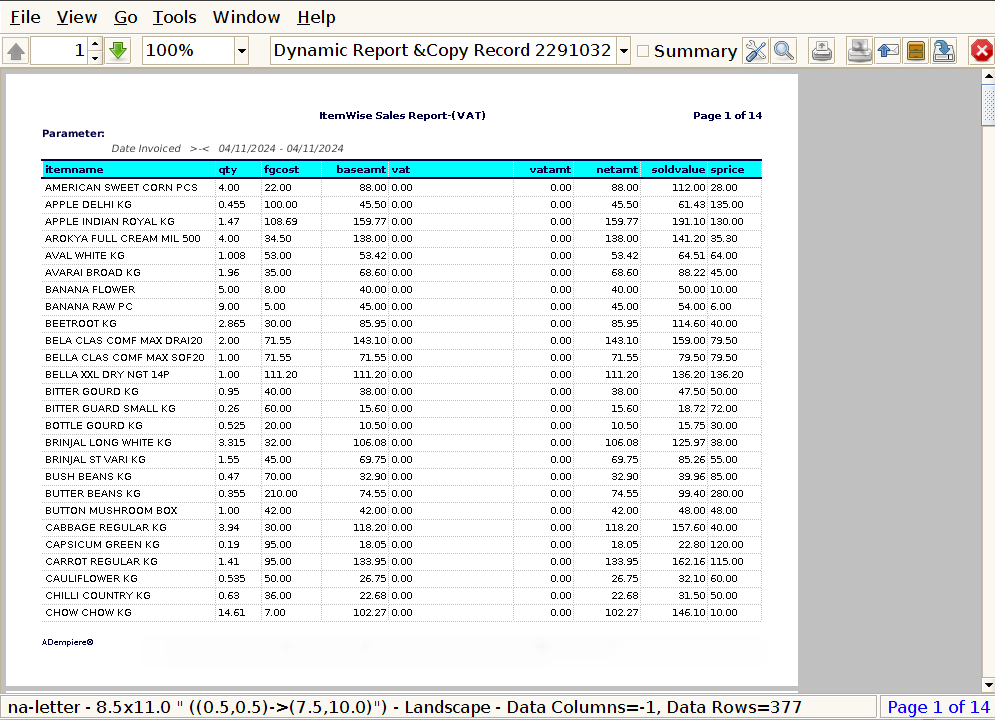
Date : In an Item-wise Sales Report (VAT Wise), the date column is crucial for organizing and tracking sales transactions on specific days.
Item Name : In an Item-wise Sales Report (VAT Wise), the Item Name column displays the name or description of the products or services that were sold. This column is essential for identifying which specific items contributed to the total sales, along with the corresponding VAT calculation and date of sale.
Quantity : The Quantity Sold column in an Item-wise Sales Report (VAT Wise) is critical for understanding how many units of each item were sold, the total revenue generated, and the VAT applicable.
Final Gross Cost : The Final Gross Cost in an Item-wise Sales Report (VAT Wise) typically refers to the total cost of goods sold (COGS), which includes the cost price of the items sold, VAT, and any other relevant costs or adjustments.
Base Amount : The Base Cost in an Item-wise Sales Report (VAT Wise) refers to the cost price of an item or product without including any additional expenses like VAT or other indirect costs.
VAT : In an Item-wise Sales Report (VAT Wise), the VAT column shows the Value Added Tax (VAT) applied to each item sold, based on the applicable VAT rate and the sale price of the item. This column is critical for businesses to track their VAT obligations, as it indicates the total VAT charged on each sale and helps in VAT filing and tax compliance.
Net Amount : The Net Amount in an Item-wise Sales Report (VAT Wise) is essential for businesses to track their actual sales revenue, excluding VAT. It allows for clear distinction between net sales and tax liabilities.
Sold Value : In an Item-wise Sales Report (VAT Wise), the Sold Value typically refers to the total amount of revenue earned from selling the item before adding VAT (excluding taxes). It represents the total value of the goods sold for each item, based on the unit price excluding VAT and the quantity sold.
Selling Price : In an Item-wise Sales Report (VAT Wise), the Selling Price refers to the price at which each item was sold. Depending on the reporting requirements, this price could either be the price excluding VAT (net price) or the price including VAT (gross price).