How to synch pending Invoices, Customers to CRM Server in Adempiere Retail
Tasks or activities in the Customer Relationship Management (CRM) system that are not yet completed and are waiting to be addressed.
User Access
Who Can Access
- Admin
- Cashier
- Manager
- Back Office
What User Can Do
- View Pending Tasks
- Update Task Status
- Generate Reports
Pre-Requisite Activities
- User Logged In with CRM Access
- Tasks Created and Assigned
- Pending Tasks Exist
- CRM System Configured for Task Tracking
Business Rules
- Task Creation Mandatory
- Accurate Task Assignment
- Status Updates Required
- No Deletion Without Approval
- Access Control
User Interface
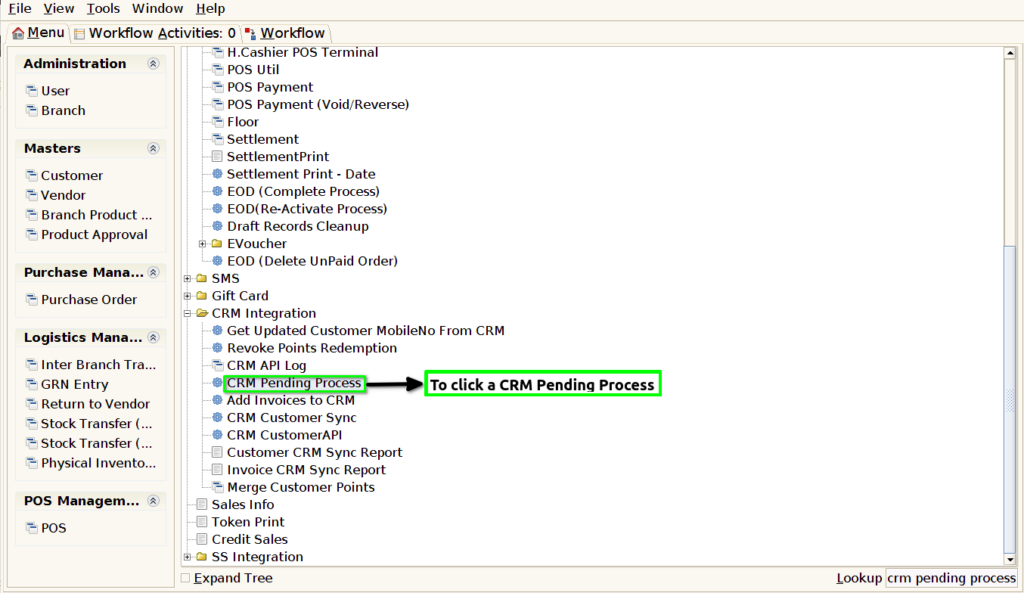
STEP1: To select a CRM Pending Process.
STEP2: To click the start check box,then to run the process.

STEP3: Once to run the process to show this popup window the process will complete or not will show and then to click the box.
