How to view Newly Registered Customer Report in Adempiere Retail
A report that lists all customers who were newly added or registered in the system within a chosen time frame, showing their registration dates and basic details.
User Access
Who Can Access
- Admin
- Back Office
- Purchase Manager
- Manager
What User Can Do
- Identify New Customers
- Track Growth
- Analyze Customer Acquisition
- Verify Data
- Export Data
Pre-Requisite Activities
- Customer Registration Process
- Capture Registration Date
- Maintain Customer Database
- Reporting Period
- User Access
Business Rules
- Date Range Filter
- Unique Customer Identification
- Exclude Inactive or Deleted Customers
- User Access Control
- Data Integrity
User Interface
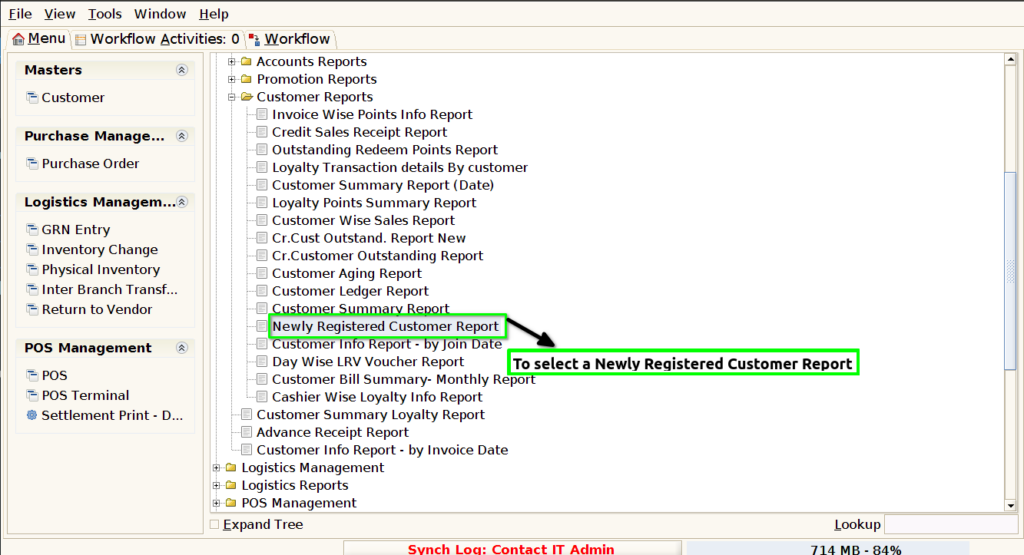
STEP 1: To select a Newly Registered Customer Report.
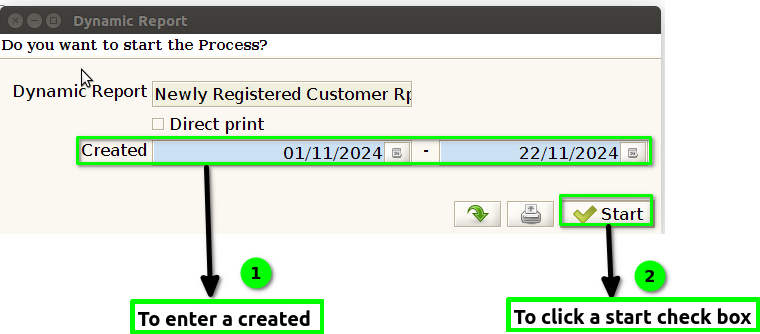
STEP 2: To enter a created field in this field is mandatory,then to click the start check box to run the process.
STEP 3: Once to complete the process to show the report based on the given data.
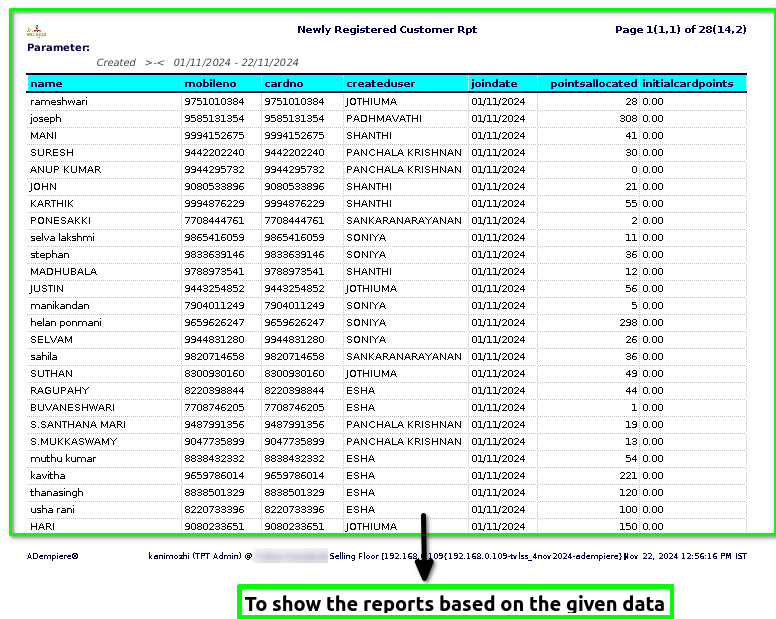
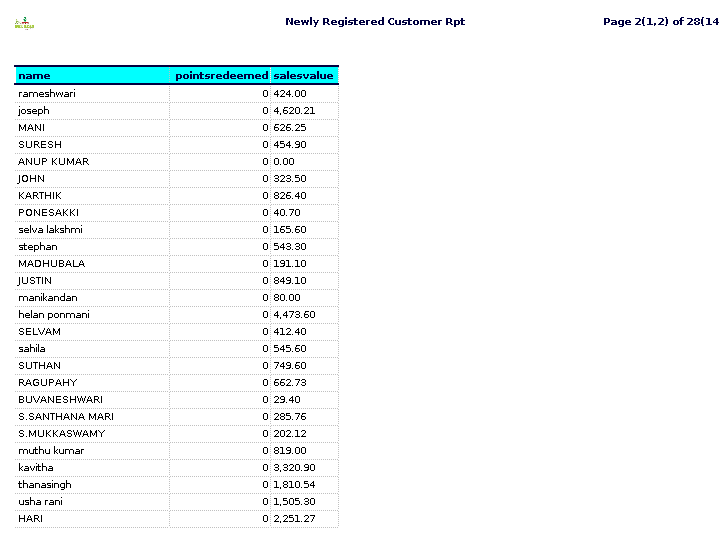
STEP 3:
Name – Typically refers to the name of a person or entity that has purchased goods or services from a business. This information is often used to identify or contact the customer in various business processes such as transactions, customer service, or marketing.
Mobile number – refers to the mobile phone number provided by a customer when interacting with a business or service.
Card number – Typically refers to a unique identifier assigned to a customer, often used in various systems to track or manage customer-related transactions, memberships, or loyalty programs.
Created user –The user is created in the system with a username, email, and password. This allows the user to log in, interact with the platform, and access personalised content or services.
Join date- Typically refers to the date when a customer first registers or signs up for a service, product, or platform.
Points allocated – metric helps businesses track how well their promotional and loyalty programs are performing, and if they are incentivizing new customers to take desired actions. If you are looking at a specific software tool, CRM, or loyalty program, it might have a specific way of calculating or presenting these points.
Initial card points – Typically refers to the points or rewards a customer receives when they first register for a rewards program or loyalty card associated with a business, retailer, or service.
Points redeemed – Typically refers to the number of loyalty or reward points that a new customer has used or cashed in since registering for an account.
Sales Value – Typically refers to the total revenue generated from the newly registered customers during a specific period. It is a metric that helps businesses understand how much income has been made from customers who have recently signed up or made their first purchase.