How to view Sales Debit Info Report in Adempiere Retail
A Sales Debit Info Report shows the list of customers who bought goods on credit and still owe payment to the company.
User Access
Who Can Access
- Admin
- Back Office
- Purchase Manager
- Manager
What User Can Do
- Track Outstanding Payments
- Monitor Credit Exposure
- Filter by Date, Customer, or Due Amount
- Prevent New Sales to Overdue Customers
Pre-Requisite Activities
- Customer Master Setup
- Sales and Payment Entry
- Define Due Dates or Payment Terms
- User Access Control
Business Rules
- Include Only Credit Sales
- Outstanding Amount = Total Sale – Amount Paid
- Due Dates Must Be Based on Payment Terms
- Real-Time Updates
User Interface
STEP 1: To select a Sales Debit Info Report.

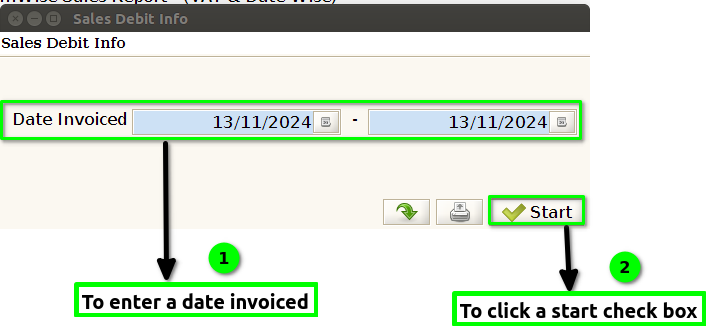
STEP 2: To enter a date invoiced.And to click the start check box.To run the process.
STEP 3: Once to complete the process to show the report based on given parameter.


STEP 4: Debit ID – generally refers to a report used in financial and sales contexts, particularly in businesses that handle sales transactions involving debit payments.
Section ID-A unique identifier assigned to a particular section of a course or class. This ID helps in organizing and differentiating between various sections of a course.
Section Name– The title or name of that specific section within a course, usually indicating the subject matter or focus (e.g., “Introduction to Biology – Section A”).
Entry Date– typically refers to the date when a particular sales transaction or record was entered into the sales tracking system or database.
Amount-The amount in sales info report generally refers to the total sales figures recorded within a specific report that summarizes sales performance over a certain period.
Status-typically refers to the current state or condition of a sales opportunity, order, or transaction within the sales process. The status helps sales teams, managers, and stakeholders understand where they stand in relation to their sales goals and objectives.
Changed-typically refers to an update in the condition or classification of a sale or transaction.
Particular -sales info report is a document or analysis that provides insights and data related to sales performance for a specific period, product, region, or other defined parameters.
Season– Sales Info Report is a document or analysis that provides insights into sales performance during a specific season or time period.