How to view Dept Wise Profit & Loss Report in Adempiere Retail
A Department-Wise Profit & Loss (P&L) Report shows the profit or loss generated by each department (e.g., Electronics, Grocery, Clothing) over a selected period.
User Access
Who Can Access
- Admin
- Back Office
- Purchase Manager
- Manager
What User Can Do
- View Profitability by Department
- Compare Sales vs. Cost
- Make Pricing or Stocking Decisions
- Export/Share Reports
Pre-Requisite Activities
- Department Master Setup
- Accurate Sales Entry
- Inventory Integration
- Date and Time Settings
- Testing and Validation
Business Rules
- Products Must Be Linked to Departments
- Include Only Finalized Sales
- Sales Returns Are Deducted
- User Access Control
User Interface
STEP 1: To Select the Dept Wise Profit & Loss Report.
STEP 2: To enter a Attributes and to enter a date range from & to date.Then to click a start check box.

STEP 3: Once to run the process to open the report and to show the details for given parameter.

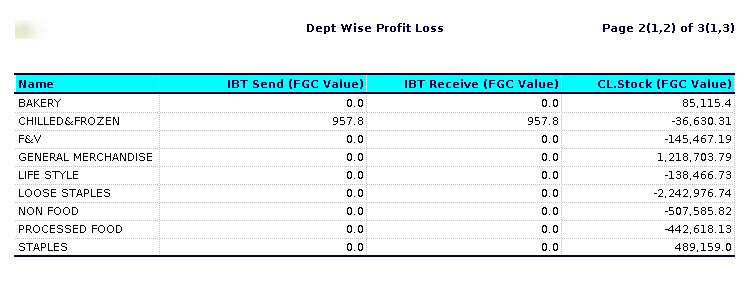
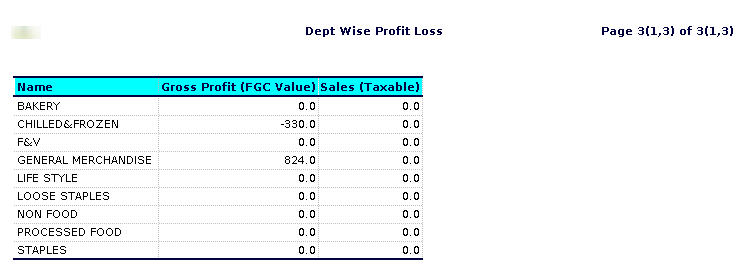
STEP 4: Name – Its refers to the department based on categories.
Open stock( final gross cost) Value – likely refers to the total cost associated with inventory that is not yet committed to any sales (i.e., open stock) and includes all expenses incurred before any deductions. Open Stock – Inventory that is available for sale but not yet sold. It can indicate a level of flexibility in inventory management.Final Gross Cost the total cost of that inventory before any deductions like discounts, returns, or allowances.
Purchase ( final gross cost) Value – typically refers to the total cost incurred by a business to acquire inventory before any deductions, such as discounts or returns.Purchase Price,Shipping and Handling Costs,Additional Fees.
Sales WAC Value – refers to the average cost of goods sold (COGS) weighted by the quantity of each product sold.Determine the Cost of Each Item,Gather Sales Data,Calculate Weighted Costs, Sum Total Costs,Total Units Sold,Calculate WAC.
Stock Adj( final gross cost) Value – typically refers to the adjusted value of inventory or stock after accounting for various factors, such as purchase costs, adjustments, and any write-downs or write-offs Stock (Inventory).
IBT send( final gross cost) Value – isn’t a standard term, so it might refer to something specific within a certain context, such as finance, logistics, or a particular software system. Generally, “IBT” can stand for “Inter-Branch Transfer,” and “final gross cost” would refer to the total cost before any deductions or adjustments.
IBT Receive( final gross cost) Value – likely refers to the total cost associated with receiving goods or services during an inter-branch transfer (IBT).IBT (Inter-Branch Transfer)Receive indicates the receiving end of the transaction, where one branch receives items from another.Final Gross Cost typically refers to the total cost of the items received, including all associated expenses such as shipping, handling, and any applicable taxes, before any deductions or adjustments.
Closing stock( final gross cost) Value – refers to the value of the inventory that a business has on hand at the end of an accounting period. Purchase Price,Direct Costs, Indirect Costs.
Sales(taxable) – Sales (taxable) refers to the portion of sales that is subject to sales tax. This includes most goods and some services that businesses sell to consumers. When a product or service is deemed taxable, the seller must collect a specified percentage of the sale price as sales tax from the buyer at the point of sale. This tax is then remitted to the government. Taxable sales can vary by jurisdiction, as different states or regions have different rules regarding what items are taxable. Common examples of taxable sales include: – Retail goods (e.g., clothing, electronics) – Restaurant meals – Hotel stays – Certain services (like repairs or installation).