How to view Stock Qty Balance Sheet – Department-Wise for Lifestyle in Adempiere Retail
A Stock Quantity Balance Sheet Dept Wise is a report that shows the current quantity of stock items held by each department within a business.
User Access
Who Can Access
- Admin
- Cashier
- Sales Manager
- Manager
What User Can Do
- Monitor Department Inventory
- Manage Stock Levels
- Improve Accountability
- Support Financial and Operational Decisions
Prerequisite Activities
- Set Up Inventory Tracking by Department
- Assign Stock to Departments
- Ensure Proper Stock Movement Recording
- Perform Physical Stock Verification
- Reporting Period
Business Rules
- One Item, Multiple Departments Allowed
- Opening and Closing Balances Must Match Transactions
- Closing Stock Qty = Opening Stock Qty + Stock In – Stock Out
- Issuing department (Stock Out)
- Receiving department (Stock In)
- Include Only Active Stock Items
- Authorized Adjustments Only
User Interface
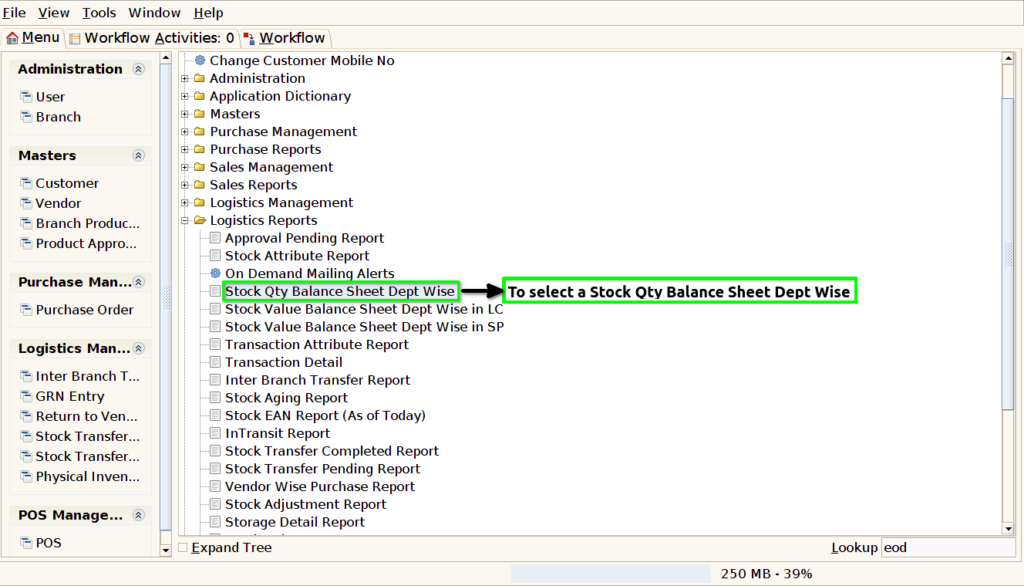
STEP 1:To select a Stock Qty Balance Sheet Dept Wise Report.
STEP 2: To enter the Start Date. To click the start check box. To run the process.

STEP 3: Once to run the process.To completed process then show report with given parameter.
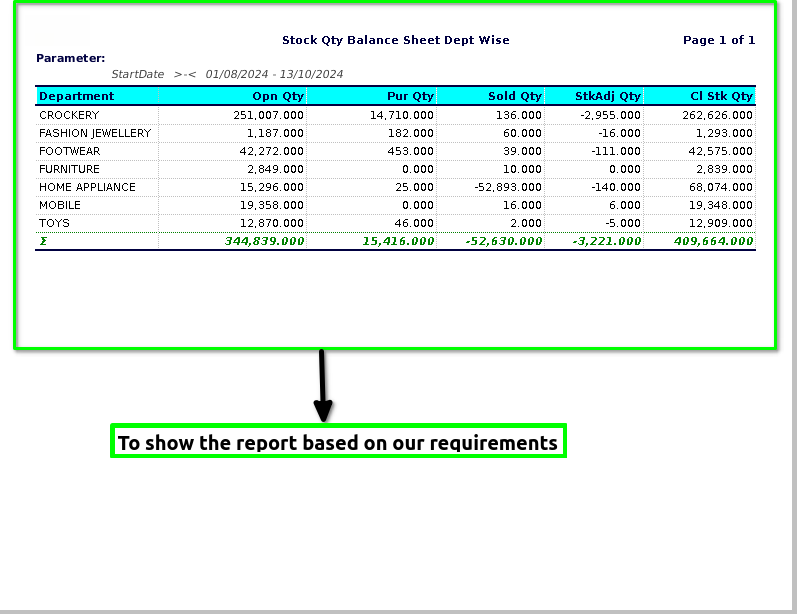
STEP 4: Department->Product Department Name.
Open Qty->Total number of Quantities.
Purchase Qty->Number of quantity to purchase count.
Sold Qty->Number of quantity to sales count.
Stock adj Qty-Number of quantity to be adjusted.
Closing Stock Qty-End of the total number of quantity count.