How Does Accounting Fact Daily Report Works in iDempiere
The Accounting Fact Daily Report provides a daily summary of accounting transactions recorded in the iDempiere system. It summarizes debit, credit, and balance amounts based on the Accounting Date and Accounting Schema.
The report helps Finance and Accounting teams review daily postings, monitor ledger activity, and verify accounting transactions. It is commonly used for reconciliation, financial analysis, and audit purposes.
Business Rules
- Retrieves data from the RV_Fact_Acct_Day view.
- Groups accounting transactions by Accounting Date.
- Summarizes data by Account, Organization, and Accounting Schema.
- Calculates Source Debit, Source Credit, and Source Balance.
- Calculates Accounting Debit, Accounting Credit, and Accounting Balance.
- Calculates accounting exchange rate.
- Supports filtering by Organization, Period, Account, Business Partner, Product, Tax, and Accounting Date.
- Returns only records matching the selected parameters.
- Displays summarized daily accounting information.
- Supports reconciliation and financial reporting.
Report Parameters
Parameter Window
The Accounting Fact Daily Report parameter window allows users to filter Business Partner records before generating the report.
Accounting Fact Daily Report – Parameter Window
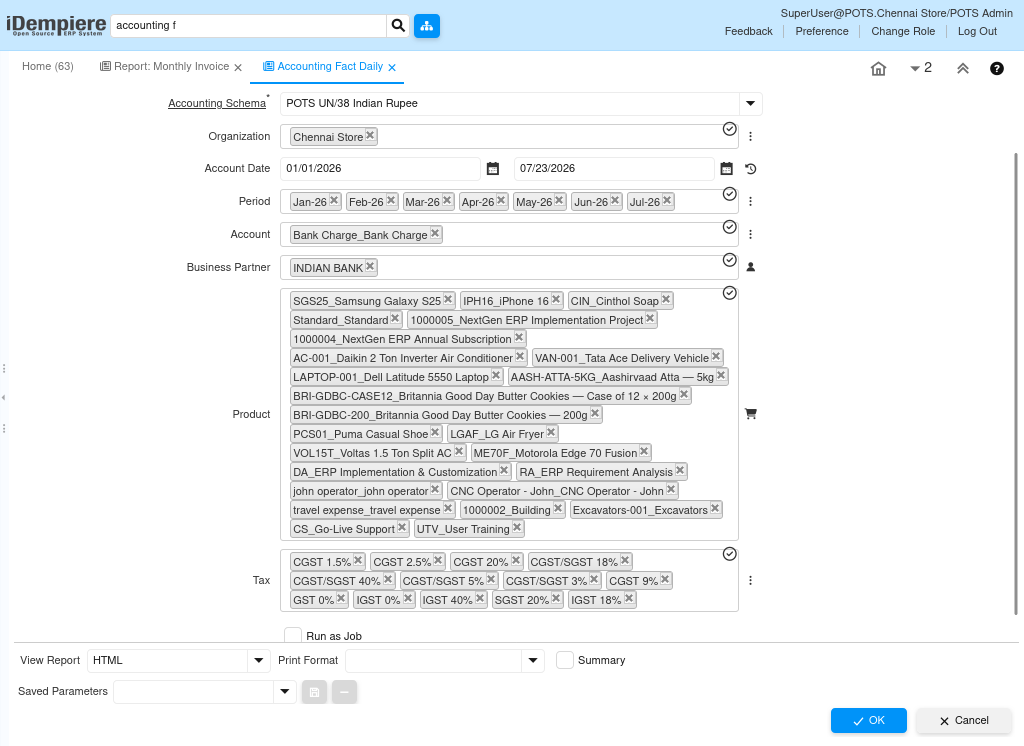
| Parameter | Purpose | Filtering Behavior | Sample Value | |
| Accounting Schema | Choose Accounting Schema | Filters by Accounting Schema. | POTS UN/38 Indian Rupee | |
| Organization | Choose Organization | Filters by Organization. | HQ | |
| From Account Date | Choose From Accounting Date | Filters from selected date. | 07/01/2026 | |
| To Account Date | Choose To Accounting Date | Filters up to selected date. | 07/31/2026 | |
| Period | Choose Period | Filters by accounting period. | Jul-2026 | |
| Account | Choose Account | Filters by account. | Sales Revenue | |
| Business Partner | Choose Business Partner | Filters by Business Partner. | ABC Traders | |
| Product | Choose Product | Filters by Product. | Laptop | |
| Tax | Choose Tax | Filters by Tax. | GST 18% | |
| Run as Job | Run in background | Runs as background job. | Checked | |
Report Output
- The report provides a daily summary of accounting entries for the selected criteria. It displays debit and credit amounts in source and accounting currencies together with calculated balances. Users can analyze transactions by account, organization, business partner, product, and tax. The report supports General Ledger verification, reconciliation, and financial analysis.
- Accounting Date
- Accounting Schema
- Organization
- General Ledger Account
- Source Debit/Credit
- Accounting Debit/Credit
- Accounting Balance
- Business Partner, Product and Tax

