How Does Monthly Invoice Product Category Report Works in iDempiere
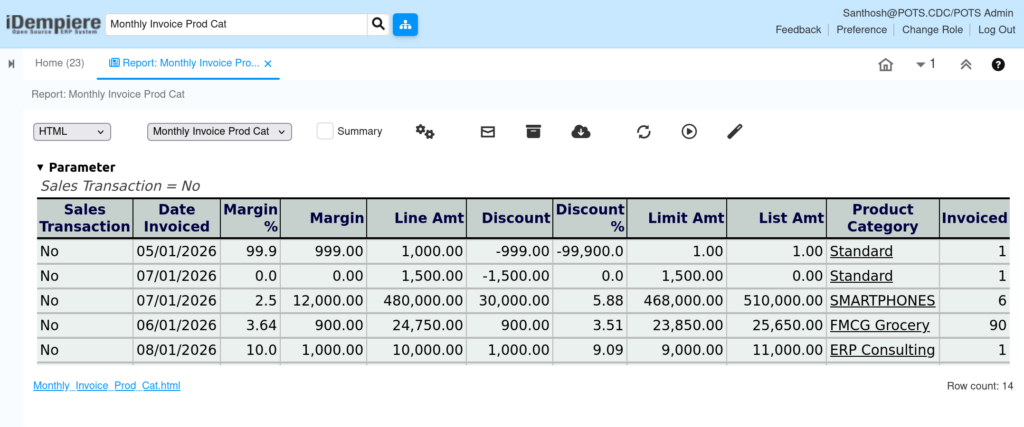
The Monthly Invoice Product Category Report provides a monthly summary of invoice transactions by product category. It helps finance and sales users review invoice quantities, invoice amounts, discounts, and sales performance for each product category.
The report summarizes invoice information by Organization, Product Category, Invoice Month, and Sales Transaction.
Business Rules
- Retrieves invoice information from the Invoice Line view.
- Groups invoice data by invoice month.
- Groups records by Organization and Product Category.
- Displays Sales or Purchase transactions based on the Sales Transaction option.
- Calculates total Invoiced Quantity.
- Calculates Net Amount, List Amount, Limit Amount and Discount Amount.
- Calculates Discount Percentage.
- Calculates Over Limit Percentage.
- Returns 0% when the calculation value is zero.
- Rounds percentage values using the invoice currency.
Report Parameters
Parameter Window
The Monthly Invoice Product Category Report parameter window allows users to filter invoice records before generating the report.
Monthly Invoice Product Category Report – Parameter Window
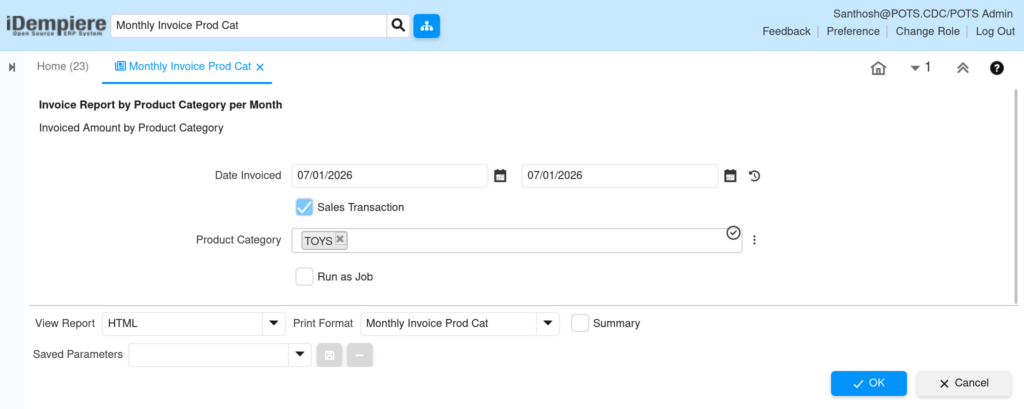
| Parameter | Purpose | Filtering Behavior | Sample Data |
| From Date | Select Form Date of Record | Shows orders for the selected Business Partner. | 01/01/2026 |
| To Date | Select To Date of Record | Shows orders for the selected product. | 07/20/2026 |
| Sales Transaction | Selects Sales or Purchase Invoice. | Checked shows Sales Invoice unchecked shows Purchase Invoice. | No |
| Product Category | Select Product Category | Filtering Product Category Only Show | User Choose |
| Run as Job | Runs the report in the background. | Generates the report as a background job. | No |
The report is executed using the selected parameter values to retrieve matching monthly invoice records by product category.
Report Output
- Displays monthly invoice summary by product category.
- Shows Organization, Product Category and Invoice Month.
- Displays Invoiced Quantity.
- Displays Line Net Amount, Line List Amount and Line Limit Amount.
- Displays Line Discount Amount and Discount Percentage.
- Displays Line Over Limit Amount and Over Limit Percentage.
- Shows whether the transaction is Sales or Purchase.