How to create a Commodity Shipment in iDempiere
Introduction
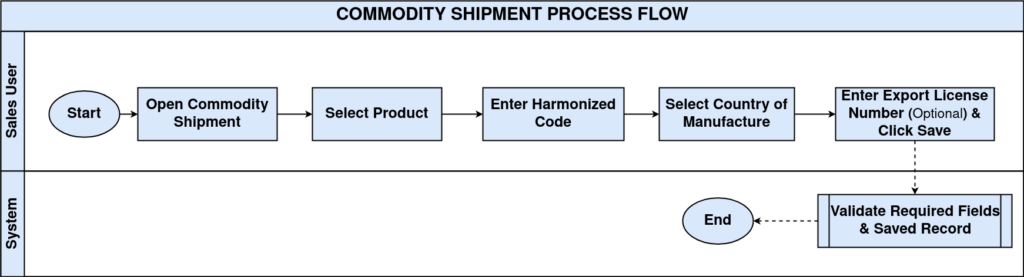
The Commodity Shipment window is used to maintain customs-related information for products that are shipped internationally. It stores the Harmonized Code (HS Code), Country of Manufacture, and Export License Number associated with a product.
This information is primarily used by shipping processors, customs authorities, and export documentation during international shipments. Although it is optional for domestic deliveries, it becomes essential when integrating with shipping carriers or generating export documents.
Process Flow
Business Rules
- Each Commodity Shipment record is linked to a single Product.
- A Product can have only one active Commodity Shipment configuration.
- Harmonized Code (HS Code) is mandatory.
- Country of Manufacture is mandatory.
- Export License Number is optional.
- Commodity Shipment does not affect inventory valuation or product pricing.
- Information is referenced only during shipping and export-related transactions.
Configuration Steps
Step 1: Create Commodity Shipment
Create a new Commodity Shipment record.
Enter the basic information:
| Field | Sample Value |
|---|---|
| Organization | CDC |
| Product | AASH-ATTA-5KG_Aashirvaad Atta — 5kg |
| Active | ✓ |
A new Commodity Shipment record is created for the selected product.
Step 2: Enter Customs Information
Provide customs-related information.
| Field | Sample Value |
|---|---|
| Harmonized Code | 11010000 |
| Country of Manufacture | India |
| Export License Number | EXP-IND-2026-001 |
Step 4: Save the Record
Click Save.
Expected Result
The Commodity Shipment configuration becomes available for shipping and export transactions.
Configuration Summary
| Configuration | Purpose |
|---|---|
| Product | Product requiring export/customs information |
| Harmonized Code | Customs HS classification code |
| Country of Manufacture | Country where the product was manufactured |
| Export License Number | Export authorization reference (optional) |
| Description | Additional shipment notes |
Common Issues and Resolutions
| Issue | Resolution |
|---|---|
| Product not available | Verify that the Product Master exists and is active. |
| Unable to save | Ensure Harmonized Code and Country of Manufacture are entered. |
| Incorrect customs classification | Verify the correct HS Code with customs regulations. |
| Export License unavailable | Leave the field blank if not required by the business or destination country. |
Next Steps
After configuring Commodity Shipment, proceed with:
- Configure Shipper
- Configure Freight Category
- Create Shipment (Customer)
- Generate Shipping Labels
- Process International Shipments
- Generate Export Documents