How Does Trial Balance Report Works in iDempiere
The Trial Balance Report provides a summary of all General Ledger accounts for a selected accounting period or accounting date range. It displays the opening balance, debit amount, credit amount, and closing balance for each account.
Users can filter the report using various accounting dimensions such as Organization, Business Partner, Product, Project, Activity, Sales Region, Campaign, and Account. This report is widely used by Finance teams to verify ledger balances, ensure that total debits equal total credits, and support month-end and year-end financial closing activities.
Business Rules
- The report requires an Accounting Schema to identify the ledger from which accounting data will be retrieved.
- Users can generate the report by selecting either an Accounting Period or an Accounting Date Range.
- If no Account Date is entered, the process automatically derives the reporting period from the selected Period or defaults to the current month.
- The report calculates the Opening Balance using all accounting transactions posted before the selected reporting period.
- Detailed accounting transactions within the selected reporting period are added to the report separately.
- Users can filter the report by Organization, Account, Account Key Range, Business Partner, Product, Project, Activity, Sales Region, Campaign, Posting Type, and Reporting Hierarchy.
- The report processes only accounting entries that match all selected filter criteria.
- Accounts having zero opening balance and no transaction during the selected period are automatically removed from the report.
- The report stores all generated data in the temporary T_TrialBalance table before displaying the final output.
- The Trial Balance Report is mainly used to verify ledger balances, support financial reconciliation, and prepare financial statements.
Report Parameters
Parameter Window
The Trial Balance Report parameter window allows users to filter records before generating the report.
Trial Balance Report – Parameter Window
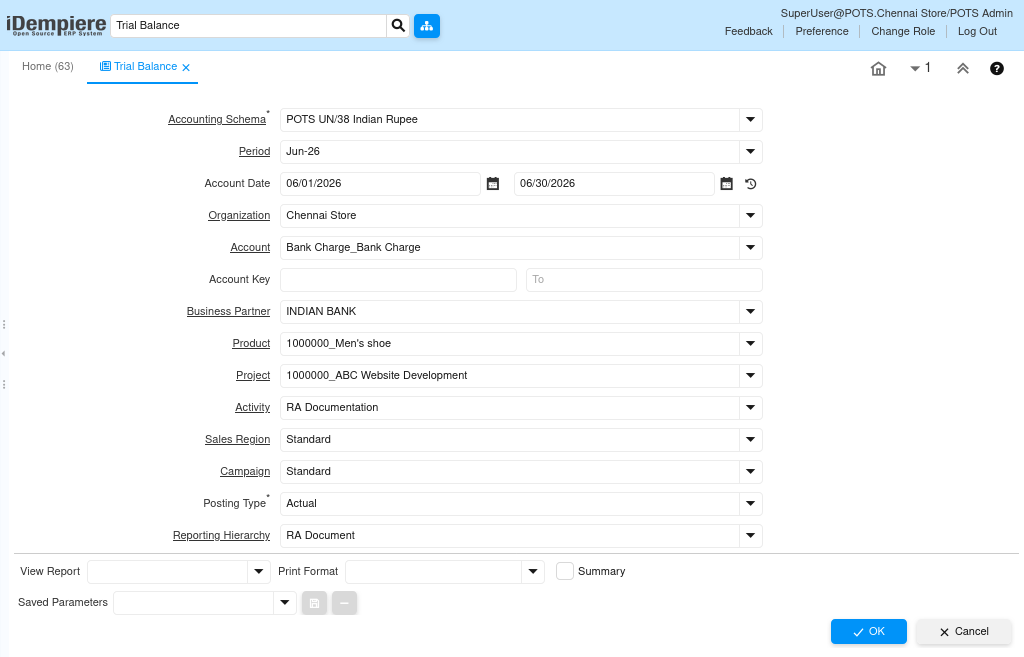
| Parameter | Purpose | Filtering Behavior | Sample Value | |
| Accounting Schema | Select the Accounting Schema | Displays transactions for the selected accounting schema | POTS UN/38 Indian Rupee | |
| Accounting Schema | Select schema | Filters accounting schema | POTS UN/38 Indian Rupee | |
| Period | Select period | Filters period | Jun-26 | |
| Account Date | Select date range | Filters accounting dates | 06/01/2026 – 06/30/2026 | |
| Organization | Select organization | Filters organization | Chennai Store | |
| Account | Select account | Filters account | Bank Charge_Bank Charge | |
| Account Key | Select account range | Filters account key | 100000-199999 | |
| Business Partner | Select BP | Filters BP | INDIAN BANK | |
| Product | Select product | Filters product | 100000_Men’s shoe | |
| Project | Select project | Filters project | ABC Website Development | |
| Activity | Select activity | Filters activity | RA Documentation | |
| Sales Region | Select sales region | Filters sales region | Standard | |
| Campaign | Select campaign | Filters campaign | Standard | |
| Posting Type | Select posting type | Filters posting type | Actual | |
| Reporting Hierarchy | Select hierarchy | Filters hierarchy | RA Document | |
The report is executed using the selected parameter values to retrieve matching records.
Report Output
The Trial Balance Report displays one row for each General Ledger account included in the selected accounting period. It first shows the Opening Balance calculated from transactions before the reporting period, followed by the debit and credit movements recorded during the selected period. The report also displays the Closing Balance, enabling users to verify account balances quickly. Users can analyze balances by Organization, Business Partner, Product, Project, Activity, Campaign, Sales Region, and other accounting dimensions. Zero-balance accounts without transactions are excluded from the final report, making the report easier to review. This report is commonly used during month-end closing, financial reconciliation, audit verification, and preparation of financial statements.
Java Process Analysis
The TrialBalance Java process performs the following operations:
- Reads all report parameters entered by the user.
- Determines the reporting period using either the selected Period or Account Date range.
- Builds dynamic filter conditions based on all selected accounting dimensions.
- Calculates the Opening Balance from accounting transactions posted before the reporting period.
- Retrieves all accounting entries within the selected reporting period.
- Stores the opening balance and transaction details in the T_TrialBalance temporary table.
- Removes accounts with zero balance and no transaction.
- Updates Account Value information before generating the final Trial Balance report.

