How to Configure Import Order in iDempiere
The Import Order window imports external order data into iDempiere. Retail businesses use it to load customer orders from POS, eCommerce, or partner systems before creating sales orders.
Proper configuration improves import accuracy, reduces manual entry, and supports consistent order processing and reporting.
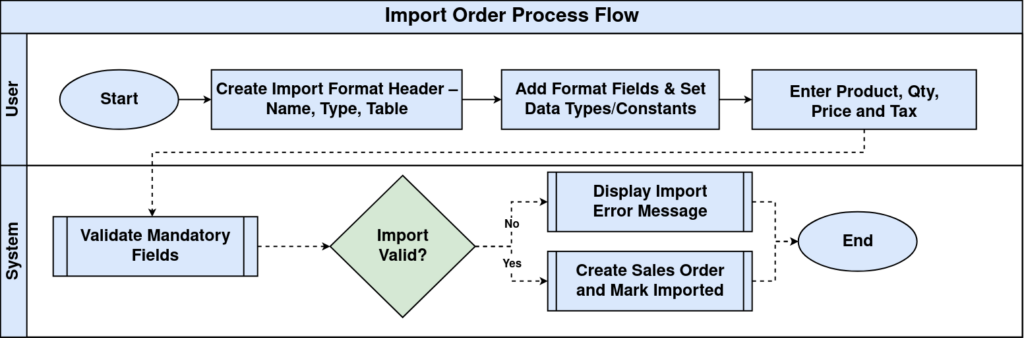
Process Flow
Business Rules
- Organization and Document Type must exist.
- Business Partner should be available before import.
- Imported flag is updated after successful processing.
- Invalid data is shown in Import Error Message.
- Product or Charge is required for order lines.
- Warehouse and Price List should be valid.
Prerequisites
- Organization configured
- Business Partner configured
- Warehouse configured
- Price List configured
- Payment Term configured
- Products and UOM configured
- Tax configured
- Document Type configured
Navigation
Menu → Import → Import Order
Step 1: Enter Order Header
Complete the required fields and verify values before processing the import.
| Field | Sample Value | Description |
|---|---|---|
| Organization | Main Store | Owning organization |
| Document Type | Standard Order | Order type |
| Document No | IMP1001 | Reference |

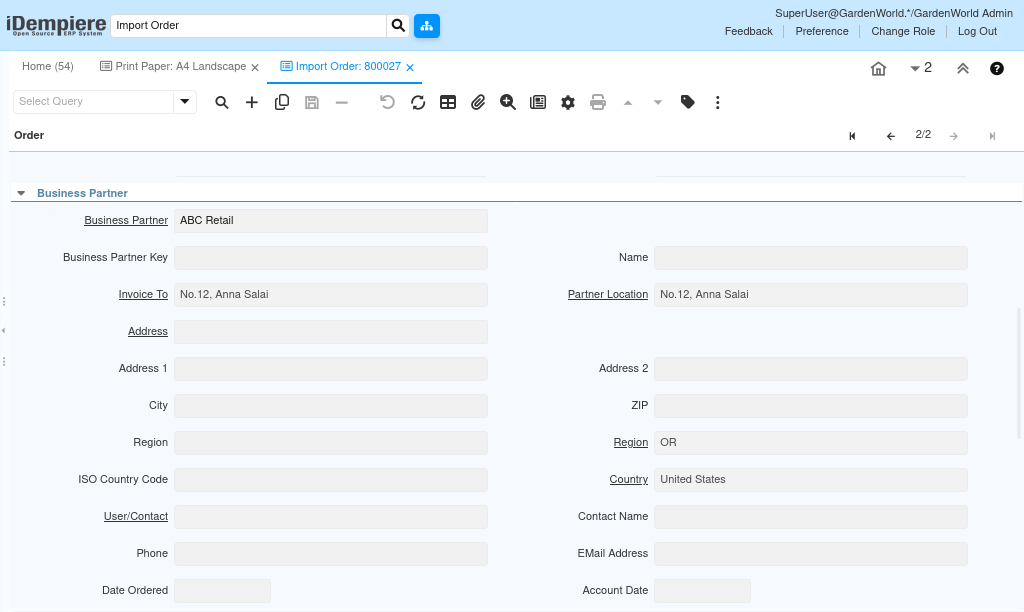
Step 2: Select Customer
Complete the required fields and verify values before processing the import.
| Field | Sample Value | Description |
|---|---|---|
| Business Partner | ABC Retail | Customer |
| Invoice To | Main Branch | Billing |
Step 3: Enter Product Details
Complete the required fields and verify values before processing the import.
| Field | Sample Value | Description |
|---|---|---|
| Product | T-Shirt | Item |
| Ordered Quantity | 10 | Qty |
| Unit Price | 499 | Price |
| Tax | CGST/SGST 18% | Tax |

Step 4: Validate Import
Complete the required fields and verify values before processing the import.
| Field | Sample Value | Description |
|---|---|---|
| Import Error Message | Blank | No errors |
| Imported | Unchecked | Pending |
Step 5: Process Import
Complete the required fields and verify values before processing the import.
| Field | Sample Value | Description |
|---|---|---|
| Imported | Checked | Import completed |
| Order | SO100045 | Created order |
Common Issues and Resolutions
| Issue | Cause | Resolution |
|---|---|---|
| Import fails | Mandatory field missing | Complete required fields |
| Customer not found | Invalid BP | Create or correct Business Partner |
| Product missing | Invalid product | Verify Product Key |
| Tax error | Missing tax | Assign valid Tax |
| Price missing | No price list | Maintain Price List |
| Warehouse blank | Warehouse not set | Assign Warehouse |
Next Steps
- Run Import Orders process
- Review Sales Order
- Complete Shipment and Invoice