How to Execute the Product Organization Process in iDempiere
Introduction
Product Organization is a system process in iDempiere that reassigns or verifies the organization ownership of a Product and its dependent records, including BOM & Formula, BOM Lines, Purchase Orders, Accounting Schema data, and Language translations.
It is used in multi-organization retail deployments where products are first created in a shared or central organization, such as a Central Distribution Center (CDC), before being aligned with individual store or business unit organizations.
Correct organization assignment ensures accurate reporting, org-level security, and proper document routing across purchasing, costing, and inventory transactions.
Process Flow Diagram
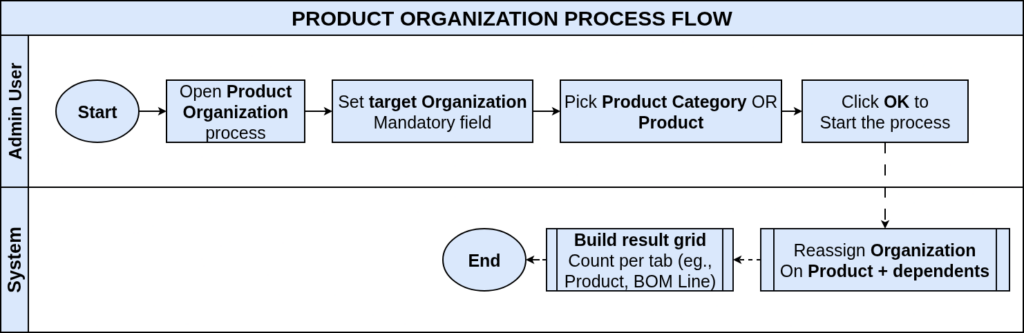
Business Rules
- Organization is a mandatory parameter; the process cannot run without it.
- Selecting a Product Category updates all products within that category.
- Selecting a specific Product limits the process to that product only.
- Run as Job executes the process in the background for large catalogs.
- The process updates dependent entities: BOM, Substitute, Replenish, Purchasing, BP Info, Costing.
- Only active organizations are available for reassignment.
- Result grid displays record counts updated per dependent entity table.
- Language and Accounting Schema records are re-owned along with the product.
- A zero count indicates no matching dependent records exist for that entity.
Prerequisites
- Organization configured under Client setup.
- Product Category configured, if reassigning by category.
- Product created and active in the system.
- Role has process access rights to Product Organization.
- Dependent records (BOM, Purchasing, Costing) exist if reassignment of dependents is expected.
Navigation
Menu → Material Management and Pricing → Material Management Rules → Product Organization
Opening the window displays a parameter form requesting Organization, Product Category, Product, and a Run as Job checkbox, along with OK and Cancel buttons.

Configuration Steps
Step 1: Select the Target Organization
The process needs a destination organization before it can reassign ownership of any product record.
Instructions
Open the Product Organization window. Select the Organization to which products should be reassigned from the Organization dropdown. This field is mandatory.
| Field | Sample Value | Description |
| Organization | CDC | Target organization for ownership reassignment |
Step 2: Choose Product Category or Specific Product
This step defines the scope of the process: an entire category of products, or a single product.
Instructions
Select a Product Category to update all products in that category, or select a single Product using the search icon. Leave the other field blank.
| Field | Sample Value | Description |
| Product Category | Beverages | Category-level reassignment scope |
| Product | (blank) | Single-product reassignment scope |
Step 3: Enable Run as Job for Large Catalogs
Bulk category updates on large catalogs can take time; running as a background job prevents session timeouts.
Instructions
Check Run as Job when reassigning a large product category. The process then runs asynchronously and notifies the user on completion.
| Field | Sample Value | Description |
| Run as Job | Checked | Executes the process as a background job |
Step 4: Execute and Review the Result Grid
The result grid confirms which dependent entities were updated and how many records changed.
Instructions
Click OK to execute the process. Review the result grid showing record counts for Product, Accounting Schema, BOM & Formula, BOM Line, PO, and Language.

| Field | Count of records | Description |
| Product | 4 | Number of products reassigned |
| Accounting Schema | 4 | Accounting schema records reassigned |
| BOM & Formula | 1 | BOM header records reassigned |
| BOM Line | 1 | BOM line records reassigned |
| PO | 2 | Purchasing info records reassigned |
| Language | 4 | Language translation records reassigned |
Common Issues and Resolutions
| Issue | Cause | Resolution |
| Mandatory field error on Organization | Organization field left blank | Select a valid organization before clicking OK |
| All result counts show 0 | Product or category already belongs to selected organization | Verify current ownership before running the process |
| Process times out on large category | Run as Job not enabled for bulk update | Enable Run as Job and rerun the process |
| Access denied when opening process | Role lacks process access to Product Organization | Grant access via Role → Process Access |
| Product Category not listed in dropdown | Category is inactive or not linked to the client | Activate the category in the Product Category window |
Next Steps
- Configure the Business Partner Organization process for BP ownership alignment.
- Review Warehouse Organization assignments for inventory consistency.
- Verify Product Category setup for correct category-level grouping.
- Check Accounting Schema and Costing records after reassignment.