How Does Income Statement for Cash Flow Report Works in iDempiere
The Income Statement for Cash Flow report in iDempiere is generated through the Financial Report window, using the same Report Line Set (Income Statement) as the standard Income Statement, but paired with a Report Column Set built for budget-to-actual comparison (Budget YTD, Actual YTD, Budget Spent, Budget Available). It presents the organization’s Revenue and Expenses for the selected accounting period against budget, helping evaluate spending pace and available headroom for cash planning purposes.
Business Rules
- The Income Statement for Cash Flow is generated based on the selected Accounting Schema and Calendar.
- The report uses the same Report Line Set “Income Statement” — Revenue and Expense account groups rolling up to Gross Margin — as the standard Income Statement.
- The Report Column Set determines which columns are displayed — Budget YTD, Actual YTD, Budget Spent, and Budget Available — rather than the period debit/credit columns used elsewhere.
- Budget Spent reflects Actual YTD consumed against Budget YTD; Budget Available reflects the remaining budget headroom (Budget YTD less Actual YTD).
- The report processes only posted accounting transactions according to the selected accounting period.
- The Create Report action supports optional restrictions by Period, Business Partner, Product, Project, Sales Region, and Campaign.
- Reports can be viewed as HTML immediately or Run as Job in the background.
- A predefined Print Format is used to display the report in a structured financial layout.
Report Parameters
Parameter Window (Financial Report Setup)
Create Report Parameters
The Income Statement for Cash Flow Create Report dialog allows users to restrict and format the report before generation.

Income Statement for Cash Flow Report – Create Report Parameter Window
| Parameter | Purpose | Filtering Behavior | Sample Value |
| Period | Select the reporting Period | Restricts the Income Statement for Cash Flow to the selected accounting period; defaults to the current period. | Jun-01 |
| Organization | Select the Organization | Restricts the report to accounting data for the selected organization. | HQ |
| Business Partner | Select Business Partner | Restricts balances to transactions involving the selected Business Partner. | ABC Retail Store – Chennai |
| Product | Select Product | Restricts balances to transactions involving the selected Product. | 10000001_JCP TRUCK 100010 |
| Project | Select Project | Restricts balances to transactions linked to the selected Project. | 10000000_Construction |
| Sales Region | Select Sales Region | Restricts balances to transactions within the selected Sales Region. | South India |
| Campaign | Select Campaign | Restricts balances to transactions tied to the selected Campaign. | Standard |
| Run as Job | Execute in Background | Runs the report generation as a background job instead of immediately. | Unchecked |
| View Report | Select Output Format | Determines the on-screen output format used to render the report. | HTML |
| Print Format | Select Print Format | Determines the print layout used for this run. | Income Statement Current Month |
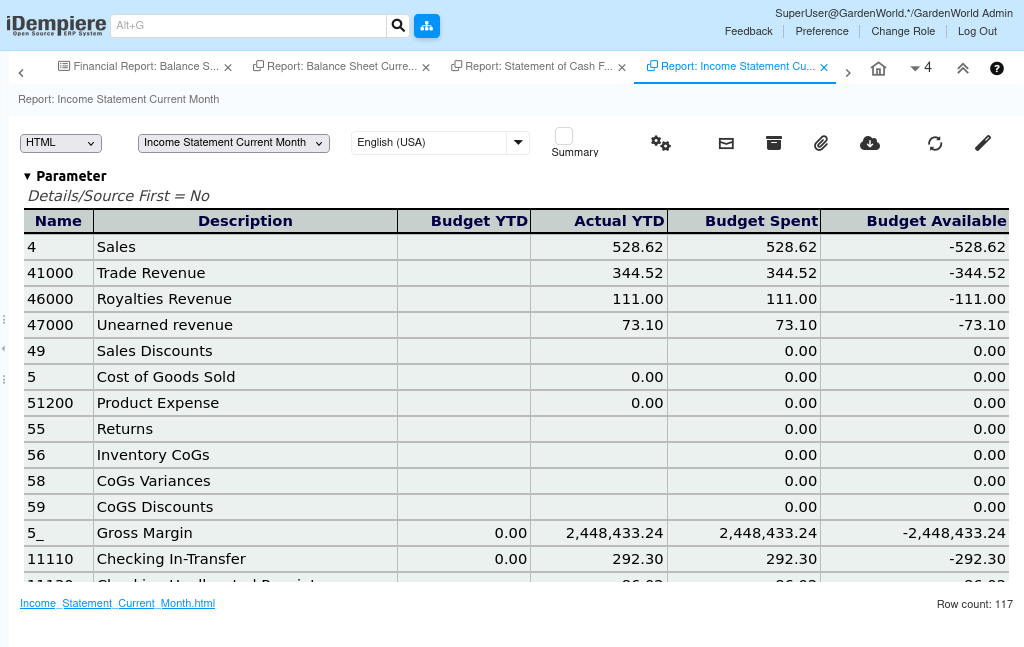
Report Output
The Income Statement for Cash Flow report displays the organization’s Revenue and Expenses for the selected reporting period (e.g. Sales, Trade Revenue, Royalties Revenue, Unearned Revenue, Sales Discounts, Cost of Goods Sold, Product Expense, Returns, Inventory CoGs, CoGs Variances, CoGS Discounts), rolling up to Gross Margin. Each line shows Budget YTD, Actual YTD, Budget Spent, and Budget Available, allowing finance users to track actual revenue and expense activity against budget for cash flow planning. The generated report can be viewed, printed, or exported for financial analysis, management review, and statutory reporting.