iDempiere – Asset Management
Overview
The Asset Management module in iDempiere 13 enables organizations to manage the complete lifecycle of fixed assets from acquisition through capitalization, depreciation, and disposal while maintaining accurate financial records and a complete audit trail.
The module integrates with Procurement and Financial Accounting, allowing assets to be created manually or automatically from vendor invoices. Asset Groups provide standardized accounting and depreciation rules, ensuring consistent financial treatment across similar asset categories. Once an asset is activated through the Asset Addition process, iDempiere manages periodic depreciation, updates asset balances, generates accounting entries, and maintains asset history throughout the asset’s lifecycle.
By integrating operational and financial information within a single ERP platform, the Asset Management module improves asset visibility, reduces manual effort, and supports accurate financial reporting.
Workflow Diagram
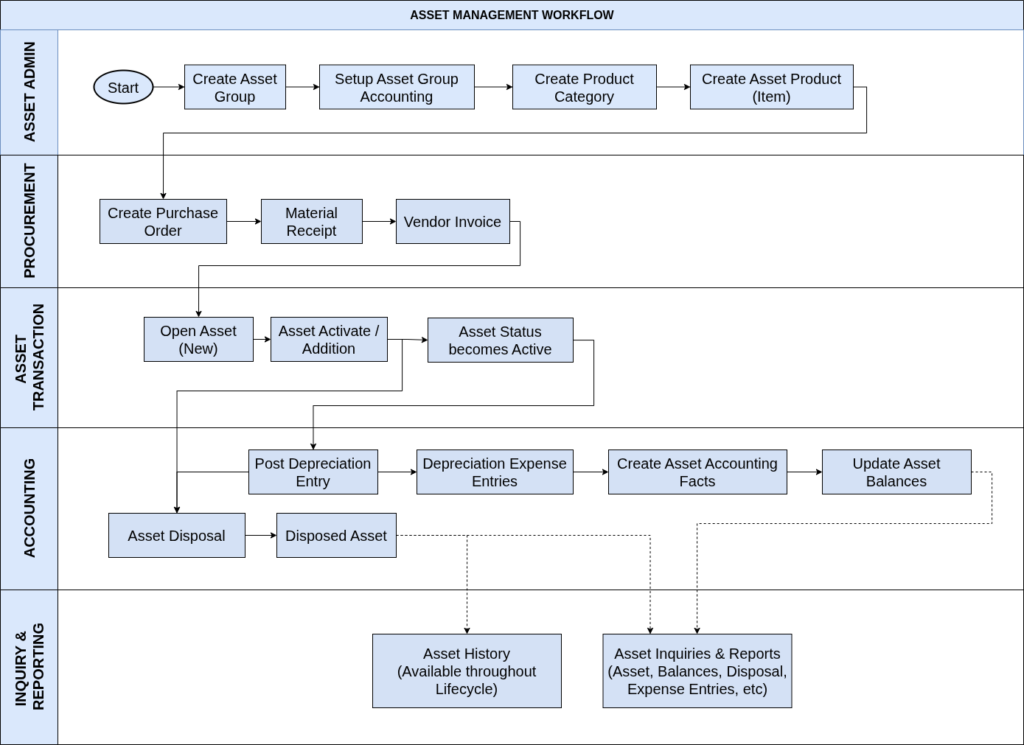
Key Features of the Asset Management Module
- Asset Group Management – Define asset groups with default accounting rules, depreciation settings, and financial controls for different classes of assets.
- Asset Group Accounting – Configure General Ledger accounts, depreciation methods, useful life, and accounting schema for each asset group.
- Product Integration – Associate asset products with Product Categories and Asset Groups to enable seamless procurement integration.
- Manual or Automatic Asset Creation – Create assets directly in the Asset window or automatically from Vendor Invoices by enabling the Create Asset option.
- Asset Addition (Capitalization) – Capitalize acquired assets through the Asset Addition process, making them available for depreciation.
- Asset Activation – Activate assets after capitalization to begin operational use and depreciation processing.
- Depreciation Processing – Execute manual or scheduled depreciation runs using configured depreciation methods.
- Automatic Accounting Integration – Automatically generate accounting entries for asset additions, depreciation, and disposals.
- Asset Balances – Maintain acquisition cost, accumulated depreciation, current depreciation, and net book value for each asset.
- Asset Disposal – Process retirement, sale, or disposal of assets while automatically calculating accounting impacts.
- Asset History – Maintain a complete audit trail of asset transactions and lifecycle events.
Business Benefits
- Improved Financial Control – Automates asset capitalization, depreciation, and disposal accounting, reducing manual effort while ensuring consistent financial reporting.
- Standardized Asset Management – Asset Groups allow organizations to apply uniform accounting policies and depreciation rules across similar asset categories.
- Increased Operational Efficiency – Automatic asset creation from procurement transactions minimizes duplicate data entry and improves process efficiency.
- Complete Asset Lifecycle Management – Track every stage of an asset—from acquisition and activation to depreciation and disposal—within a single integrated ERP platform.
- Accurate Asset Valuation – Asset Balances provide real-time visibility into acquisition cost, accumulated depreciation, and current net book value.
- Seamless ERP Integration – Works closely with Procurement and Financial Accounting to provide end-to-end visibility across operational and financial processes.
- Audit and Compliance Support – Asset History maintains a comprehensive record of all asset activities, supporting internal controls and external audits.