How Does Balance Sheet Report Works in iDempiere
The Balance Sheet report in iDempiere is generated through the Financial Report window, using a predefined Report Line Set (Balance Sheet) and Report Column Set (e.g. Actual Current Month) to organize and display account balances. It presents the organization’s Assets, Liabilities, and Equity as of a selected reporting period, showing beginning and ending balances for both the current period and the fiscal year, providing essential information for financial analysis and decision-making.
Business Rules
- The Balance Sheet is generated based on the selected Accounting Schema and Calendar.
- The report uses the Report Line Set “Balance Sheet” to determine which Asset, Liability, and Equity account groups are included, and enforces Assets = Liabilities + Equity.
- The Report Column Set determines which balance columns are displayed — typically Begin Total Balance, Begin Year Balance, End Year Balance, and End Total Balance.
- Balance Sheet accounts are cumulative: balances use the “Total” amount type (balance up to the end date), unlike Income Statement accounts which reset each fiscal year.
- The report processes only posted accounting transactions according to the selected accounting period.
- Enabling List Sources and List Transactions displays the source accounts and underlying transactions, including payment allocations, that contribute to each account balance.
- Exclude Adjustment Periods controls whether adjustment periods are included when calculating balances.
- The Create Report action supports optional restrictions by Period, Business Partner, Product, Project, Sales Region, and Campaign, and an alternative Reporting Hierarchy.
- Reports can be viewed as HTML immediately or Run as Job in the background.
- A predefined Print Format is used to display the report in a structured financial layout.
Report Parameters
Create Report Parameters
The Balance Sheet Create Report dialog allows users to restrict and format the report before generation.
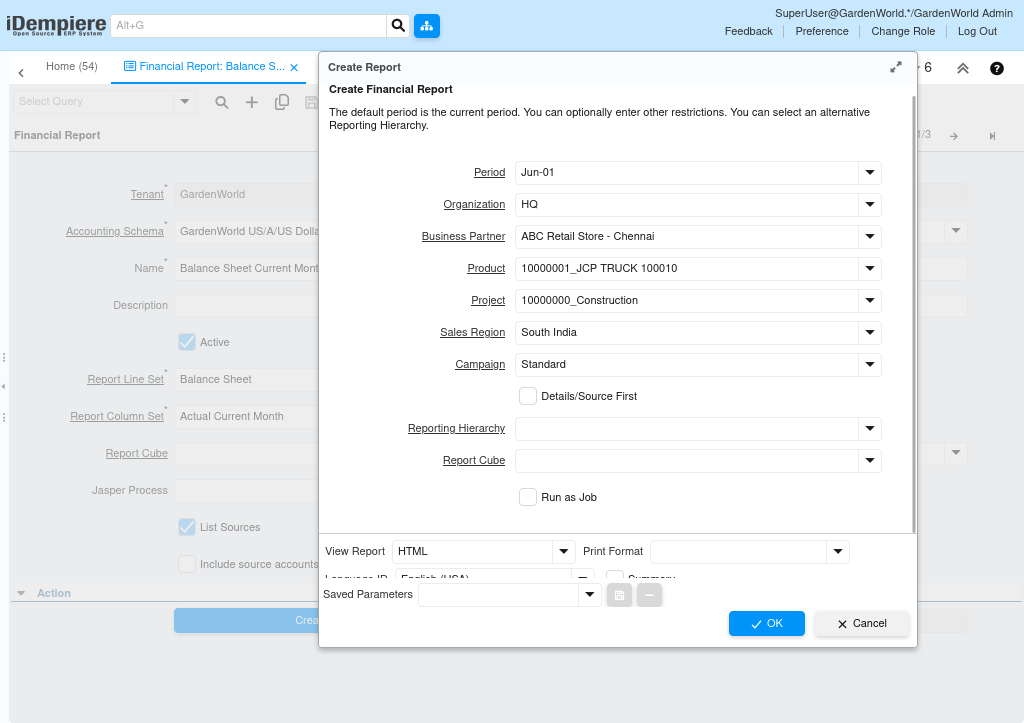
Balance Sheet Report – Create Report Parameter Window
| Parameter | Purpose | Filtering Behavior | Sample Value |
| Period | Reporting period | Calculates selected period | Jun-01 |
| Organization | Organization filter | Filters organization | HQ |
| Business Partner | Business Partner filter | Filters BP postings | ABC Retail Store |
| Product | Product filter | Filters product postings | JCP TRUCK 100010 |
| Project | Project filter | Filters project | Construction |
| Sales Region | Sales Region filter | Regional postings | South India |
| Campaign | Campaign filter | Campaign postings | Standard |
| Reporting Hierarchy | Hierarchy | Groups accounts | Default |
| Run as Job | Background process | Runs asynchronously | No |
| View Report | Output type | HTML/PDF | HTML |
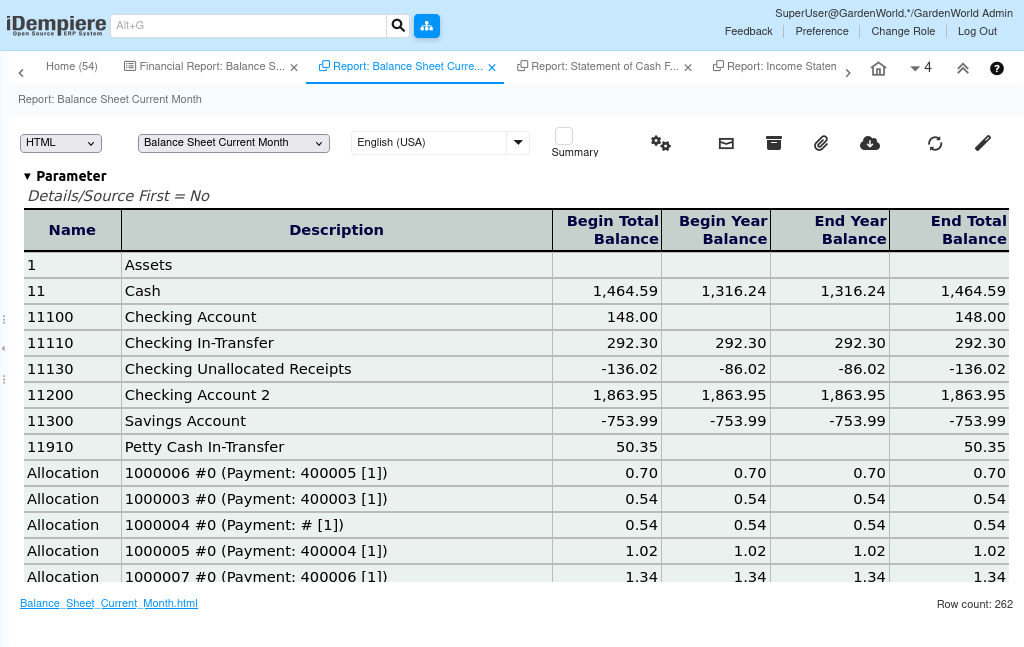
Report Output
The Balance Sheet report displays the organization’s Assets, Liabilities, and Equity as of the selected reporting period. Each line represents an account group or individual account (e.g. Assets → Cash → Checking Account), with balances shown across the columns defined by the Report Column Set. When List Sources and List Transactions are enabled, supporting source accounts and individual transactions (including payment allocations) are listed beneath each account to allow drill-down analysis. The generated report can be viewed, printed, or exported for financial analysis, management review, and statutory reporting.