How to Configure Serial No Control in iDempiere
The Serial No Control window in iDempiere defines the rule set used to auto-generate serial numbers for products that require individual tracking.
It is used in Material Management, applying to products with serial number attributes referenced during Sales Orders, Shipments, and Physical Inventory.
This configuration ensures consistent, non-duplicate serial sequences, supporting traceability, warranty tracking, and accurate inventory reporting.
Process Flow Diagram

Business Rules
- Active Serial No Control records are the only ones available for assignment to Attribute Set.
- Current Next automatically increments each time a serial number is generated.
- Increment value sets the gap between two consecutively generated serial numbers.
- Prefix and Suffix values are appended automatically to every generated serial number.
- Start No applies only to the first serial number issued under the sequence.
- Exclude tab entries prevent this rule from applying to selected tables or transactions.
- Organization scope determines which business unit can use this Serial No Control record.
Prerequisites
- Organization configured.
- Product or Product Category requiring serial number tracking identified.
- Role and window access rights configured for Serial No Control.
- Sales Transaction document types identified, if exclusion rules are needed.
Navigation
Opening this window displays the Serial No Control header with Name, Start No, Current Next, Increment, Prefix, and Suffix fields, along with an Exclude tab for restricting the rule from specific tables or Sales Transactions.

Configuration Steps
Step 1: Define the Serial No Control Header
This step identifies the serial numbering rule so it can be selected later from products or related transactions.
Enter a unique Name and optional Description. Keep the Active checkbox enabled so the record is available for selection during transaction entry.

| Field | Sample Value | Description |
| Name | SN-WARRANTY-01 | Unique identifier for this serial numbering rule |
| Description | Warranty item serial rule | Optional explanatory text |
| Active | Checked | Controls whether the rule is available for use |
Step 2: Set the Starting Sequence Values
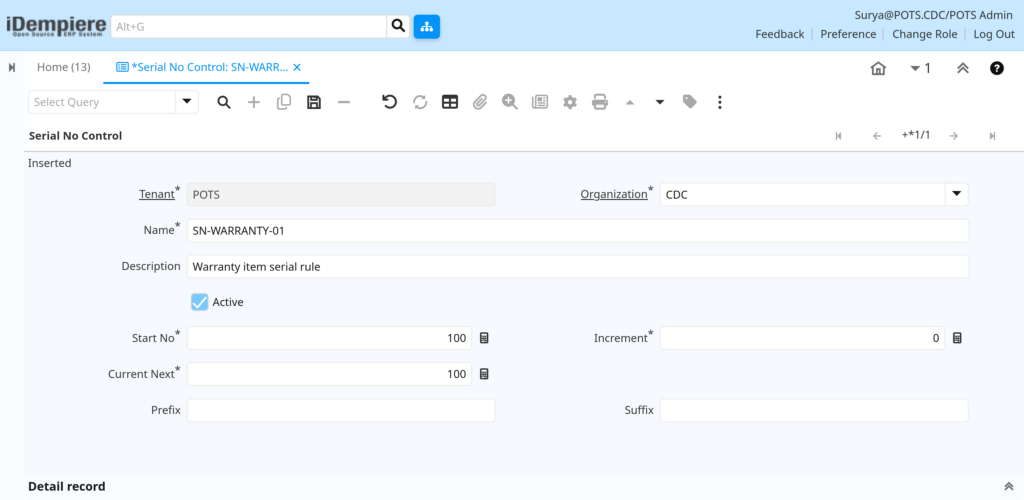
The starting values determine where the serial number sequence begins and where the next number will be issued from.
Enter Start No as the first serial number in the sequence. Current Next initializes to the same value and updates automatically after each number is issued.
| Field | Sample Value | Description |
| Start No | 100 | First serial number in the sequence |
| Current Next | 100 | Next serial number to be issued; auto-updates |
Step 3: Configure Increment and Formatting
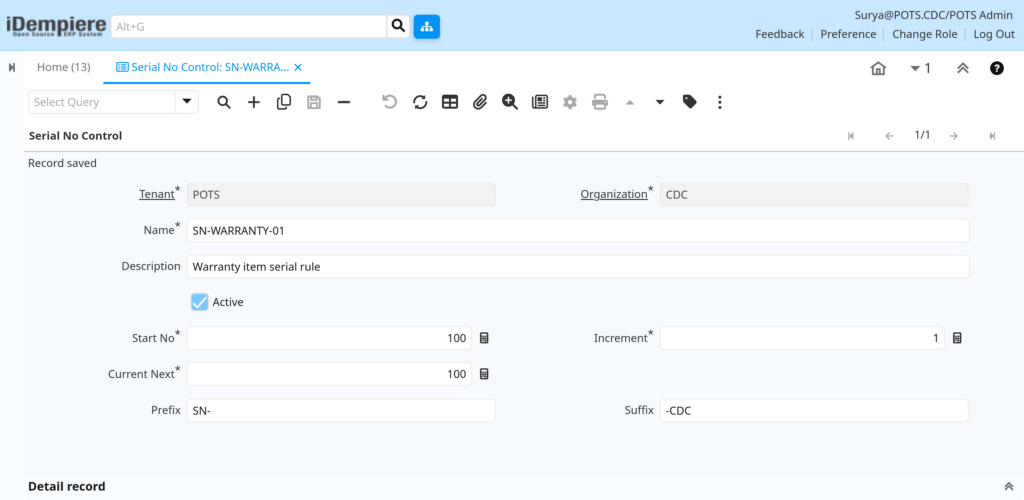
Increment controls sequence spacing, while Prefix and Suffix format the serial number for readability or classification.
Set Increment to the desired step value. Enter Prefix or Suffix text if the serial number must include fixed identifiers, such as a location or product code.
| Field | Sample Value | Description |
| Increment | 1 | Value added to Current Next after each serial number is issued |
| Prefix | SN- | Fixed text added before the generated number |
| Suffix | -CDC | Fixed text added after the generated number |
Step 4: Exclude Specific Tables or Transactions
The Exclude tab restricts this Serial No Control rule from applying to selected tables or Sales Transaction document types.
Open the Exclude tab, add a new line, select the Table to exclude, and enable Sales Transaction if the exclusion applies only to sales documents.

| Field | Sample Value | Description |
| Organization | CDC | Organization scope for the exclusion rule |
| Table | M_InOutLine | Table excluded from this serial number rule |
| Sales Transaction | Checked | Limits exclusion to sales-side transactions |
Common Issues and Resolutions
| Issue | Cause | Resolution |
| Serial number not incrementing | Increment value left at 0 | Set Increment to 1 or the required step value |
| Duplicate serial numbers generated | Start No overlaps existing issued numbers | Set Start No higher than the last issued serial number |
| Serial No Control not available for selection | Record is not Active | Enable the Active checkbox and save |
| Prefix or Suffix missing on generated numbers | Fields left blank during setup | Enter the required Prefix or Suffix values |
| Rule applies to unintended Organization | Record created under the wrong Organization | Recreate the record under the correct Organization or use Global (*) |
| Exclude rule not taking effect | Table or Sales Transaction not set correctly | Verify the correct Table is selected and the flag is enabled |
| Users cannot access the window | Role lacks window or table access | Grant Serial No Control window access to the required Role |
Next Steps
- Configure the Product window to link products to this Serial No Control record.
- Verify Attribute Set Instance setup for products requiring serial tracking.
- Test serial number generation through a Sales Order or Shipment transaction.