How Does Business Partner Open Report works in iDempiere
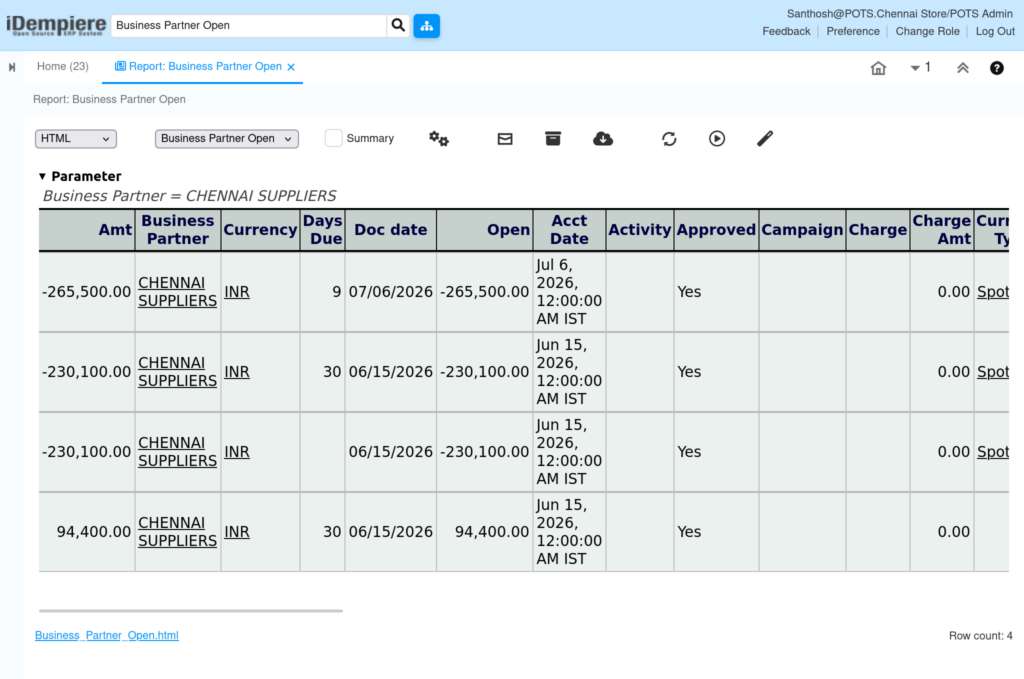
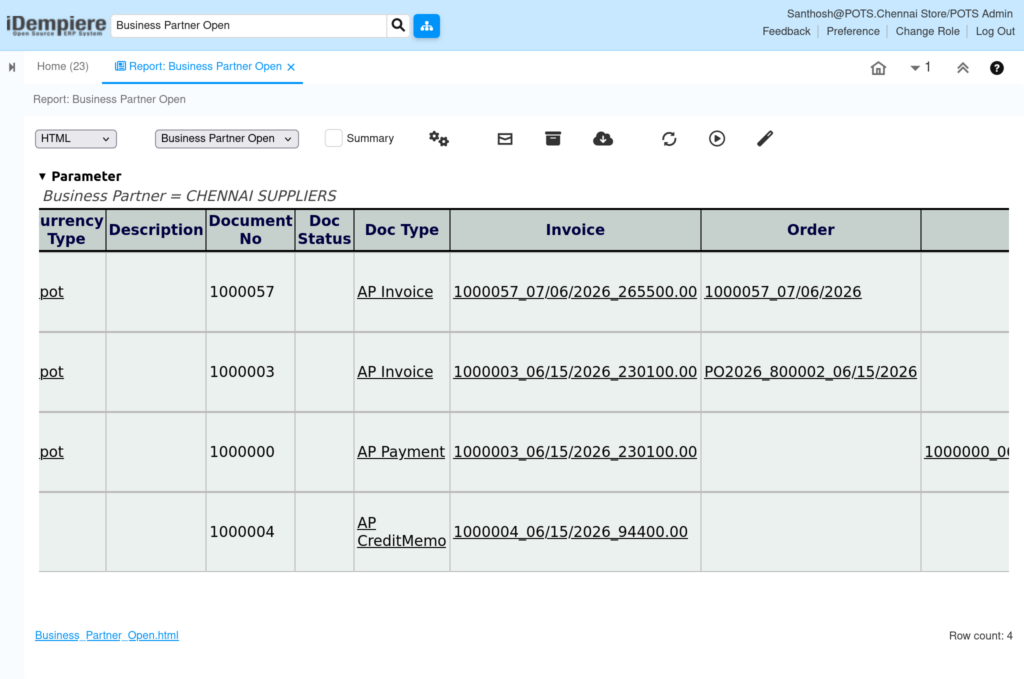
The Business Partner Open Report provides a detailed view of outstanding financial transactions for a selected Business Partner. It displays open sales or purchase invoices that have not been fully settled, along with payments that have been completed but are not yet allocated to invoices.
This report helps finance and accounts users monitor pending receivables and payables, identify overdue invoices, and verify available unallocated payments. It is commonly used during customer follow-up, supplier reconciliation, month-end closing, and financial auditing.
Business Rules
- Retrieves Business Partner open balance information from the RV_BPartnerOpen database view.
- Displays only invoices that are Completed (CO) or Closed (CL) and are not fully paid.
- Displays payments that are Completed (CO) or Closed (CL) but not allocated to any invoice.
- Calculates the Open Amount using the remaining unpaid invoice balance or the available payment amount.
- Calculates the Due Days for open invoices based on the payment due date.
- Combines invoice and payment information into a single report for easier financial reconciliation.
- Allows users to filter data by Business Partner to review outstanding transactions for a specific customer or vendor.
- Displays accounting information such as document number, accounting date, document status, invoice amount, open amount, and payment details.
- Excludes fully paid invoices and fully allocated payments from the report.
Report Parameters
Parameter Window
The Business Partner Open Report parameter window allows users to filter Business Partner records before generating the report.
Business Partner Open Report – Parameter Window

| Parameter | Purpose | Filtering Behavior | Sample Value |
| Business Partner | Choose Business Partner | Displays open invoices and payments for the selected Business Partner. | CHENNAI SUPPLIERS |
| Run as Job | Run the report in the background | Runs the report as a background job. | Checked |
Report Output
- After the report is generated, it provides a consolidated view of all outstanding transactions for the selected Business Partner.
The report displays:
- Business Partner details.
- Invoice document number.
- Invoice date and Accounting date.
- Original Invoice Amount.
- Remaining Open Amount.
- Unallocated Payment Amount.
- Due Days for outstanding invoices.
- Document Status.
- Currency.
- Organization.
- Description (if available).
The report enables users to quickly identify pending invoices, overdue balances, and available payments that can be allocated. It is useful for customer follow-up, supplier payment verification, balance confirmation, and financial reconciliation.