How does Unallocated Payment Report works in iDempiere
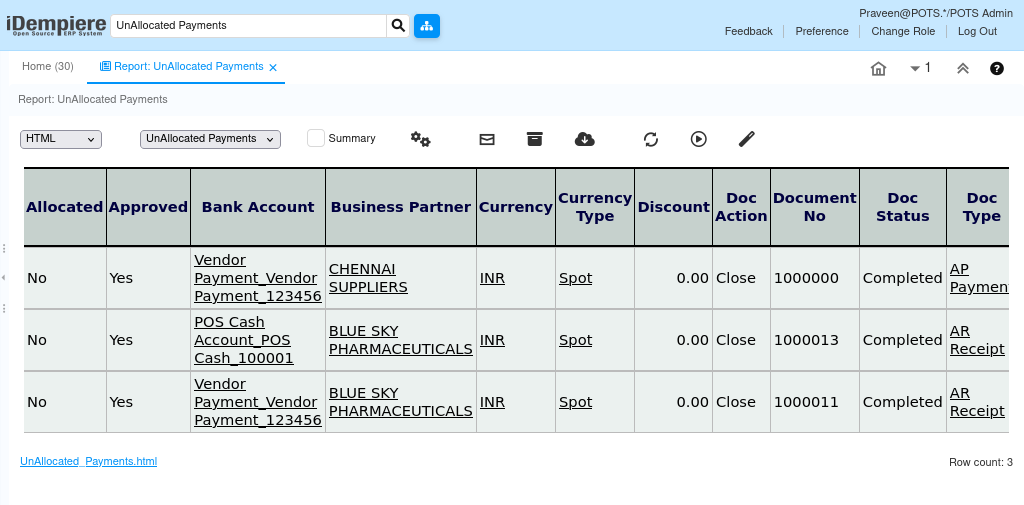
The Unallocated Payment report provides detailed information about payments and receipts in iDempiere that have not yet been allocated to an invoice. It displays each payment transaction along with its business partner and currency details, helping users identify which payments remain open.
The report is mainly used by Finance, Accounts Receivable/Payable, and Management teams to review outstanding payments and receipts, follow up on allocation activity, and track which payments still need to be applied to invoices.
Business Rules
- The report retrieves data from the C_Payment_V report view.
- Each record represents a single payment or receipt transaction.
- Payment amount, discount amount, write-off amount, tax amount, and over/under amount are automatically sign-adjusted based on transaction type: receipts are shown as positive amounts, while payments are shown as negative amounts.
- A multiplier field reflects the sign adjustment applied to each transaction based on whether it is a receipt or a payment.
- A payment is considered unallocated when its IsAllocated flag on C_Payment is set to ‘N’, meaning it has not yet been fully applied to an invoice.
- Only payments with a Document Status of Completed (CO) or Closed (CL) are included in the report results.
- The report is read-only and does not create or update payment data.
- Based on the available implementation, the report retrieves data directly from the C_Payment_V view without using a custom Java process.
Report Parameters
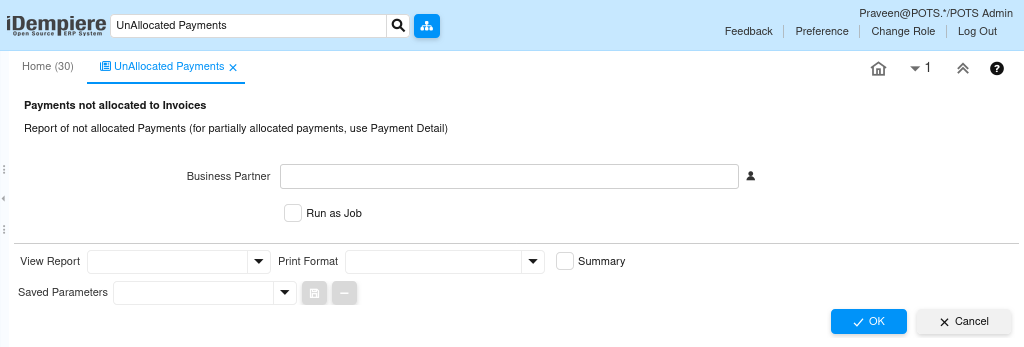
Unallocated Payment – Parameter window
The Unallocated Payment parameter window allows users to filter payment records before generating the report. Users can select Business Partner to display only the payment records that match the selected criteria.
| Parameter | Purpose | Filtering Behavior | Sample Data |
| Business Partner | Selects the business partner associated with the payment. | Displays payment records for the selected business partner. | Alpha Retail Solutions |
Report Output
- The Unallocated Payment report displays one row per open payment or receipt. Each row shows the transaction amount signed according to whether it is a payment or a receipt, along with business partner details.
The report includes the document number, business partner, transaction type, transaction date, currency, payment amount, allocation status, and document status. It helps users track outstanding payments and follow up on amounts still awaiting allocation.