How to Configure Address Transaction in iDempiere
The Address Transaction window stores and validates address information used by customers, suppliers, and organizations. In retail, accurate addresses support billing, shipping, taxation, and reporting. Proper address validation reduces delivery issues and improves master data quality.
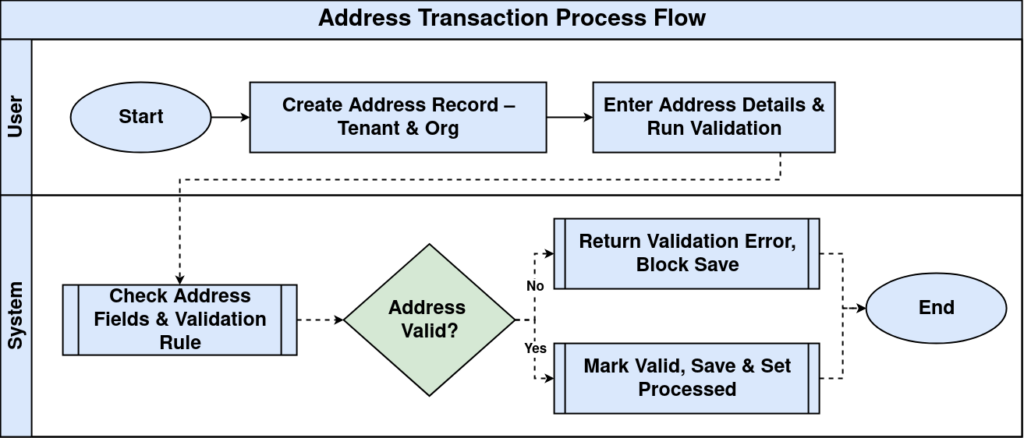
Process Flow
Business Rules
- Address must belong to the selected tenant and organization.
- Address fields should be completed before validation.
- Validated addresses can be reused across transactions.
- ZIP and Country should match the entered location.
- Processed records should not be modified without authorization.
Prerequisites
- Tenant configured.
- Organization configured.
- Country and Region master available.
- Address Validation configured (if used).
Navigation
Menu → System Admin → General Rules → Address Transaction
Configuration Steps
Step 1: Create Address Record
Create a new record and select the appropriate tenant and organization.
| Field | Sample Value | Description |
|---|---|---|
| Tenant | GardenWorld | Client |
| Organization | Retail Store | Business unit |
Step 2: Enter Address Details
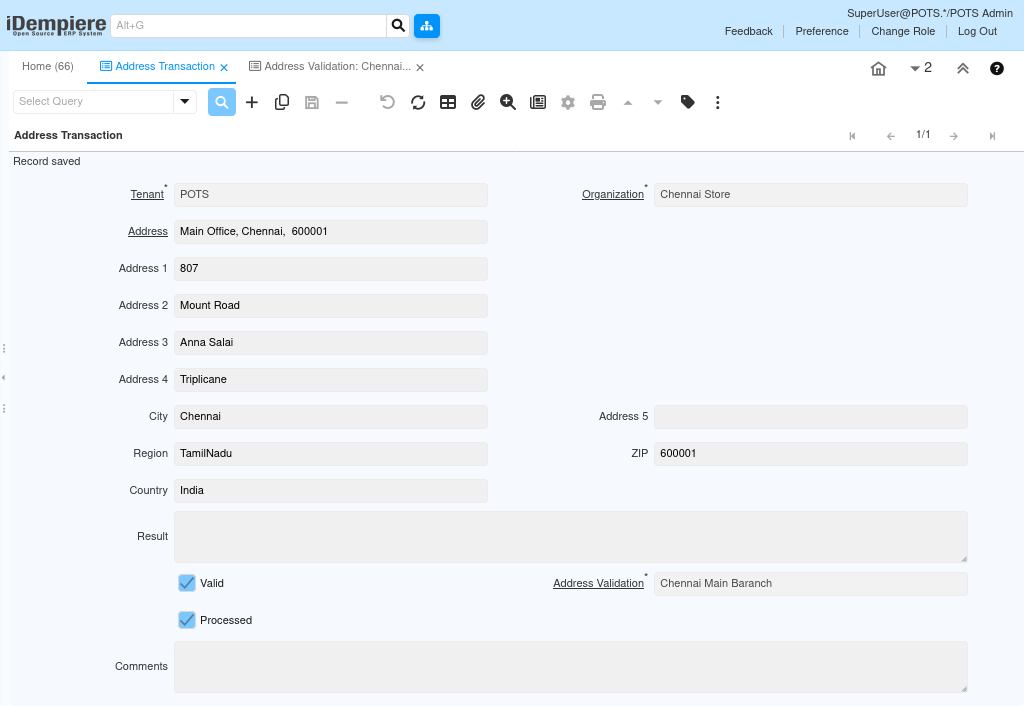
Fill Address, Address1–Address5, City, Region, Country, and ZIP.
| Field | Sample Value | Description |
|---|---|---|
| Address | Main Office | Address name |
| City | Chennai | City |
| Country | India | Country |
| ZIP | 600001 | Postal code |
Step 3: Validate Address
Run address validation if available and review the Result field.
| Field | Sample Value | Description |
|---|---|---|
| Address Validation | Standard | Validation rule |
| Result | Validated | Validation result |
Step 4: Save Record
Verify the Valid flag and save the completed address.
| Field | Sample Value | Description |
|---|---|---|
| Valid | Yes | Record verified |
| Processed | No | Processing status |
Common Issues and Resolutions
| Issue | Cause | Resolution |
|---|---|---|
| Validation failed | Incomplete address | Complete mandatory fields |
| Invalid ZIP | ZIP mismatch | Enter correct postal code |
| Cannot save | Mandatory field missing | Fill required fields |
| Record not editable | Processed record | Create a new record or reopen |
| Wrong organization | Incorrect org selected | Choose the correct organization |
Next Steps
- Configure Business Partner addresses.
- Maintain Customer master records.
- Review Address Validation rules.