How to Process Create Costing Records in iDempiere
Create Costing Records is a process window in iDempiere used to manually generate cost detail and cost accumulation records for a product across active Accounting Schemas.
It is used in inventory, purchasing, and manufacturing operations whenever a product is set up after transactions already exist, or when costing records are missing or out of sync.
Running this process ensures accurate standard, average, or FIFO/LIFO cost calculations, which directly affect inventory valuation, matching, and financial reporting.
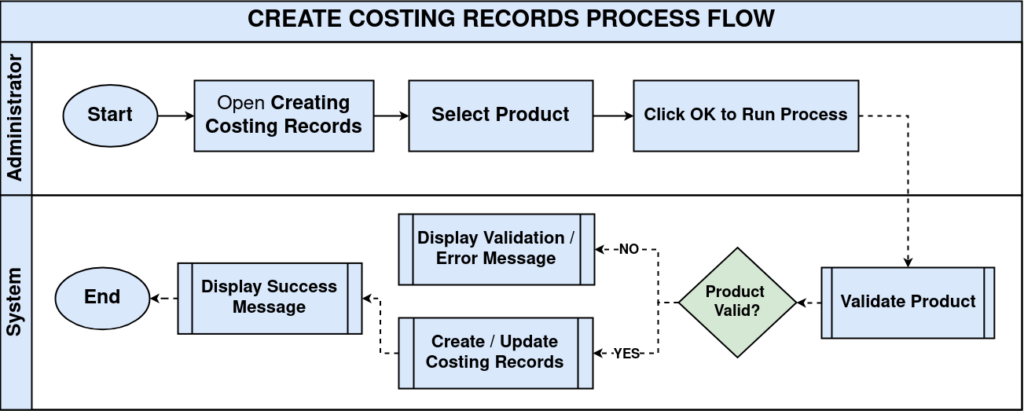
Process Flow Diagram
Business Rules
- Costing records are created only for products with a valid Costing Method assigned.
- The process runs for the product’s active Accounting Schema and Cost Type combinations.
- Existing costing records for the product are not duplicated, only missing ones are created.
- Cost records are required before Material Receipt or Invoice matching can post accounting entries.
- Running this process does not overwrite existing cost history or cost detail records.
- The Run as Job option queues the process in the background instead of running immediately.
- Each cost record is scoped to a Client, Organization, Accounting Schema, and Cost Type.
- The product must be Active to be selected in this process.
Prerequisites
- Costing Method configured at Accounting Schema or Product Category level.
- Product created and marked Active in the Product window.
- Client-level Accounting Schema and Cost Type configured.
- Product Category assigned to the product for default costing setup.
Configuration Steps
Step 1: Select the Product
The process requires a specific product to generate costing records for; without it the process cannot identify which item to cost.
Click the Product field, search for the item (for example, CIN_Cinthol Soap), select it from the picklist, and confirm the selection.
| Field | Sample Value | Description |
| Product | CIN_Cinthol Soap | Product for which costing records will be created or refreshed. |
| Run as Job | Unchecked | Determines whether the process executes immediately or as a background job. |

Step 2: Choose the Execution Mode
Large product catalogs or bulk runs may need background processing to avoid session timeouts during execution.
Leave Run as Job unchecked for immediate execution, or check it to queue the process for background execution.
Step 3: Execute the Process
Running the process triggers the underlying costing engine to create or refresh cost detail and accumulation records.
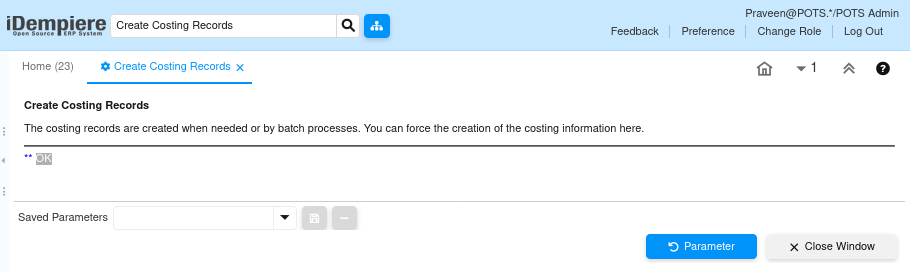
Click OK to run the process. A confirmation message reading OK displays once the costing records are created successfully.
Common Issues and Resolutions
| Issue | Cause | Resolution |
| Process returns Product not found error | Product field left blank or an invalid Product ID was passed | Select a valid, active product before clicking OK. |
| Costing records are not created | No Costing Method configured for the Accounting Schema or Product Category | Configure Costing Method in Accounting Schema or Product Category first. |
| Process appears to do nothing | Costing records already exist for all schema and cost type combinations | No action needed; existing records are not duplicated. |
| Run as Job result not visible immediately | Job is queued and processed asynchronously in the background | Check Process Monitor or Scheduled Job status for completion. |
| Incorrect cost values after creation | Product Category costing setup uses the wrong Costing Method | Review the Costing Method (Standard, Average, FIFO/LIFO) in Product Category. |
| Process not visible to the user | Role does not have access to the Costing process or window | Grant process and window access to the Role. |
| Product not available in the picklist | Product is Inactive or not assigned to the current Organization | Verify the product is Active and available for the Organization. |
Next Steps
- Open Product Costing to review the generated cost records.
- Configure Accounting Schema Costing, including Costing Method and Cost Type.
- Review Cost Type and Cost Element setup for the schema.
- Proceed to Material Receipt or Vendor Invoice processing to validate cost postings.