How Does Unreconciled Accounting Facts Report Works in iDempiere
The Unreconciled Accounting Facts Report helps Finance users identify accounting entries that have not yet been reconciled. It displays posted accounting facts pending reconciliation for the selected General Ledger Account and Accounting Date range.
The report supports reconciliation, audit verification, and financial control. It is commonly used during month-end and year-end closing.
Business Rules
- Uses the T_RV_Reconciliation view.
- Reads accounting entries from RV_Fact_Acct.
- Joins reconciliation records using Fact_Acct_ID.
- Displays unreconciled accounting facts.
- Supports filtering by Account.
- Supports filtering by Accounting Date range.
- Returns only matching records.
- Displays accounting dimensions.
- Helps reconciliation activities.
- Supports audit review.
Report Parameters
Parameter Window
The Unreconciled Accounting Facts Report parameter window allows users to filter records before generating the report.
Unreconciled Accounting Facts Report – Parameter Window
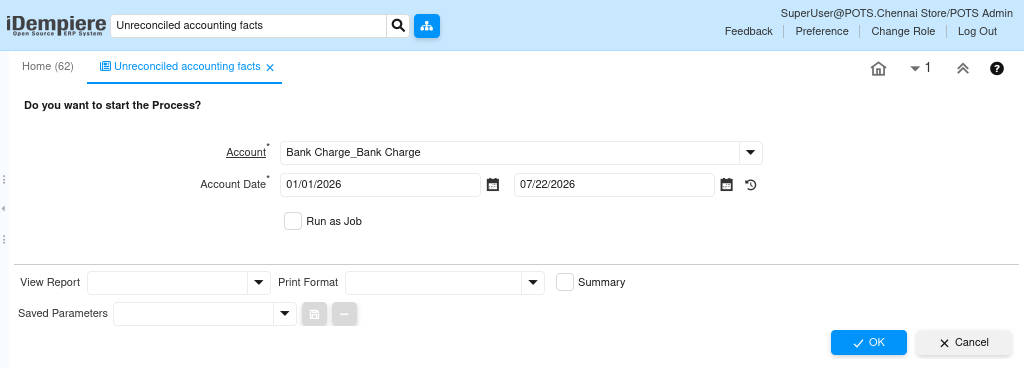
| Parameter | Purpose | Filtering Behavior | Sample Value | |
| Account | Choose Account | Filters by account. | Bank Charge_Bank Charge | |
| From Account Date | Choose From Accounting Date | Filters from selected date. | 01/01/2026 | |
| To Account Date | Choose To Accounting Date | Filters up to selected date. | 22/07/2026 | |
| Run as Job | Run in background | Runs report in background. | Checked | |
Report Output
- The report lists unreconciled accounting transactions for the selected account and accounting date range. It helps users identify pending reconciliation items and verify accounting balances for financial reporting and audit.
