How Does Quarterly Invoice Product Report Works in iDempiere
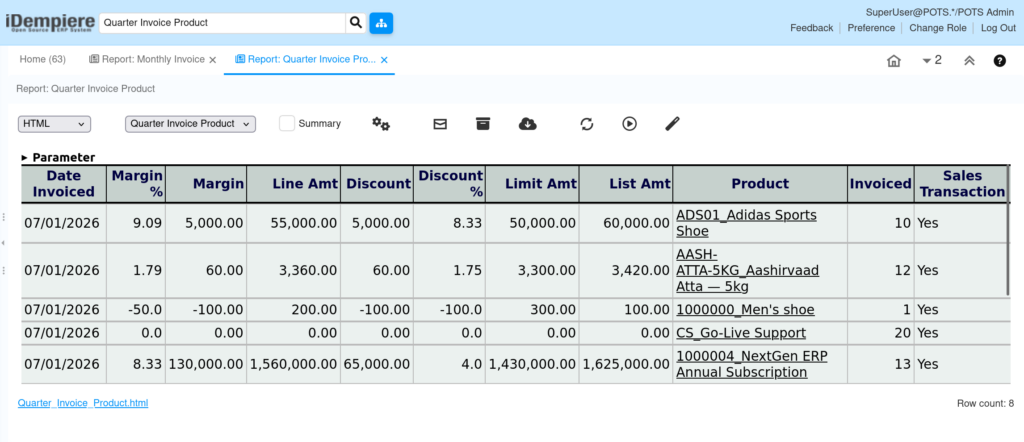
The Quarter Invoice Product Report provides a quarterly summary of invoice transactions by product.
Business Rules
- Retrieves invoice information from the Invoice Line view.
- Groups invoice data by quarter.
- Groups records by Organization and Product.
- Calculates invoiced quantity, amounts, discount and over limit values.
- Displays Sales or Purchase transactions.
Report Parameters
Parameter Window
The Quarter Invoice Product Report parameter window allows users to filter invoice records before generating the report.
Quarter Invoice Product Report – Parameter Window
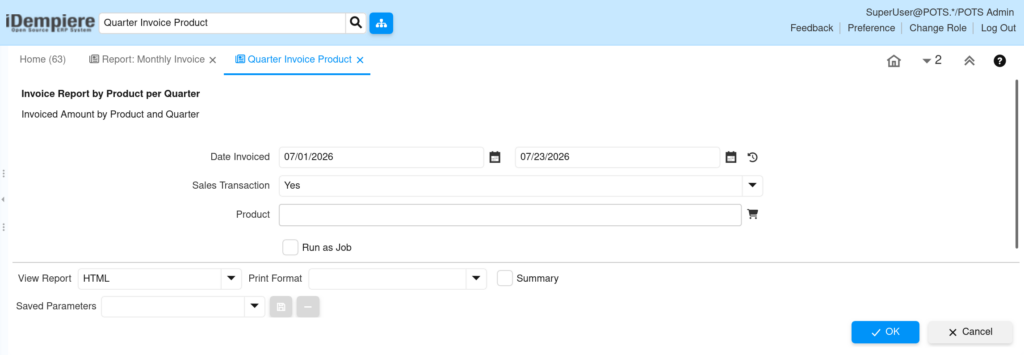
| Parameter | Purpose | Filtering Behavior | |
| From Date | Choose Invoice From Date | Filters invoices from the selected date. | 01/01/2026 |
| To Date | Choose Invoice From Date | Filters invoices from the selected date. | 07/20/2026 |
| Sales Transaction | Show Sales Transactions Only | Shows Sales or Purchase invoices. | Checked |
| Product | Choose Product | Displays invoices for the selected Product . | Coca Cola 500ml |
| Run as Job | Run the report in the background | Runs the report as a background job. | Checked |
The report is executed using the selected parameter values to retrieve matching monthly invoice records by product .
Report Output
- Displays quarterly invoice summary by product.
- Shows Product and Invoice Quarter.
- Displays invoice quantity, amounts, discounts and over limit values.